Foreign currency
Do this if your company bills or pays in another currency, such as US dollars. Your books stay in New Zealand dollars. A foreign invoice or bill is raised in its own currency, converted into NZD at a rate you can see, and the difference between the rate you booked and the rate you were paid at is recorded as an exchange gain or loss. At each period end you revalue what is still open. It is accountant's work. It belongs with Raise, send and get paid for an invoice, Receipts, payments and transfers and Month-end checklist and closing a period.
About the screenshots
Foreign currency is off for a company until Project Five switches it on, and it is off in Easy's demo company, Little Polynesian Café. The pictures therefore come from a practice company, shown before and after multi-currency was switched on. The customer (Moana Marine), the invoice and the rates are made up: a boat charter of USD 1,000 plus 15% VAT (USD 1,150), raised on 3 September 2026 at 1.6000, with September closing at 1.7000 and the customer paying in NZD on 5 October at 1.6800.
Before you start
- Multi-currency is on for your company. You can't switch it on yourself (Step 1).
- You know your rates. A rate says how many NZD one unit of the currency buys, so "1 USD = 1.6234 NZD" is entered as 1.6234. Take it from your bank or the source you use, and use the same one each time.
- The people who do each part. Currencies and rates are accounting settings, so whoever can change accounting setup does them. Revaluing is accountant's work, which a Data entry role lacks (People, roles and access).
- Some things stay in NZD whatever you switch on. Opening balances, manual journals, expense claims, the Manager import, payment runs and bank files, card payments, stock and goods receipts and fixed assets are always entered in NZD (not pictured).
Step 1. Project Five switches it on
Settings → Accounting & tax → Currencies.
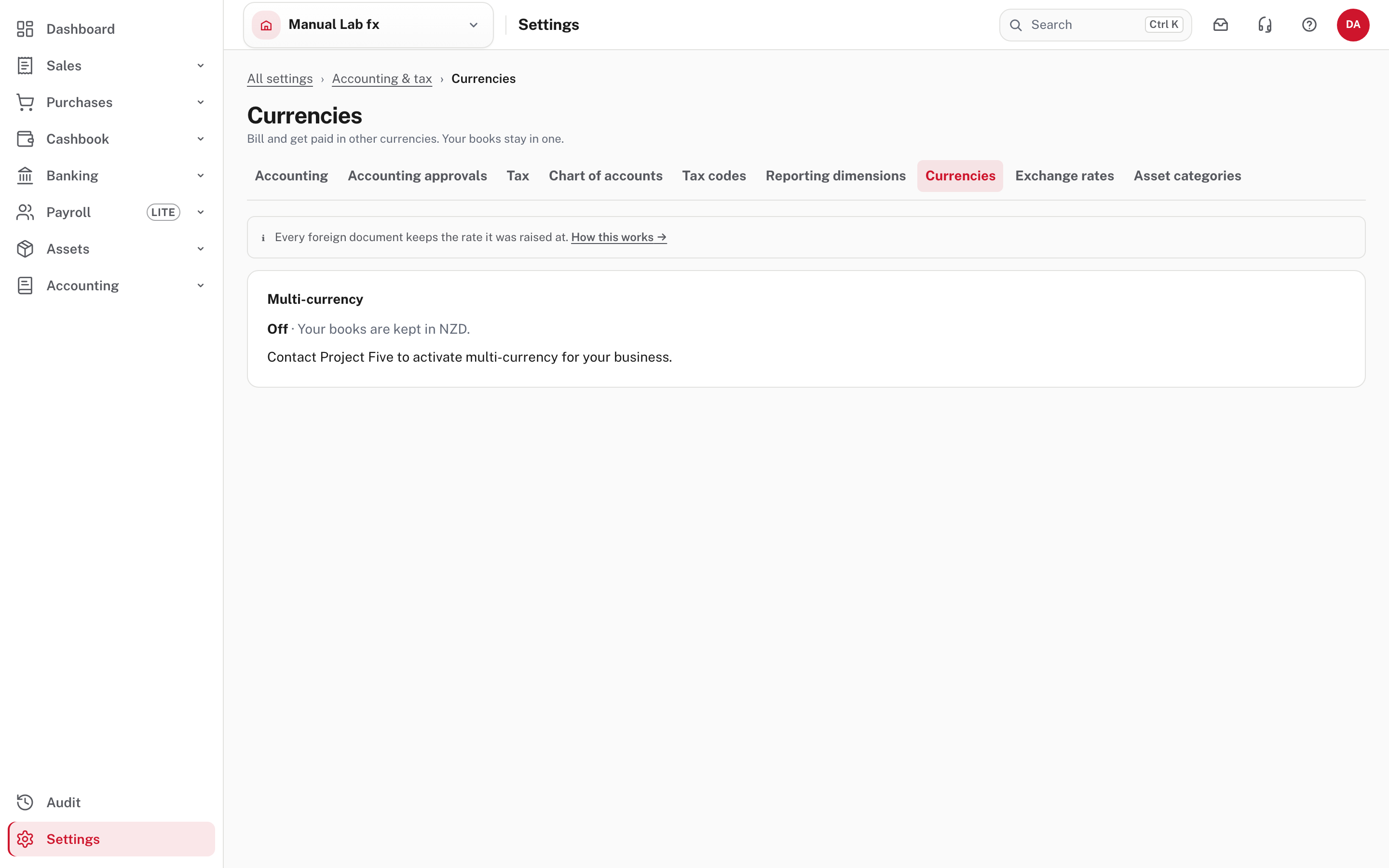
While it is off the page says Off · Your books are kept in NZD, every document is in NZD and there are no rate fields. Contact Project Five. Project Five switches it on from its own console, giving a reason that is recorded. Nothing else is needed from you.
Switching it on adds two accounts under Other income: Realised FX Gain/Loss and Unrealised FX Gain/Loss (here codes 4310 and 4320). They are kept apart because realised is what settling a document at a different rate earned or cost, and unrealised is the period-end restatement of what is still open. Switching it off later stops new foreign documents, and documents already in a currency are kept. Currencies with three or four decimal places, such as the Kuwaiti dinar, are not offered.
Step 2. Add the currencies and enter the rates
Back on Currencies, choose a currency under Add a currency and choose Add.
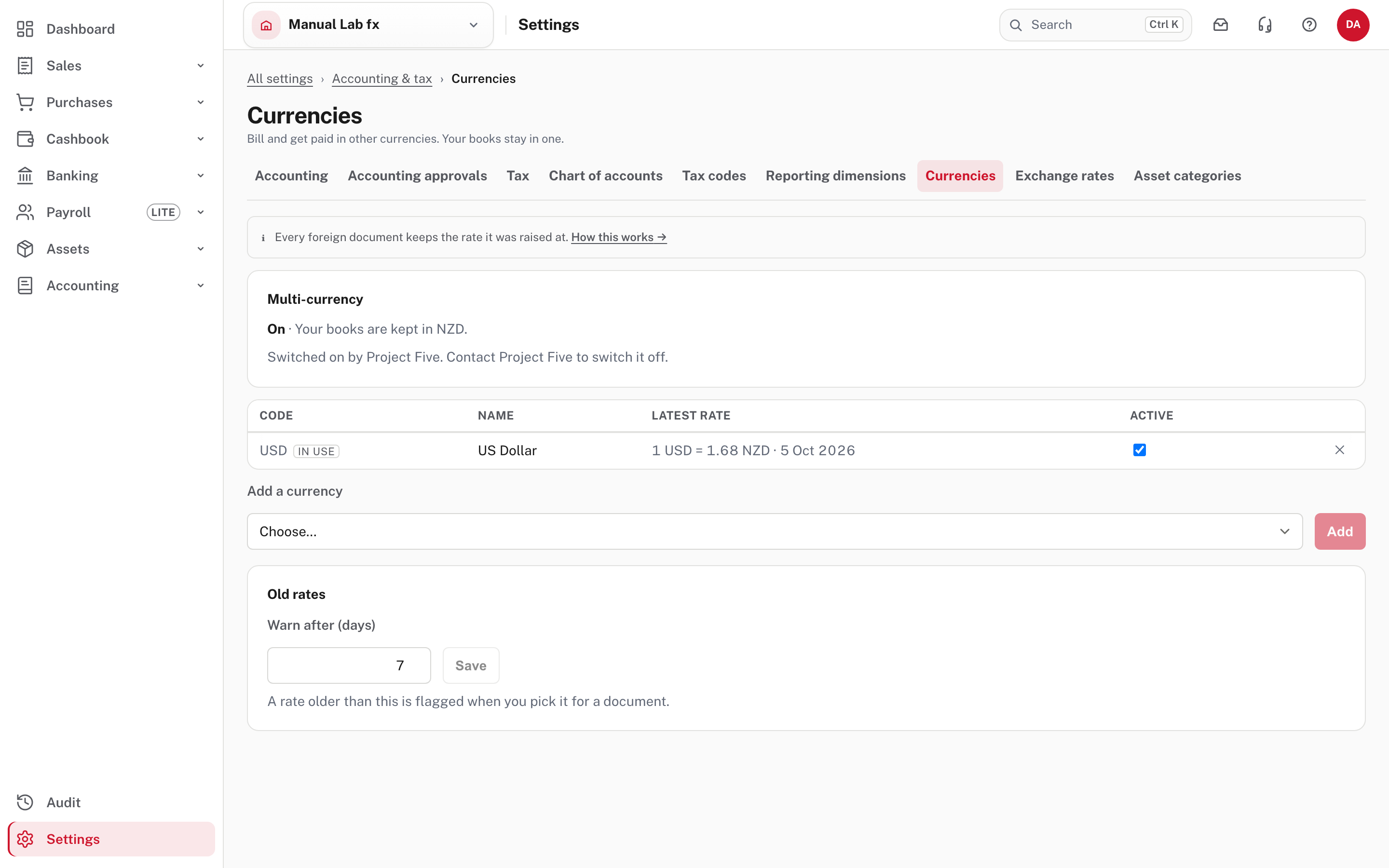
The list shows each currency's code, name, latest rate and whether it is Active. IN USE appears once a document uses it. A currency that has rates can't be removed, only made inactive so it is not offered on new documents. Old rates: Warn after (days) is how old a rate may be before Easy asks you to confirm it when it is picked for a document (7 here).
Now Settings → Accounting & tax → Exchange rates.
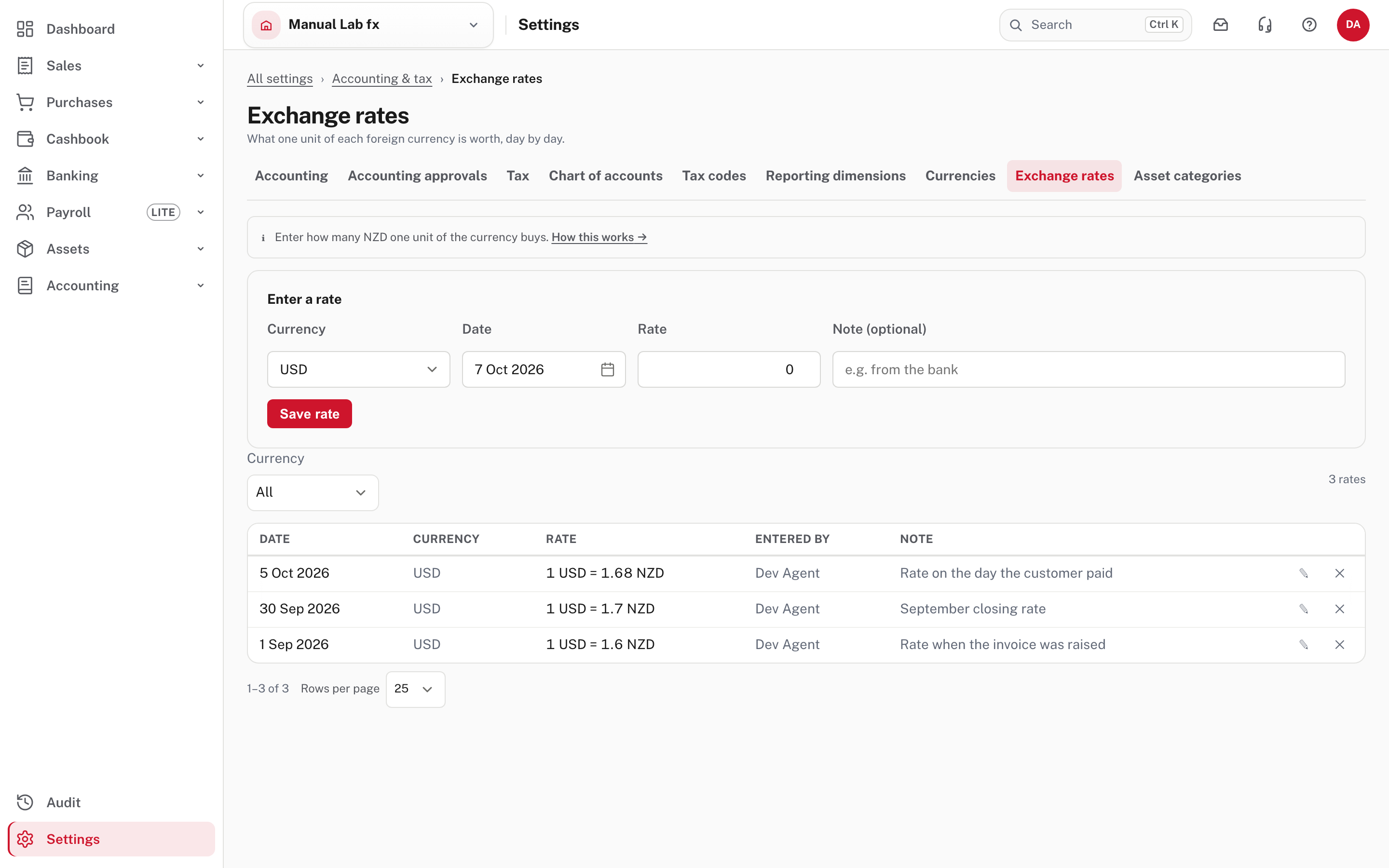
Choose the currency, the date and the rate (and a note, such as where it came from) and Save rate. There is one rate per currency per day: entering a rate for a day that already has one replaces it. A rate can't be dated in the future. The pencil edits a rate and the cross deletes it, but editing or deleting a rate never changes a document that was already raised: each document keeps the rate it was booked at. The picture has three rates: 1.6000 on 1 September, 1.7000 on 30 September and 1.6800 on 5 October.
More detail: Multi-currency and old rates.
Step 3. Raise a document in another currency
A customer or supplier can have a billing currency on their record. It is only the starting point for a new document, so change it whenever you like. Then Sales → Invoices → New invoice.
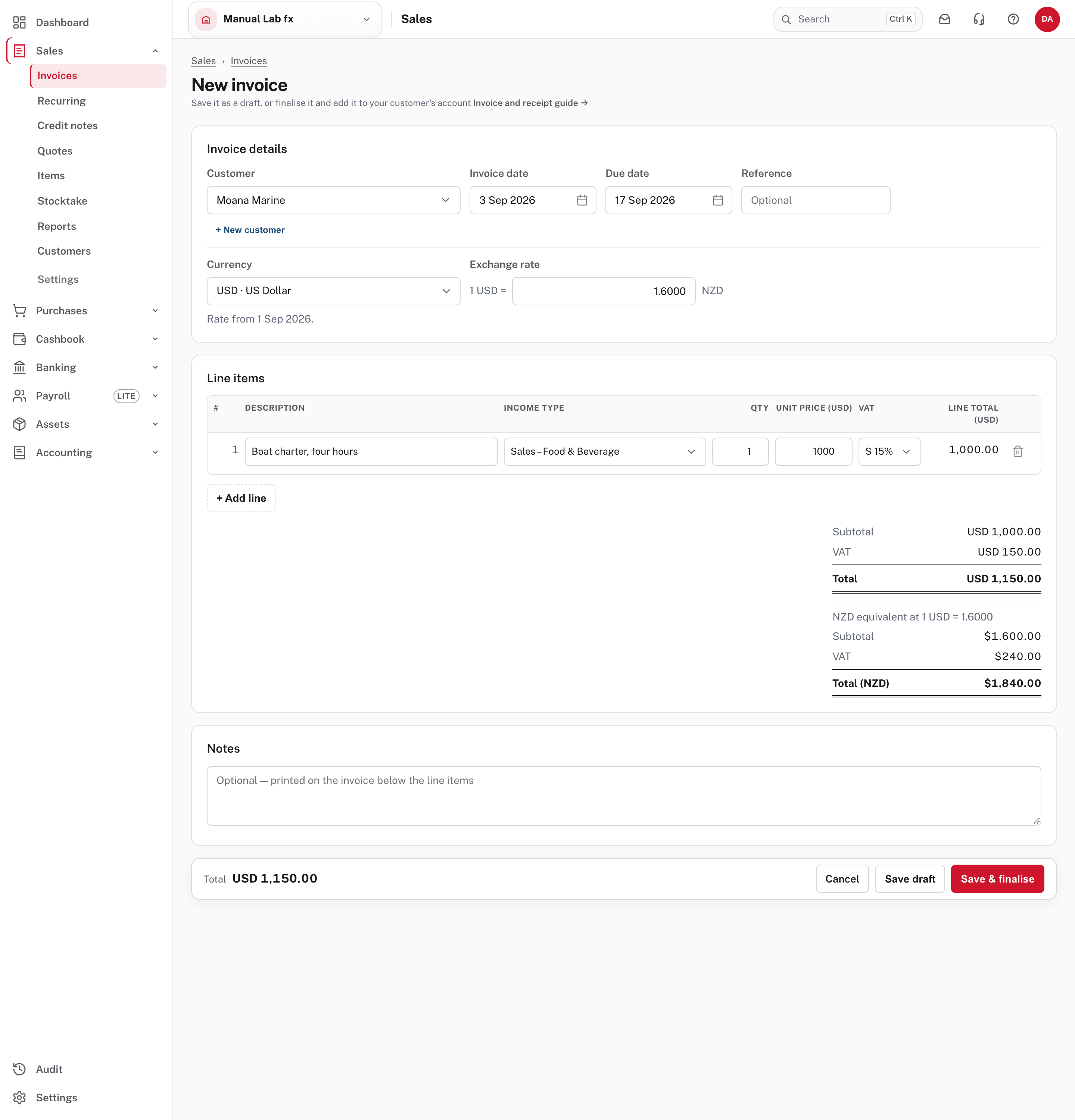
Beside the date is a Currency box and an Exchange rate. Choose the currency and Easy fills in the latest rate on or before the invoice date and says where it came from ("Rate from 1 Sep 2026", for an invoice dated 3 September). A rate after the document's date is never used. Type your own rate if you have one: it is never replaced. Prices and line totals are in the foreign currency, and under the totals Easy shows what the invoice comes to in NZD (NZD equivalent at 1 USD = 1.6000: subtotal $1,600.00, VAT $240.00, total $1,840.00). Each line is converted and rounded once, so the NZD total can differ by a cent from the USD total times the rate. The NZD figure is the one that reaches your accounts and your VAT return.
Not pictured: a rate that is a few days old
A rate older than the "Old rates" days is filled in, but you have to confirm it before you can save. With no rate on or before the date you type one, and you can save it to Exchange rates from the same screen if you can manage settings. The 1.6000 here was two days old, within the 7, so nothing was asked. A saved draft keeps its rate when you change its date.
Choose Save & finalise. The same Currency box is on quotes, credit notes, bills, supplier credit notes and purchase orders (not pictured).
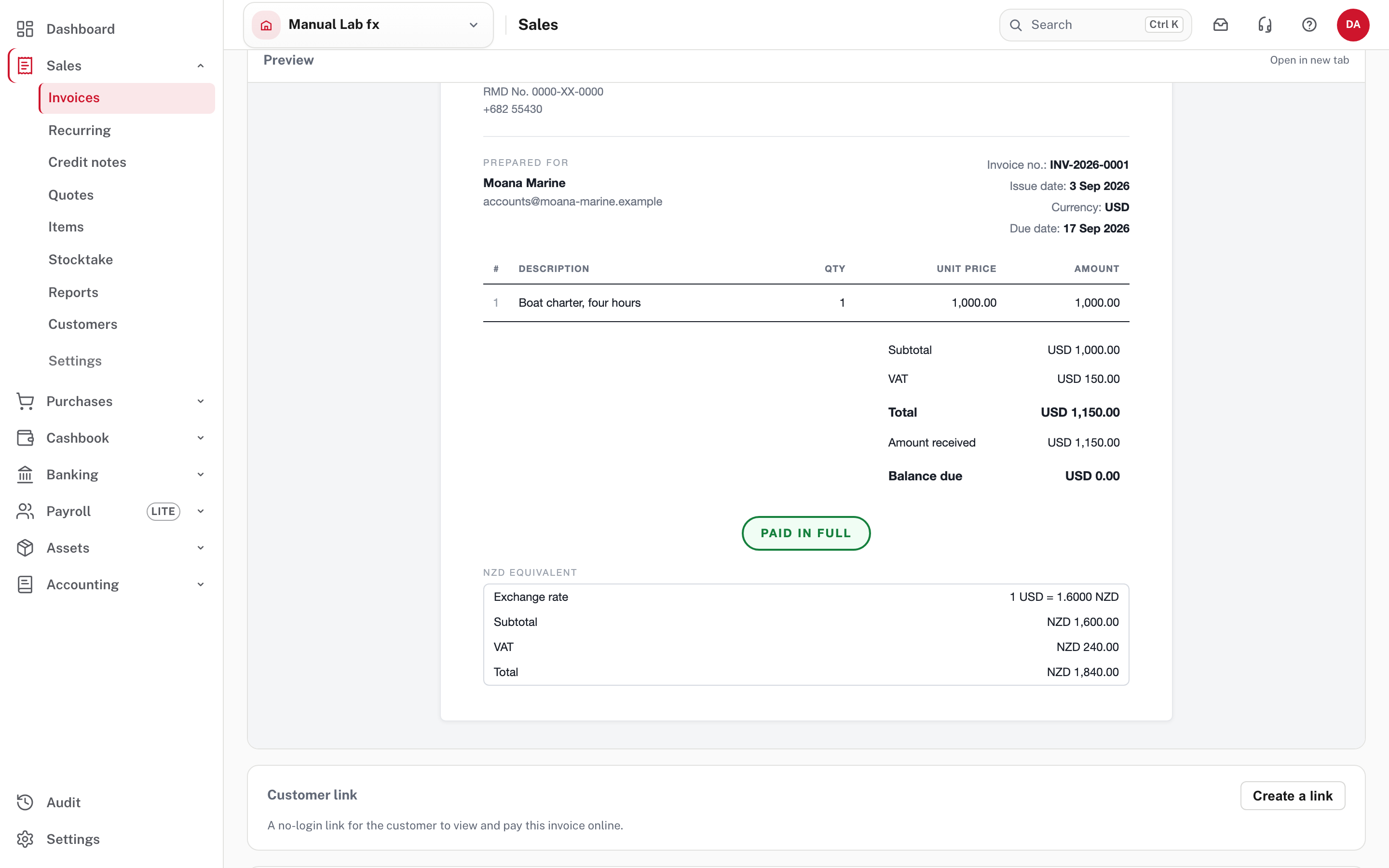
The customer's copy names the currency in its header (Currency: USD) and shows every total with the code. A foreign invoice with VAT always carries the small NZD equivalent box, because VAT is owed to RMD in NZD: it can't be turned off. Your bank details stay on the invoice. A foreign invoice prints no "pay online" link, so the customer pays by bank transfer (Chasing overdue invoices, step 6). A foreign invoice is in the aged report and the customer's statement in its own currency: a customer who owes in two currencies gets two statements, and the aged report has a row for each customer and currency with a total in NZD that agrees with Trade Debtors.
More detail: Documents in another currency and What your customer sees.
Step 4. Revalue at the period end
Between being raised and being paid, the USD invoice is carried at the rate it was booked at (1.6000, so $1,840.00 in Trade Debtors). At the period end, restate everything still open in a foreign currency at the closing rate: invoices, bills, credit notes and the balance of a bank account held in another currency. The Period close page tells you when you should.
Accounting → Period close, with the period ending date set to the month you are closing.
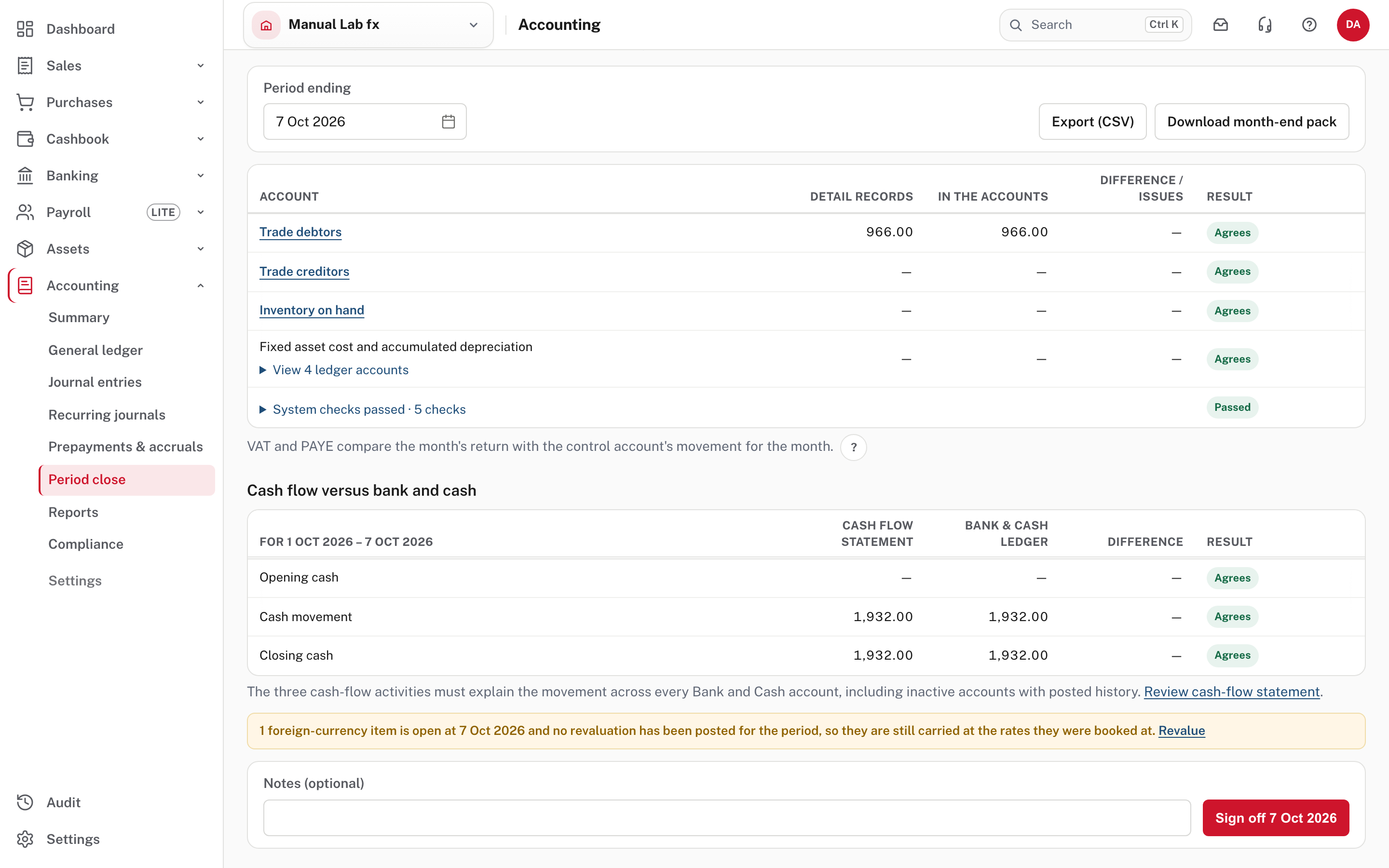
With a USD invoice open, the page warns: "1 foreign-currency item is open at 7 Oct 2026 and no revaluation has been posted for the period, so they are still carried at the rates they were booked at", with a Revalue link. It warns, it does not stop you: the period can still be signed off. Choose Revalue. The same screen is listed in Accounting → Reports as Foreign-currency revaluations, with + New revaluation (or Revalue now, the first time).
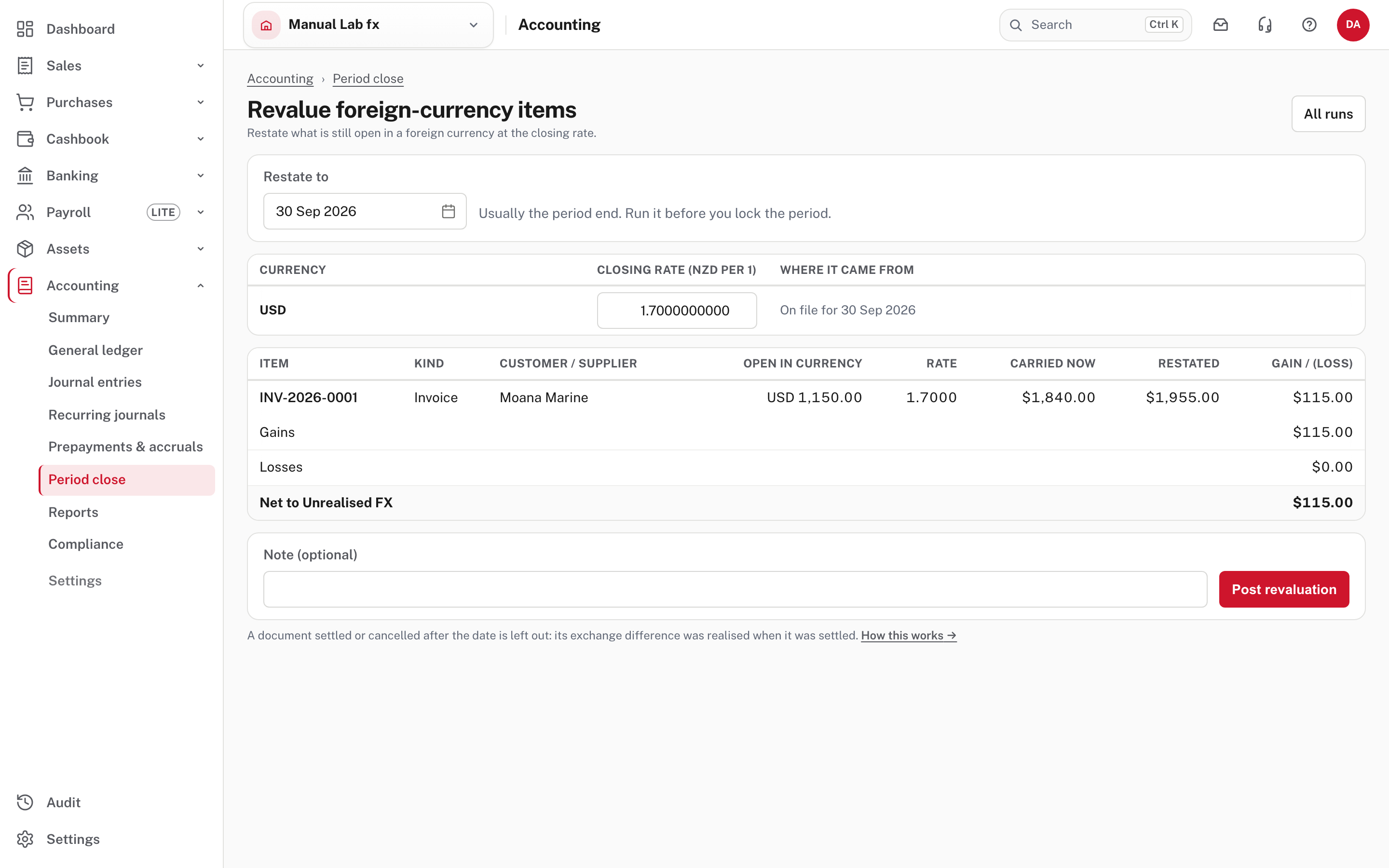
- Restate to is usually the period end (30 September). Run it before you lock the period.
- Closing rate: for each currency, the latest rate on or before the date, with where it came from ("On file for 30 Sep 2026"). Change it on the screen if you use another. An old rate is flagged, and the revaluation uses the rate as shown.
- The table lists each open item: open in currency, the rate, what it is carried now, what it would be restated to, and the gain or loss. The USD 1,150.00 invoice goes from $1,840.00 to $1,955.00, a gain of $115.00. The totals say Net to Unrealised FX.
- Add a note and choose Post revaluation.
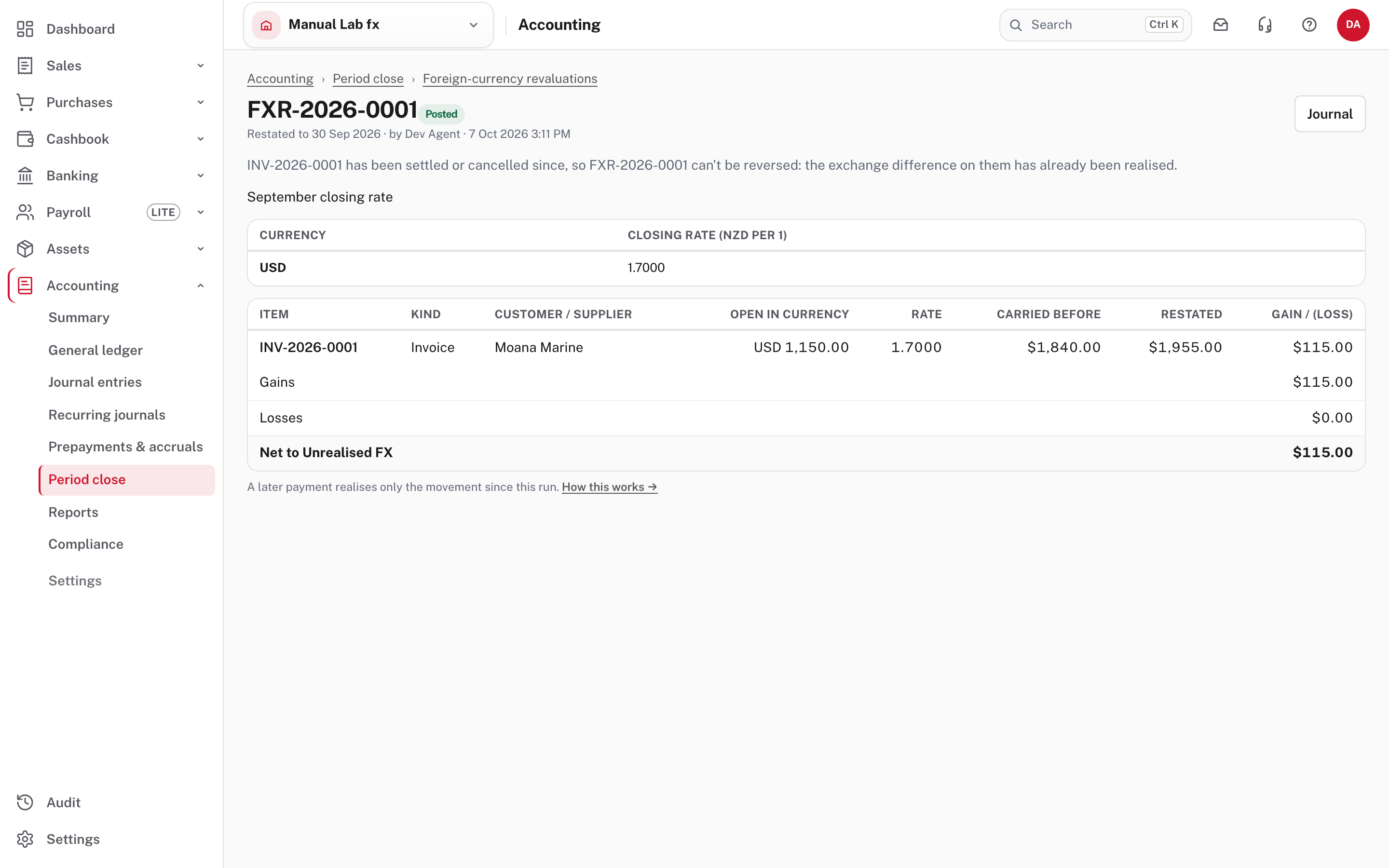
The run is numbered (here FXR-2026-0001) and Posted. Choose Journal to see the entry:
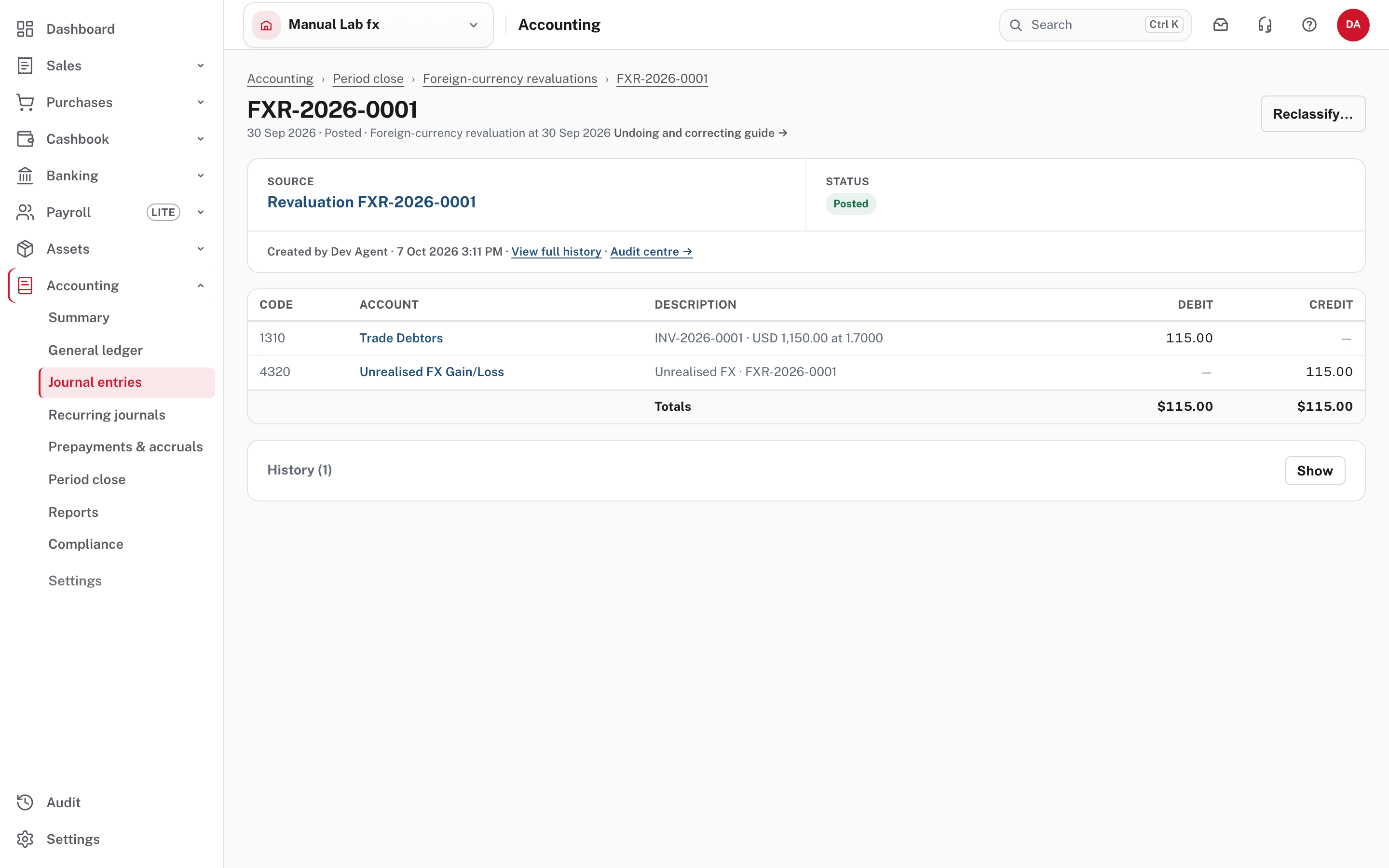
A revaluation stays. The next one books only the change since the last, and a later payment's realised gain or loss is measured from the restated value. Only the latest revaluation can be reversed (the Reverse button on the run), only while its period is open and nothing it restated has been paid off since: in the picture there is no Reverse, and the page says the invoice has been settled since. Not pictured: a reversal. A document paid or cancelled after the date is left out of a revaluation, because its difference was realised when it was paid. A bank account's own balance never changes, only what it is worth in NZD.
More detail: Revaluing at a period end.
Step 5. Get paid, or pay, in another currency
Your bank account is in NZD, so the customer's USD invoice is settled with NZD. Open the invoice and choose Record receipt.
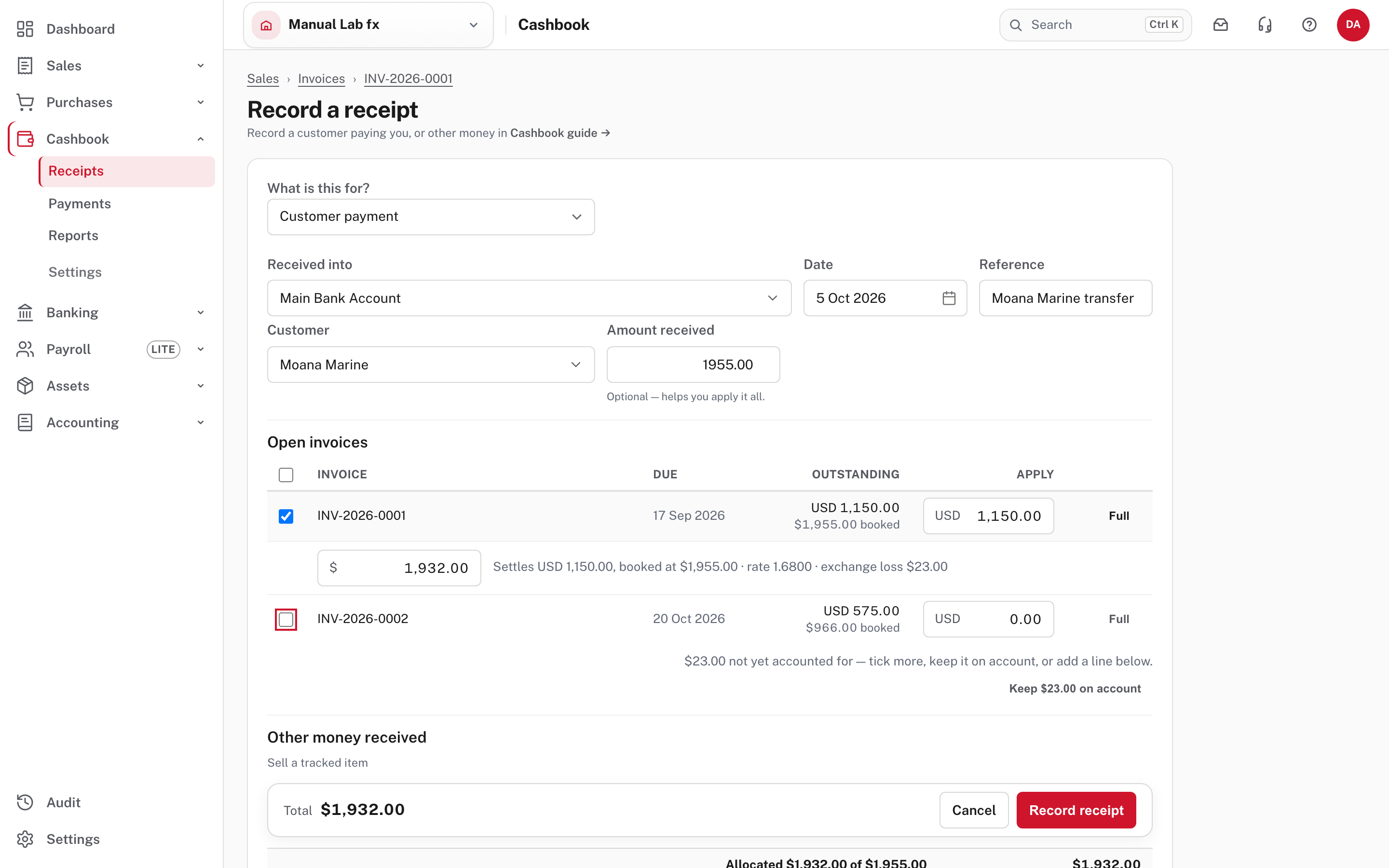
For each invoice you tick, enter how much of it the payment settles, in its own currency (USD 1,150.00, Full) and the NZD the bank received ($1,932.00). Easy shows what that works out to: "Settles USD 1,150.00, booked at $1,955.00 · rate 1.6800 · exchange loss $23.00". The invoice is carried at $1,955.00 because of the revaluation. Without the revaluation it would still be carried at $1,840.00, and the same $1,932.00 would book a gain of $92.00. The invoice stays owed in USD until it is cleared, whatever the NZD came to: paying USD 400 of USD 1,000 leaves USD 600 owing, and the last payment clears the invoice completely, so a rounding difference never lingers in Trade Debtors.
Check the Total at the bottom
The Amount received box near the top starts on the booked figure, 1,955.00, and doesn't change when you type the NZD the bank received, so the form says "$23.00 not yet accounted for" and offers Keep $23.00 on account. Ignore both. The receipt is recorded for the NZD typed on the invoice's line ($1,932.00 in total), which is the Total in the bar at the bottom.
Choose Record receipt.
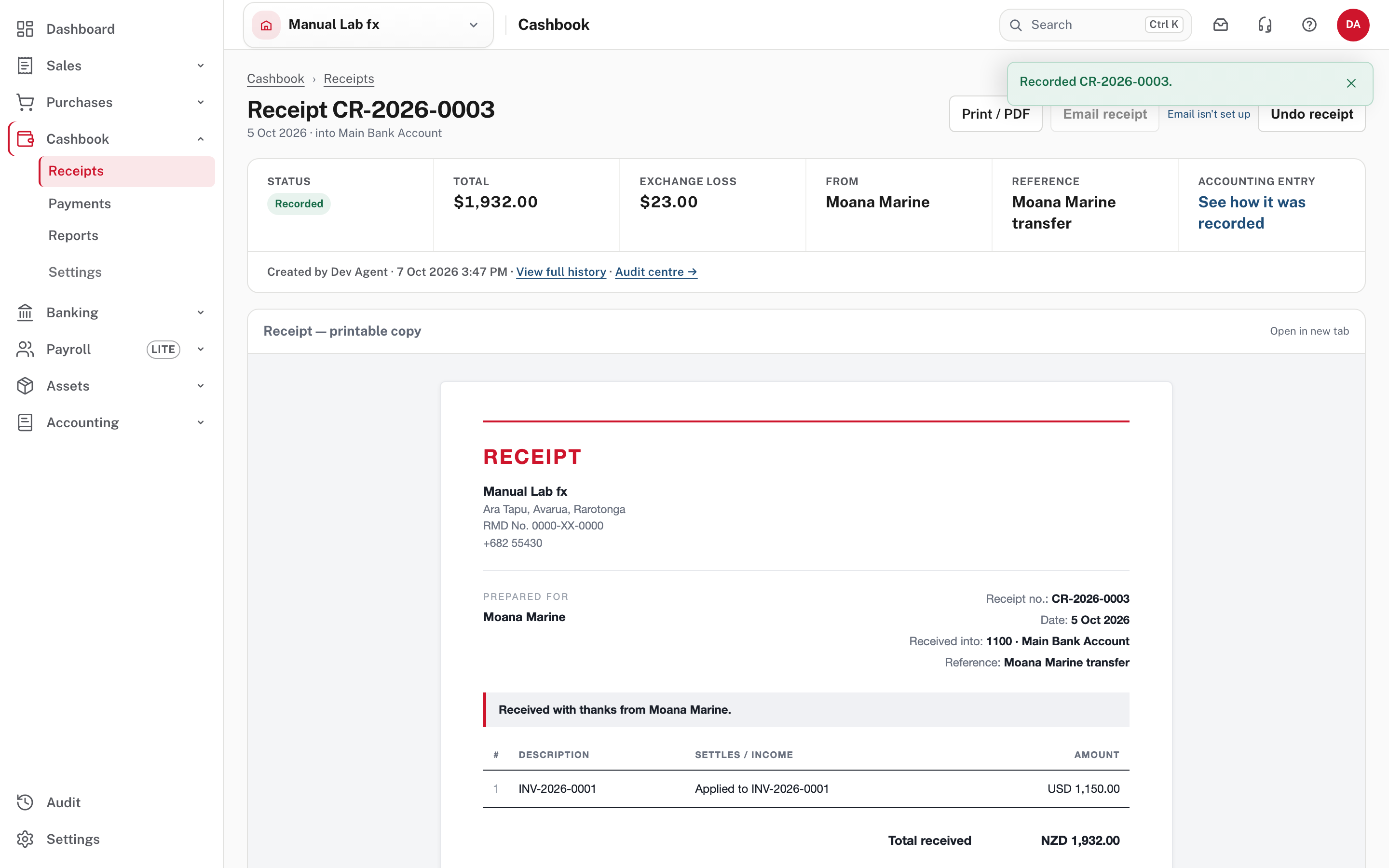
The receipt says it applied USD 1,150.00 to the invoice, shows Total received NZD 1,932.00 and, in the strip at the top, Exchange loss $23.00. The gain or loss is posted to Realised FX Gain/Loss in the same entry and is never printed for your customer.
Accounting → Reports → Realised exchange gains and losses lists them.
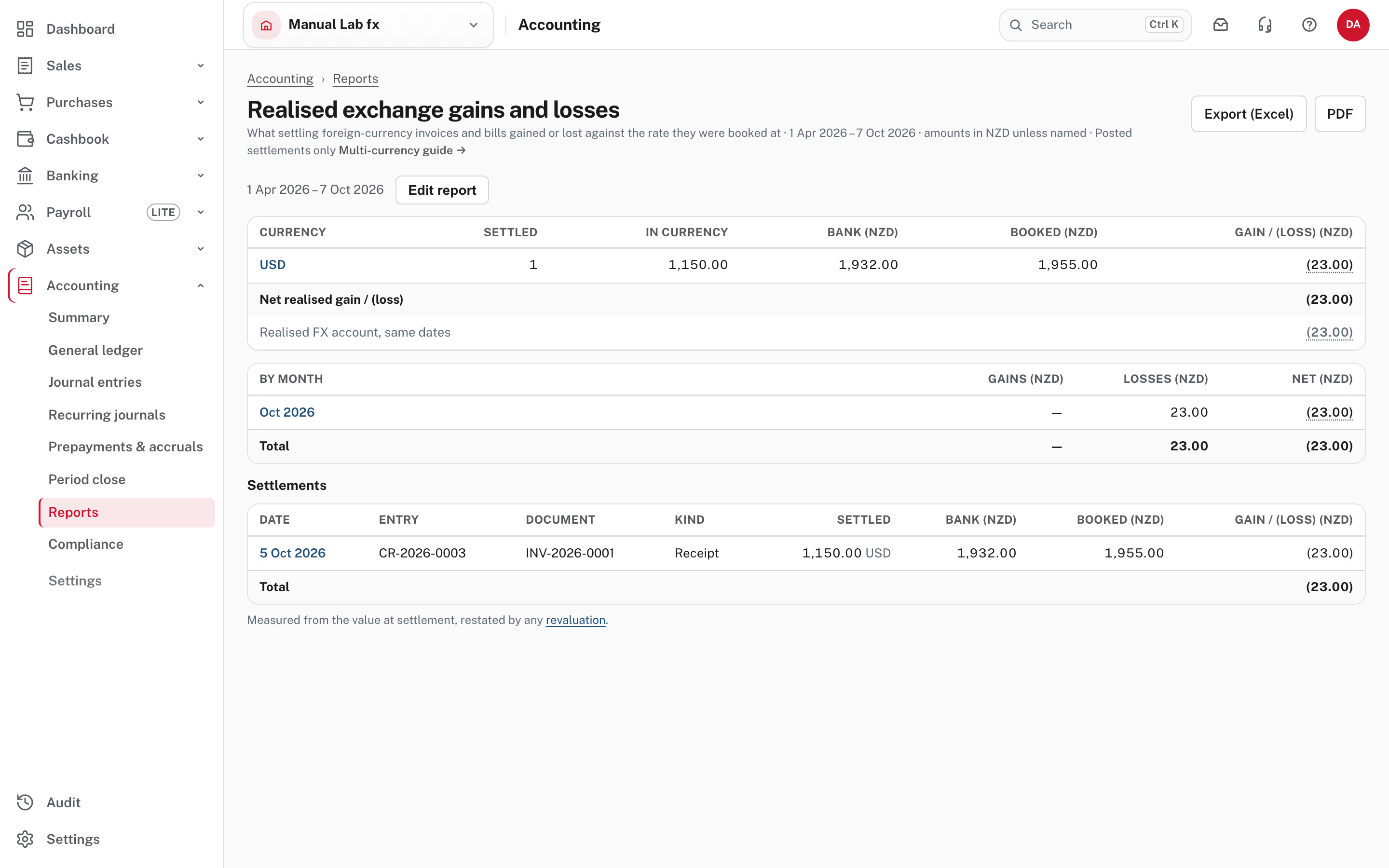
It shows, for each currency, how many documents were settled, the amount in the currency, the bank NZD, the booked NZD and the gain or loss, then the same by month and one row per settlement, each opening its receipt or payment. Realised FX account, same dates underneath must agree with the total. Together the two gains and losses give 115.00 less 23.00, which is 92.00: what the USD 1,150 moved from 1.6000 to 1.6800.
Paying a foreign bill is the other way round. Not pictured: Record payment on a bill asks for the same two amounts, and foreign bills are paid one at a time from the cash book, because a payment run takes only NZD bills (Pay suppliers). A credit note in a foreign currency can be applied only to an invoice in the same currency. If the two were raised at different rates, applying one to the other books the difference as a realised gain or loss.
More detail: Getting paid, and paying, in another currency.
Foreign currency and the tax return
The VAT return, the registers and the dashboard add up the NZD figures. The tax audit lists each line at its NZD amounts, because that is what the return counts (not pictured). Filtering and sorting invoices and bills by an amount compares the NZD figures too.
Common mistakes
- Typing the rate upside down. Enter how many NZD one USD buys (1.6234), not how many USD one NZD buys.
- Forgetting to revalue before locking the period. Revalue before you lock it, and note that you can't date a revaluation before one that stands.
- Entering the bank's amount in the USD box. The USD box is how much of the invoice is settled, in USD. The NZD box is what the bank got.
- Editing a rate to fix an old document. It changes nothing already raised. Undo and re-raise the document, or credit it (Credit notes, undoing and correcting).
Check before you continue
Check before you continue
- Multi-currency is on, the currencies you use are added, and there is a rate for each currency on or before every document date.
- Each foreign invoice and bill shows the right currency and rate, and the NZD equivalent is what you expect.
- Every foreign receipt or payment records both the amount settled in its currency and the NZD that moved at the bank.
- At each period end, open foreign items were revalued at the closing rate before the period was locked.
- Realised exchange gains and losses agrees with the Realised FX account, and Trade Debtors agrees with the aged report in NZD.