Landed costs and import VAT
When you import stock, the supplier's bill is only part of what the goods cost you. The freight, the duty and the broker's fee are part of the cost too, so they belong in the value of your stock and reach your profit when the goods are sold. Easy collects those costs on one holding account, Landed Costs Clearing, and lets you spread them over the goods they belong to. The VAT you pay to Customs at the border is separate: it goes on its own line and is claimed on the VAT return. The Accountant (or whoever keeps the books) does this when a shipment arrives. It continues Purchase orders and expense claims and Enter, approve and record a bill, and the stock itself is explained in Items, stock and stocktake.
About the screenshots
Screenshots are from Easy's demo company, Little Polynesian Café. The suppliers (Manual LC Auckland Spice Co, Manual LC Pacific Freight, Manual LC Customs Broker), the two stock items (Manual LC Vanilla paste 1kg, Manual LC Tonka beans 500g) and all amounts are made-up examples. The VAT return picture in Step 6 is from a separate practice company, where a bill with import VAT like the one in Step 3 is dated 15 September, so that its return is for a month that has ended.
Before you start
- The goods are tracked stock. An item that is a Good with Track stock on hand ticked (Sales → Items). Landed costs apply to tracked stock only: for goods you don't keep as stock, code the freight or duty to the goods' own expense account, or to the asset's cost account for an asset, and there is nothing to spread.
- The goods are in your books currency. Goods bought in a foreign currency can't be received into stock yet, so they can't take landed costs (Easy's Help).
- You have the supplier's bill for the goods, and the freight, duty and broker bills. Enter and record each one first. A bill left as a draft is not in the books, so its cost can't be spread.
- Know what counts. Freight, insurance in transit, import duty and levies, the customs broker's fee and cartage from the wharf or airport are landed costs. Storage after the goods arrive, general office costs and any exchange difference when you pay a foreign supplier are not (What counts as a landed cost).
- Roles. Recording the bills needs the same role as any bill. Recording or undoing the spread is the accountant's work: from Easy's source, it needs the permission that Data entry lacks (the one that also covers manual journals, credit notes and period close), so everyone who keeps the books except Data entry can do it (People, roles and access).
Step 1. Record the bill for the goods
Purchases → Bills → + New bill, as in Enter, approve and record a bill. Add the stock with Add from item….
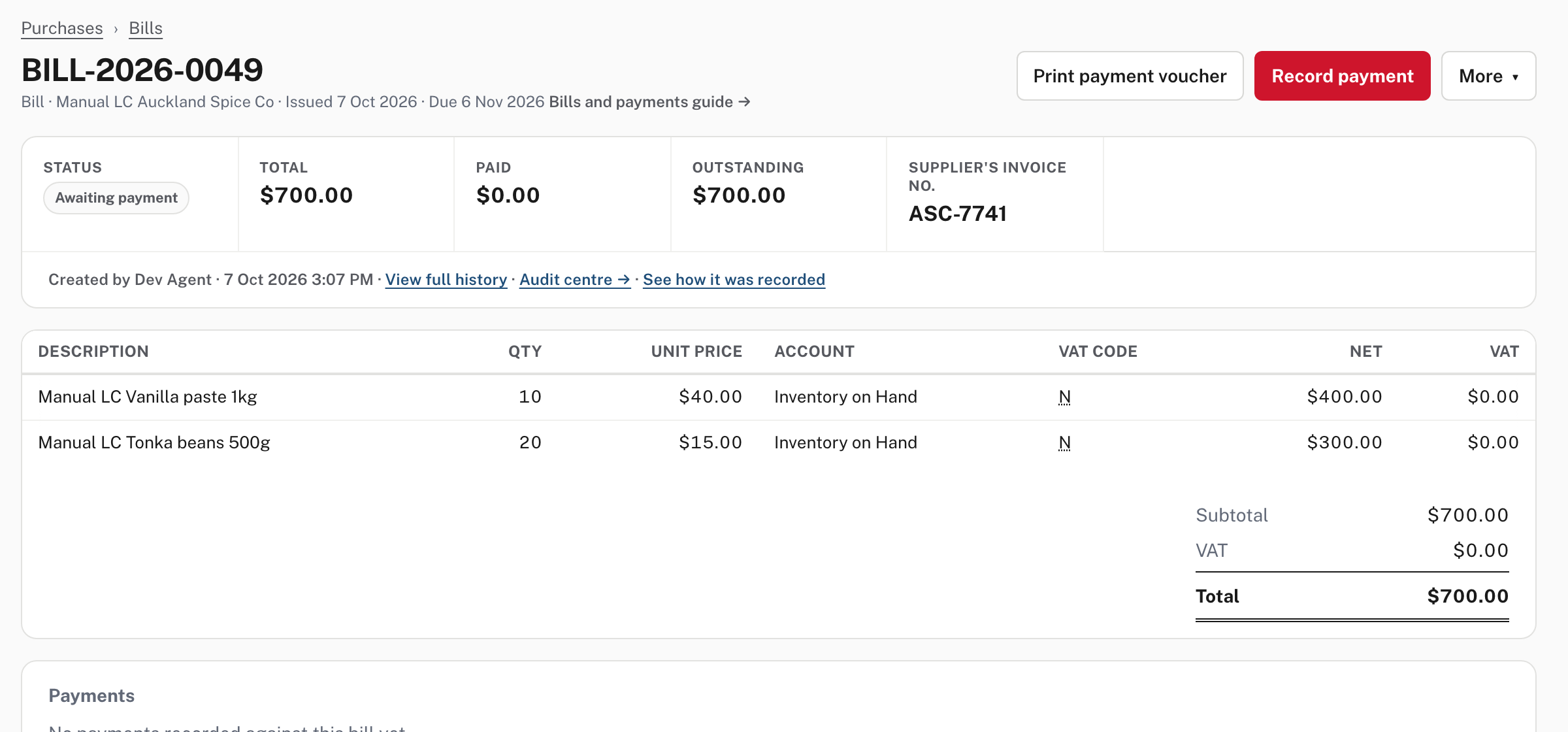
A tracked item sends its lines to Inventory on Hand, so recording the bill receives the stock at the supplier's price: 10 jars and 20 bags for $700.00. A stock bill is one of the two places you spread costs from. The other is a goods receipt on a purchase order (Purchase orders and expense claims, Step 4), whose row has an Add landed costs link.
Step 2. Record each freight, duty and broker bill, coded to Landed Costs Clearing
For each cost, make an ordinary bill and choose Landed Costs Clearing as the Expense type of the line.
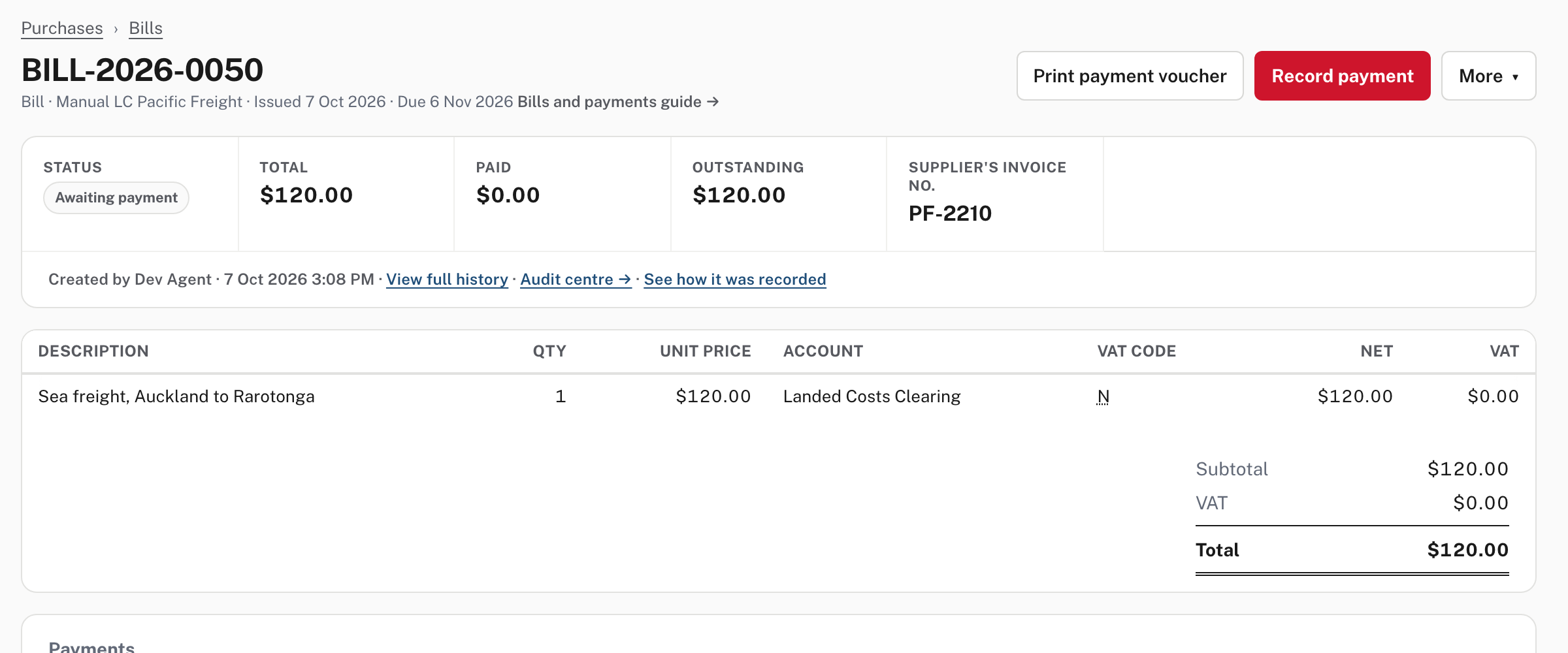
The account is a current asset, not an expense: the cost waits there until you spread it, and does not reach your profit meanwhile. Easy's Help gives one rule: each bill line is spread whole, so if one freight bill covers two shipments, put each shipment on its own line. A supplier's invoice for the goods can carry its own freight line coded the same way.
Step 3. Import VAT is its own line
Customs collects VAT at the border. On the bill from Customs (or from your broker, if they pay it for you), put that VAT on its own line with the VAT code IMP, Import VAT (paid to Customs).
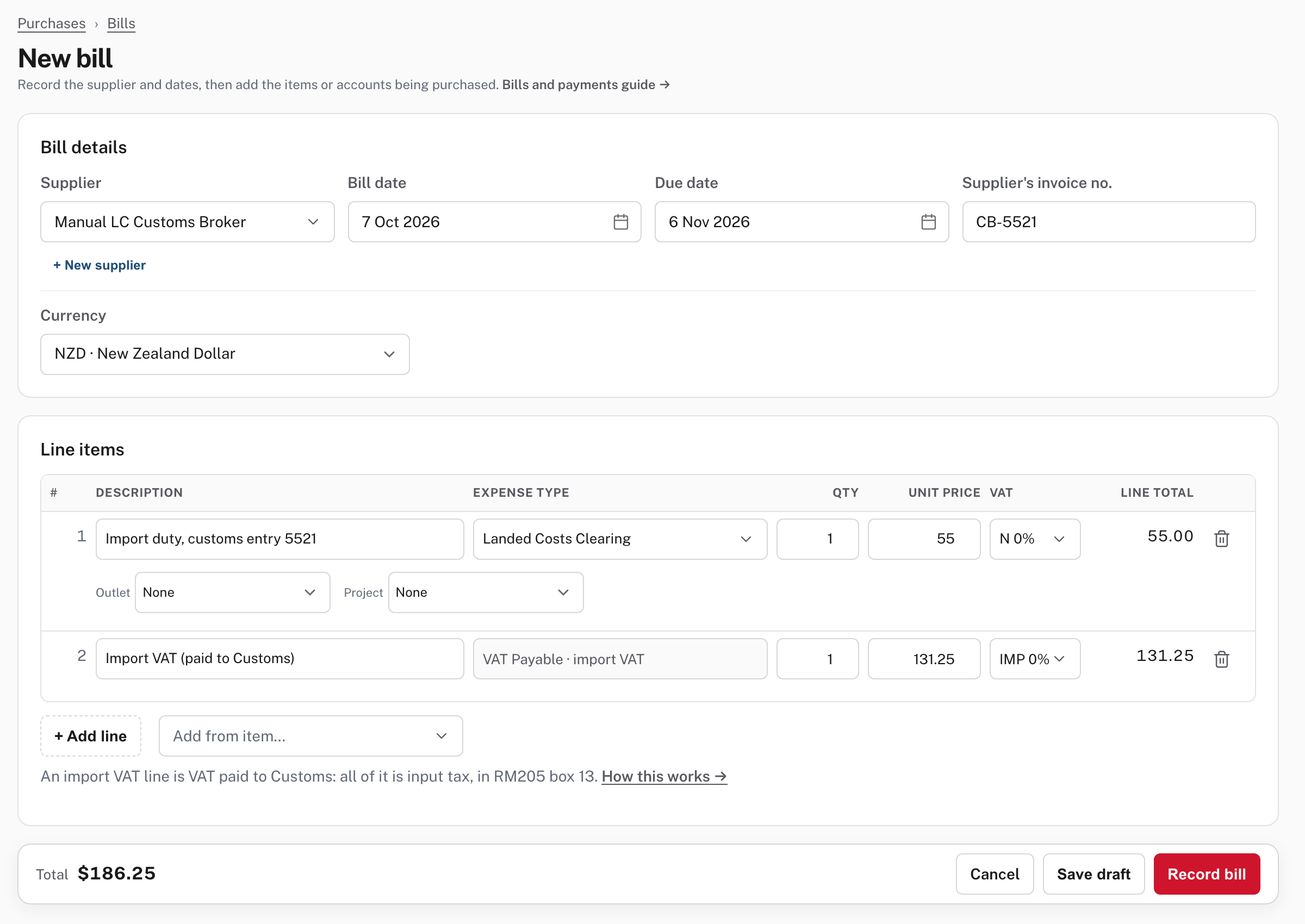
When you choose IMP the line changes: its account shows VAT Payable · import VAT (there is no expense type to choose), and a note says An import VAT line is VAT paid to Customs: all of it is input tax, in RM205 box 13. The unit price you type is the whole line, the VAT itself: there is no net amount behind it and nothing is added on top (here $131.25, so the bill's total is $55.00 + $131.25 = $186.25). The duty line on the same bill is coded to Landed Costs Clearing with the code N (no VAT).
Two cases from Easy's Help, not pictured:
- If the company is not registered for VAT, import VAT is part of the goods' cost: code that line to Landed Costs Clearing too and spread it with the other costs.
- Import VAT can't be keyed on a cashbook line, a sale or a purchase order. Record it on a bill to Customs, then pay that bill.
Keep the customs entry with the bill as the evidence for the claim. Choose Record bill.
Step 4. Spread the costs over the goods
Purchases → Landed costs.
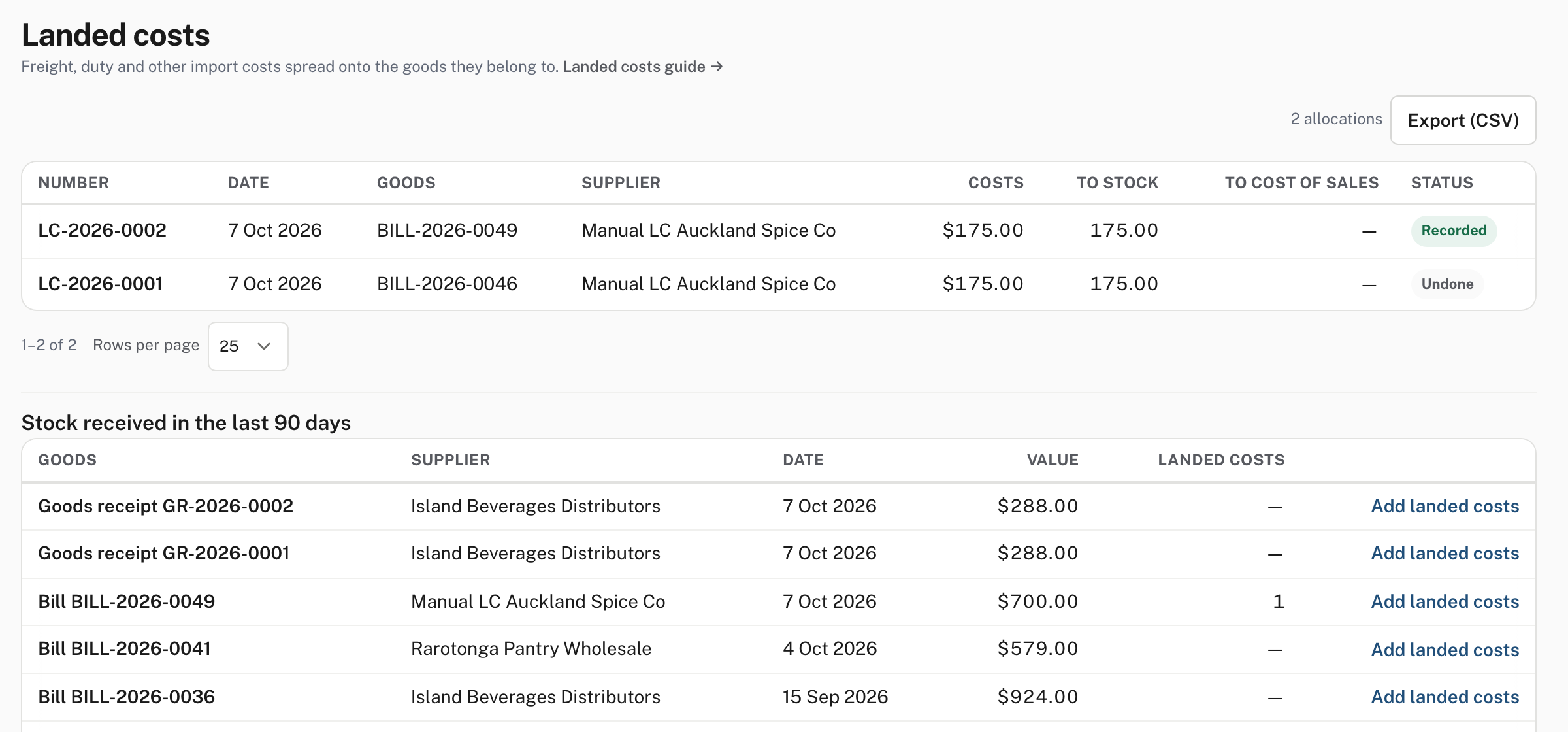
The top table lists each allocation with its number (LC-2026-…), date, goods, supplier, costs, how much went to stock and how much to cost of sales, and its status. The table below it lists goods received in the last 90 days (goods receipts and stock bills) with the Landed costs count already spread and an Add landed costs link. (A row that says Undone, like LC-2026-0001 in the picture, stays listed.) Choose Add landed costs on the goods' bill.
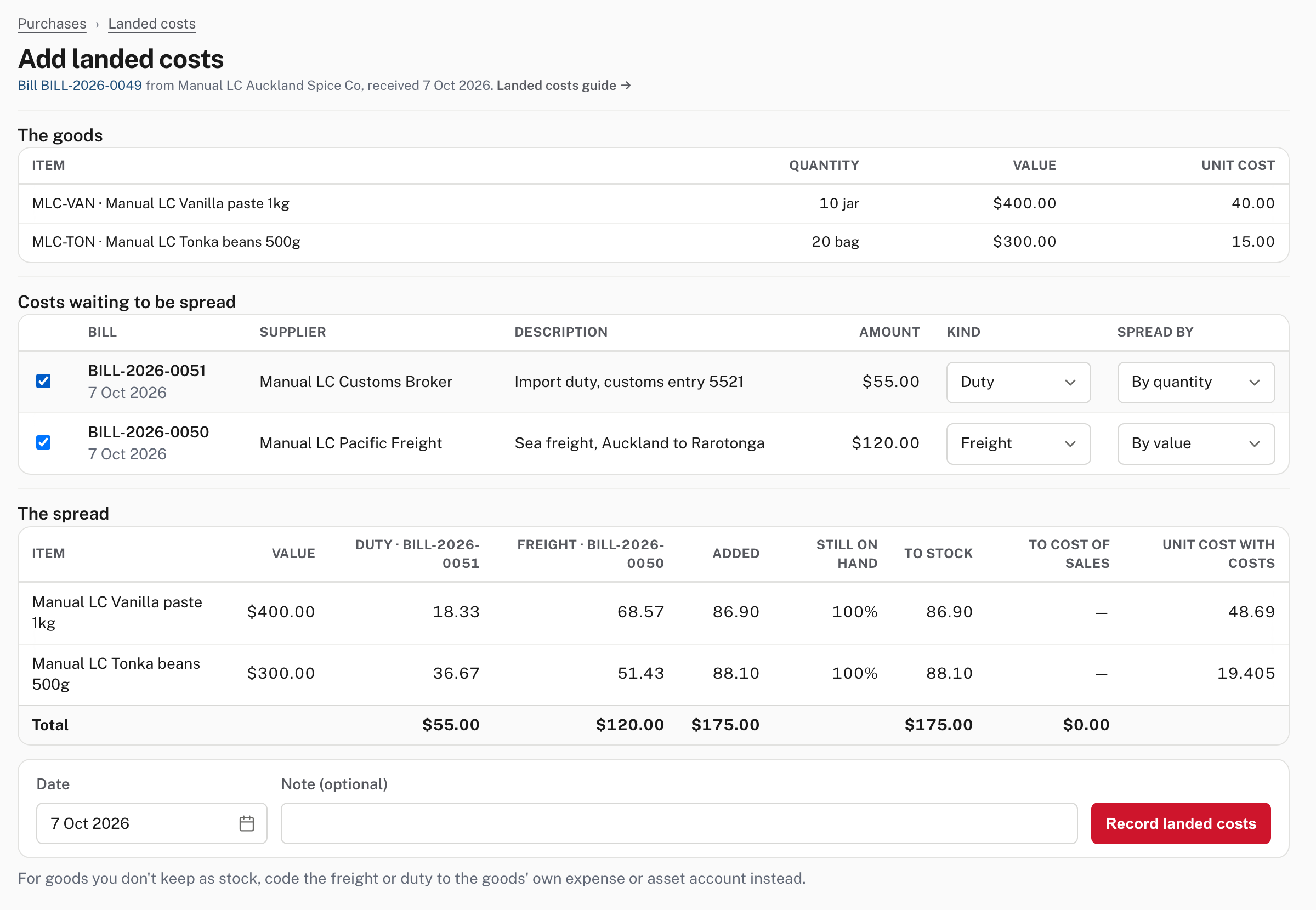
- The goods shows what is being costed: the items, quantities, value and the unit cost they have now (here 10 jars at $40.00 and 20 bags at $15.00).
- Costs waiting to be spread lists every recorded cost still on Landed Costs Clearing. Tick the ones that belong to these goods (here the freight and the duty). Do not tick a cost that belongs to another shipment.
- For each cost choose its Kind (Freight, Insurance, Duty, Broker, Cartage, Other; a company not registered for VAT is also offered Import VAT, from Easy's source) and Spread by:
| Spread by | What it does |
|---|---|
| By value | In proportion to each item's value. The usual choice, and the one for the freight in the picture: $400 and $300 of $700, so $68.57 and $51.43 of $120. |
| By quantity | In proportion to the number of units. Used for the duty in the picture: 10 jars and 20 bags is 30 units, so $18.33 and $36.67 of $55. |
| By hand | You type each item's share. For duty, take each line's duty from the customs entry. The amounts you type must add up to the cost exactly. |
- The spread shows, per item, each cost's share, the total Added, Still on hand, To stock, To cost of sales and the Unit cost with costs. Here the jars go from $40.00 to $48.69 and the bags from $15.00 to $19.405. Each share is rounded to the cent and any cent left over goes on the line that carries the most, so the shares always add up (Help).
- Check the Date (it starts at the date of the goods, or of a ticked bill if that is later, from Easy's source) and add a Note if you like, then choose Record landed costs.
Check the tick boxes before you record
The page spreads exactly the costs ticked. A freight bill ticked against the wrong shipment makes both shipments' stock values wrong, and the way back is to undo the landed costs and spread again.
If some of the goods were already sold
Stock is valued at average cost. If some goods were sold or written off before the costs arrived, the share for those goods goes to cost of sales and only the share for what is still on hand goes onto stock; Still on hand shows the proportion per line. In the picture all of it is on hand, so everything went to stock. Not shown in the demo: this is from Easy's Help; the goods in the picture had not been sold.
Step 5. Check the result
After Record landed costs you land on the allocation.
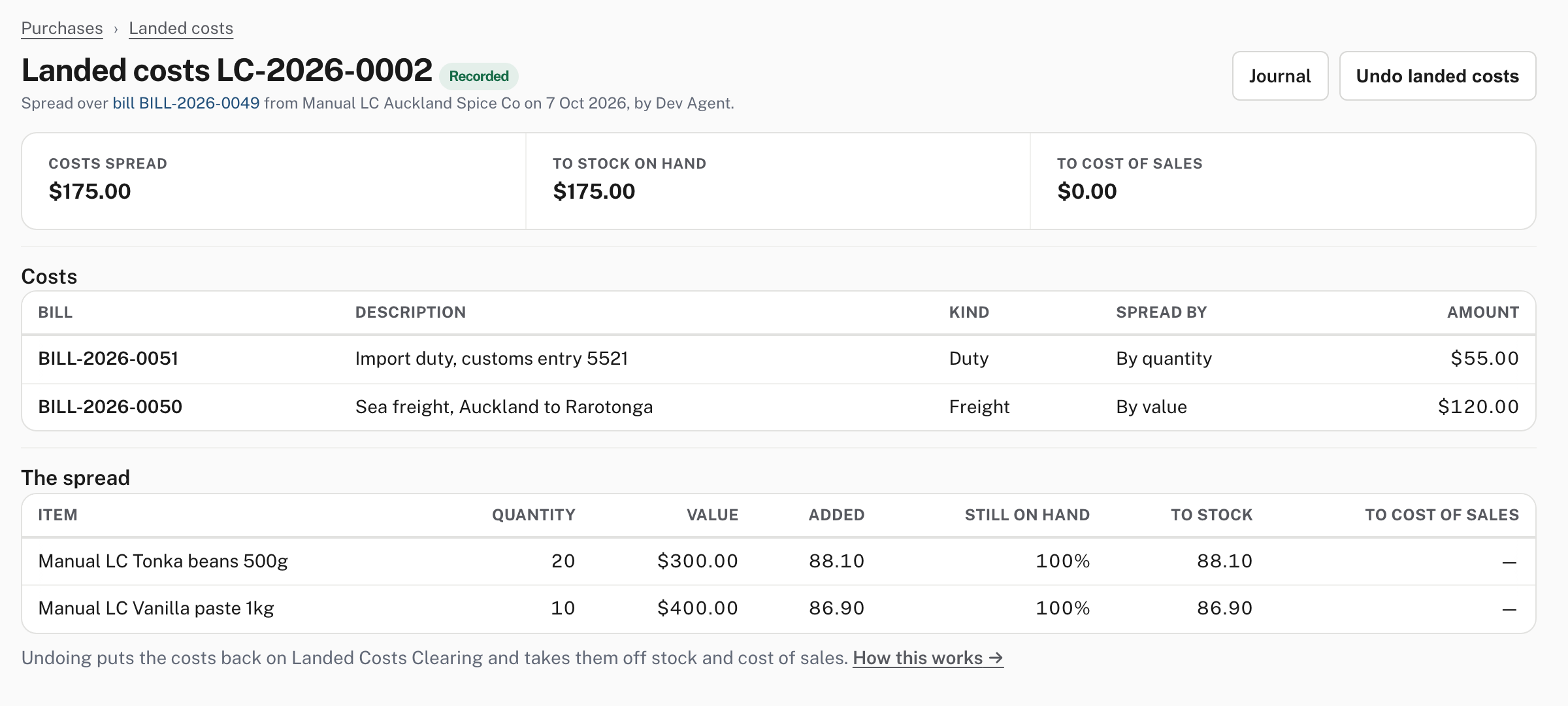
It shows the number, the status (Recorded), the total spread, how much went to stock on hand and to cost of sales, the costs and how each was spread, and the share each item took (the beans took $88.10 and the jars $86.90, the sum of their shares of the freight and the duty). Journal opens the entry it made. Easy's Help says that entry moves the cost out of Landed Costs Clearing into Inventory on Hand (and cost of sales for what was sold), and records the stock value with it, so the stock value on Sales → Items and the Inventory on Hand account keep agreeing. The goods' bill now has a Landed costs card listing the allocations that touched it.
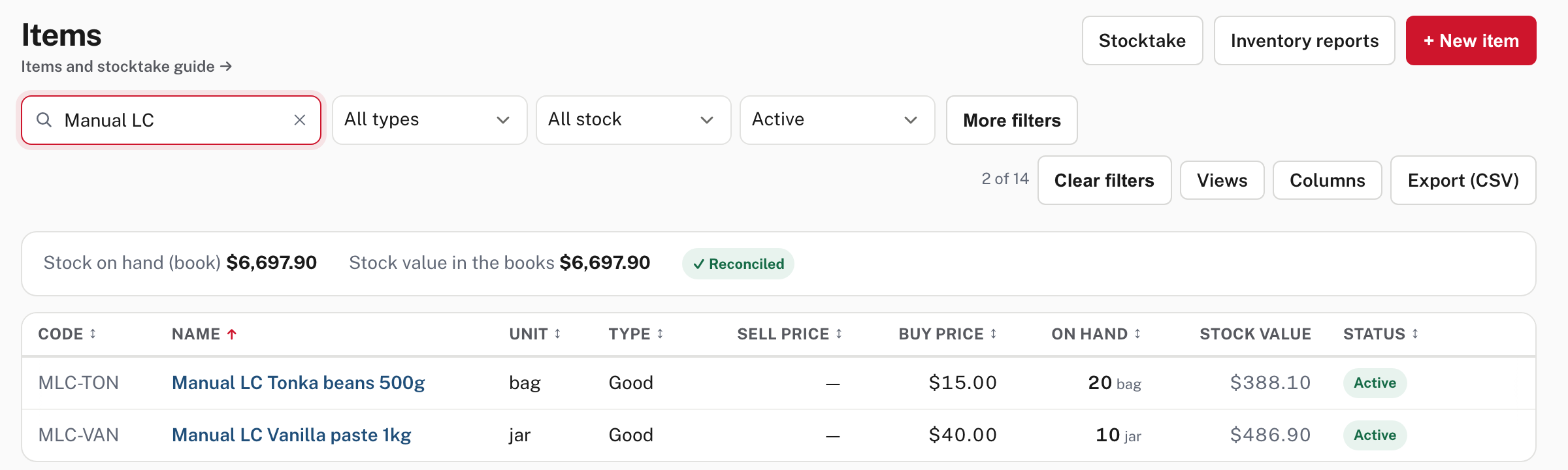
On Sales → Items the jars' stock value is $486.90 ($400.00 plus $86.90) and the bags' $388.10 ($300.00 plus $88.10), and the line at the top still says Reconciled: the stock value in the books agrees with the stock on hand.
Undoing
Open the allocation and choose Undo landed costs. Easy says LC-2026-… will be undone by an opposite entry dated today. The costs go back to Landed Costs Clearing, ready to spread again. The allocation then reads Undone and stays on the list. From Easy's Help: it can't be undone while today is in a locked period, and while landed costs stand you can't undo the goods' bill, or a bill that gave a cost, until you undo the landed costs first.
Step 6. Claim the import VAT
You don't claim import VAT anywhere special. Because the bill's IMP line is coded as import VAT, the VAT & PAYE return (RM205) picks it up.
Accounting → Compliance → VAT and PAYE returns, then open the return for the month of the bill (Work this return). The page is titled VAT & PAYE return (RM205).
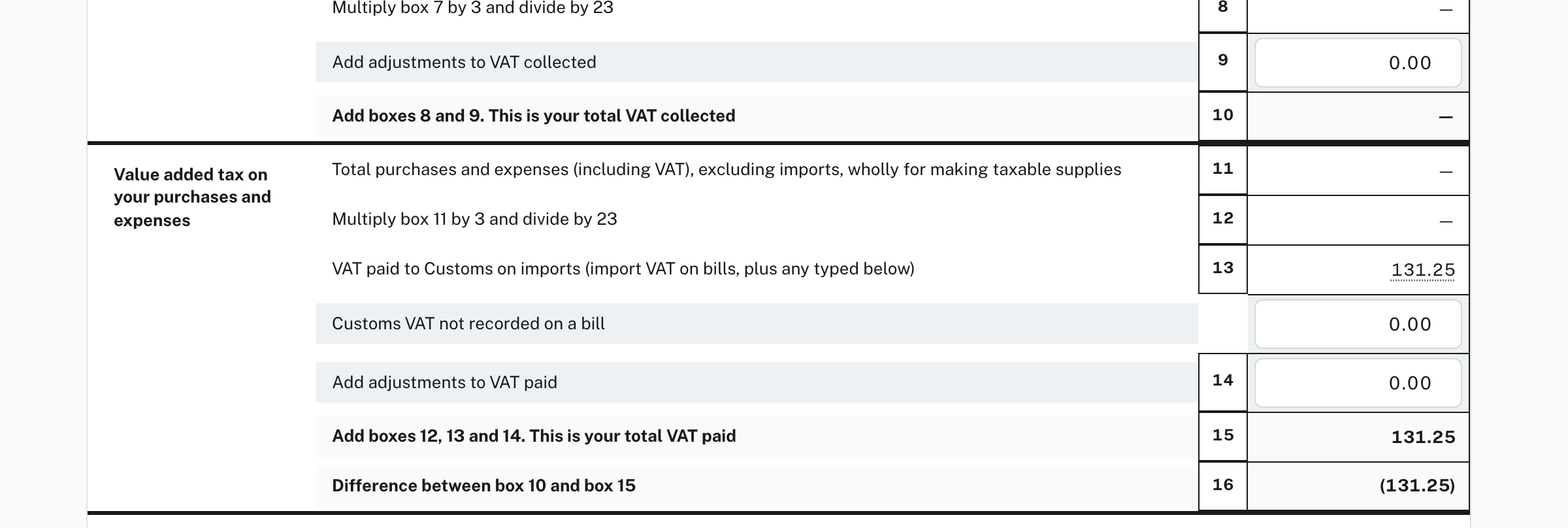
Pictured in the separate practice company described at the top. Box 13, VAT paid to Customs on imports (import VAT on bills, plus any typed below), shows 131.25, and the total VAT paid in box 15 and the difference in box 16 follow from it. In that month there is no other VAT, so box 16 reads (131.25): a refund. The line Customs VAT not recorded on a bill is for a Customs charge you have no bill for; don't type here what is already on a bill. From Easy's Help:
- If the company is registered for VAT, the IMP line goes to VAT Payable and appears in box 13; it is never in box 11 or 12.
- Box 13 adds the import VAT on your bills to anything typed on the return, and the return warns you when a month has both, in case the typed figure is one of the bills.
- On the payments basis, the import VAT on a bill counts in the month you pay the bill.
See Monthly VAT and PAYE returns for the rest of the return, and VAT: registration, tax codes and rate changes for the IMP code. More detail: Import VAT.
When something goes wrong
- A cost you recorded isn't in "Costs waiting to be spread". Check that the bill is recorded (not a draft) and that the line is coded to Landed Costs Clearing. When nothing is waiting, the page says Nothing is waiting to be spread. On a bill, choose Landed Costs Clearing for the freight, duty or broker lines, then come back.
- The costs came after most of the goods were sold. Spread them as usual: the share for what was sold goes to cost of sales, as Step 4 explains.
- The wrong costs were spread. Choose Undo landed costs on the allocation and spread again. Nothing is deleted.
- Import VAT is typed on the return and is also on a bill. The return warns about it. Clear the typed figure.
Check before you continue
Check before you continue
- Every freight, duty and broker bill for the shipment is recorded and coded to Landed Costs Clearing.
- Import VAT is on its own line with the IMP code (or, if the company isn't registered, coded to Landed Costs Clearing).
- The goods and the costs ticked on Add landed costs belong to the same shipment, and the spread method suits each cost.
- The new unit costs look right, and Sales → Items still says Reconciled.
- Nothing is left waiting on Landed Costs Clearing for a shipment you have already spread.
- The month's RM205 shows the import VAT in box 13 once, not also typed under Customs VAT not recorded on a bill.