Switching from goPayroll
You do this once, when a company stops paying its staff in goPayroll and starts in Easy. Easy reads goPayroll's own data export: the staff file, each person's bank accounts and split pay, standing allowances and deductions, leave balances and the year's pay to the cut-over. Then you check the result and compare Easy's pay with goPayroll's before the first live pay. Whoever runs payroll (a payroll manager, an Accountant, an Administrator or the Owner) can do the import; the final sign-off is the Owner's. It sits after Set up payroll and before Run a pay period.
About the screenshots
The pictures are from a practice company, Dev Sandbox, not from Little Polynesian Café. The goPayroll file is a made-up sample built for this manual: a bakery, Reef Road Bakery Ltd, with three invented staff (Tane Piri, Mere Koroa, Aroha Teina). No real company or person is in it. The practice company has its own test people (the Dev names), who appear beside the three in lists. The import was run for real there. The comparison uses one of its test pay runs, with figures typed to match it.
Before you start
- Payroll is set up (Set up payroll): Full Payroll on, a pay calendar, the wages account, the leave rules. The import needs Full Payroll, and the preview tells you what is missing.
- You have goPayroll's export. In goPayroll choose Tools → Data export. It downloads a .zip holding one .db file: the whole company, every pay run it ever made. Easy takes the .zip, or the .db inside it, up to 256 MB.
- You have chosen the cut-over: the first day of a month. The year's pay up to that date comes across, so choose the month after your last goPayroll pay. Keep paying in goPayroll until then.
- It costs nothing by itself. Easy charges for the employees you pay in a month, counted from finished pay runs, so bringing people and past months across adds nothing (Help).
- Another system than goPayroll? Use Imports & opening balances with a CSV file instead, in the same place (From another payroll system). This chapter is only about goPayroll.
Step 1. Find the import
Payroll → Payroll settings → Setup & switching.
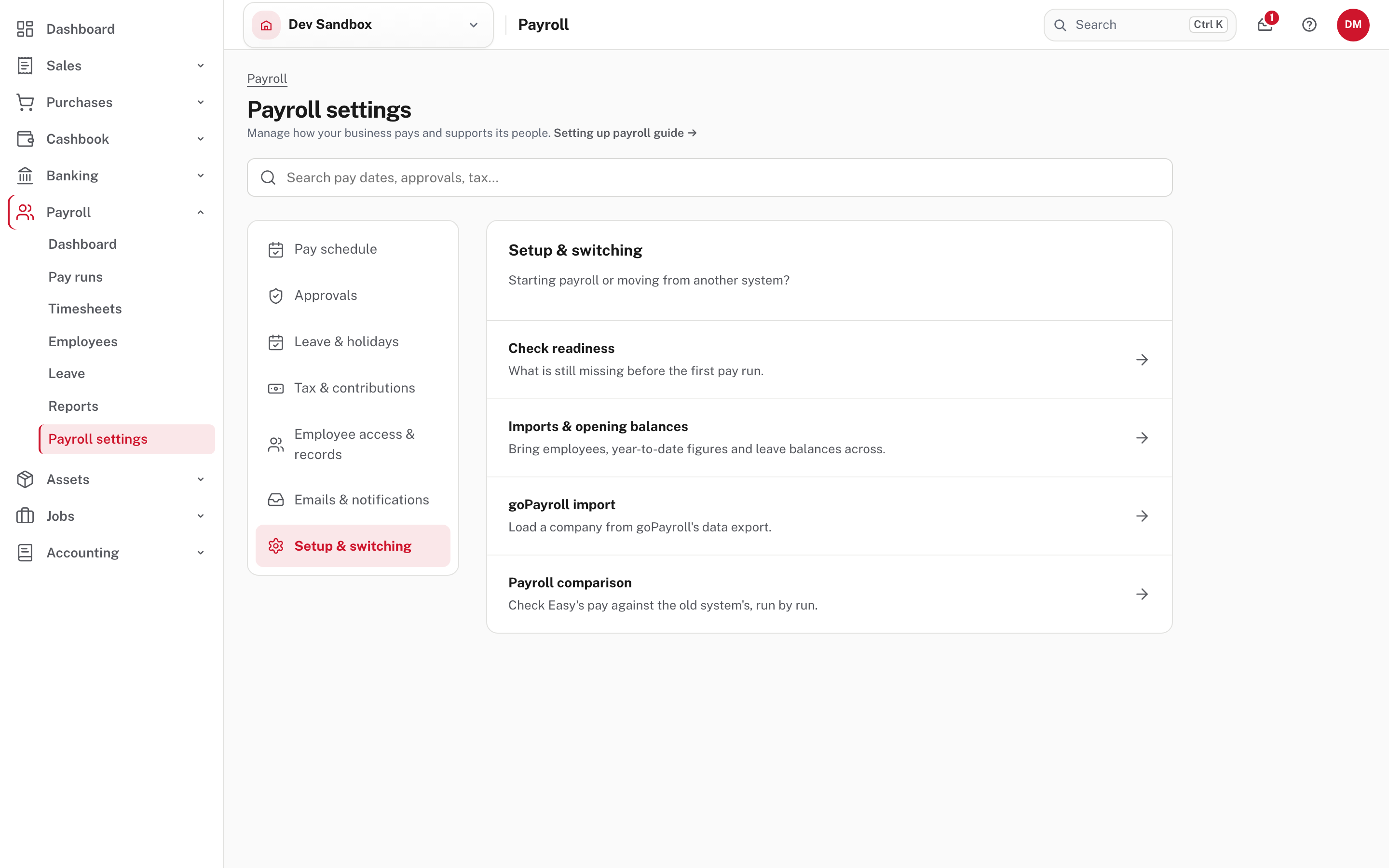
Four pages sit here, and they are also the tabs along the top of each one. goPayroll import loads the company. Payroll comparison checks the pay. Imports & opening balances is the CSV route. Check readiness lists what is still missing before the first pay run.
Step 2. Choose the export
goPayroll import.
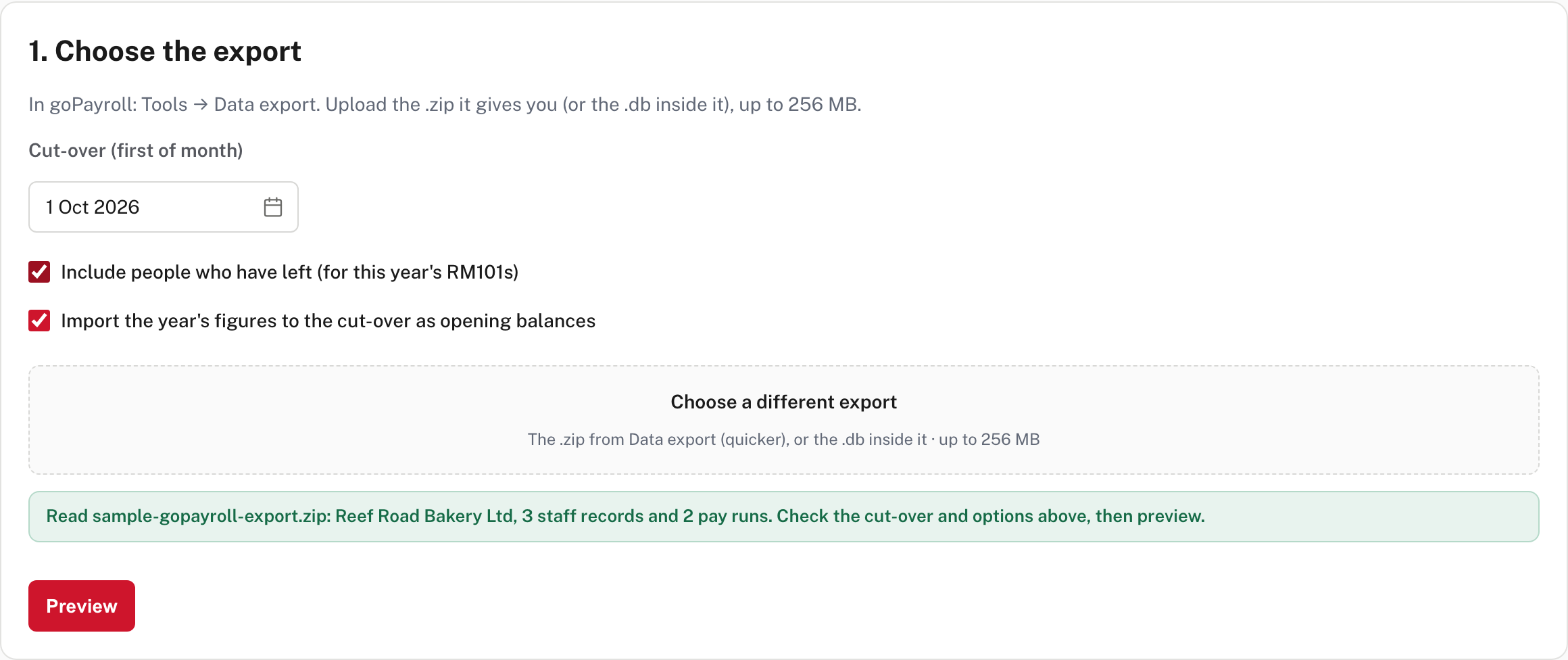
- Cut-over (first of month) starts as the month after goPayroll's last pay (here 1 Oct 2026). Easy refuses any other day of the month.
- Include people who have left (for this year's RM101s) is off until you tick it. Someone who left comes across only if they were paid in the cut-over's year, because their RM101 needs that pay. Earlier leavers stay in goPayroll.
- Import the year's figures to the cut-over as opening balances is on. It brings each month goPayroll paid, so the year's RM101s and the RM106 are complete (Payroll returns).
Choose the file with Choose the goPayroll export. A big file shows how much has arrived, then that Easy is reading it (not shown in the demo: the sample file is small). When it is read, a green line says what was in it: "Read sample-gopayroll-export.zip: Reef Road Bakery Ltd, 3 staff records and 2 pay runs." Nothing is saved yet. Choose Preview.
Step 3. Read the preview
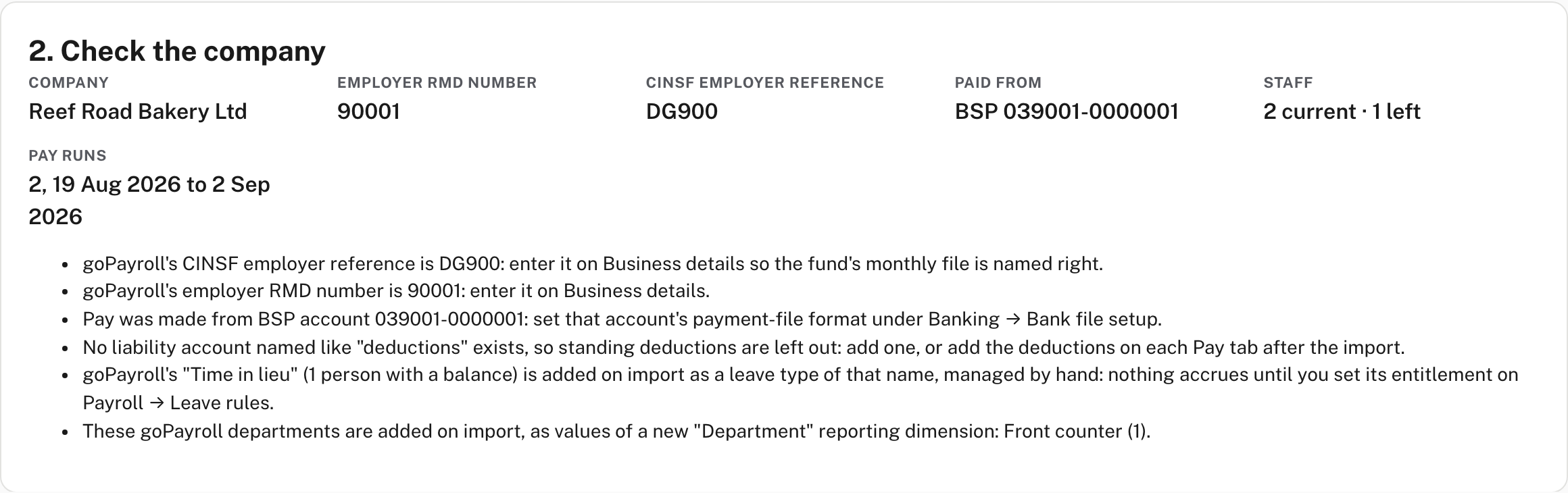
The first card shows the company, goPayroll's employer RMD number and CINSF reference, the account pay was made from, how many staff are current and how many have left, and the pay runs. Under it are notes, each one a job for you. In the sample:
- goPayroll's employer RMD number and CINSF employer reference are shown so you can enter them on Business details.
- The paying account needs its payment-file format set under Banking → Bank file setup.
- No liability account named like "deductions" exists, so standing deductions are left out. Add one, or add the deductions on each pay tab afterwards.
- goPayroll's Time in lieu is added as a leave type of that name, managed by hand: nothing accrues until you set its entitlement on Payroll settings → Leave & holidays → Leave rules.
- The goPayroll department (Front counter) is added as a value of a new Department reporting dimension.
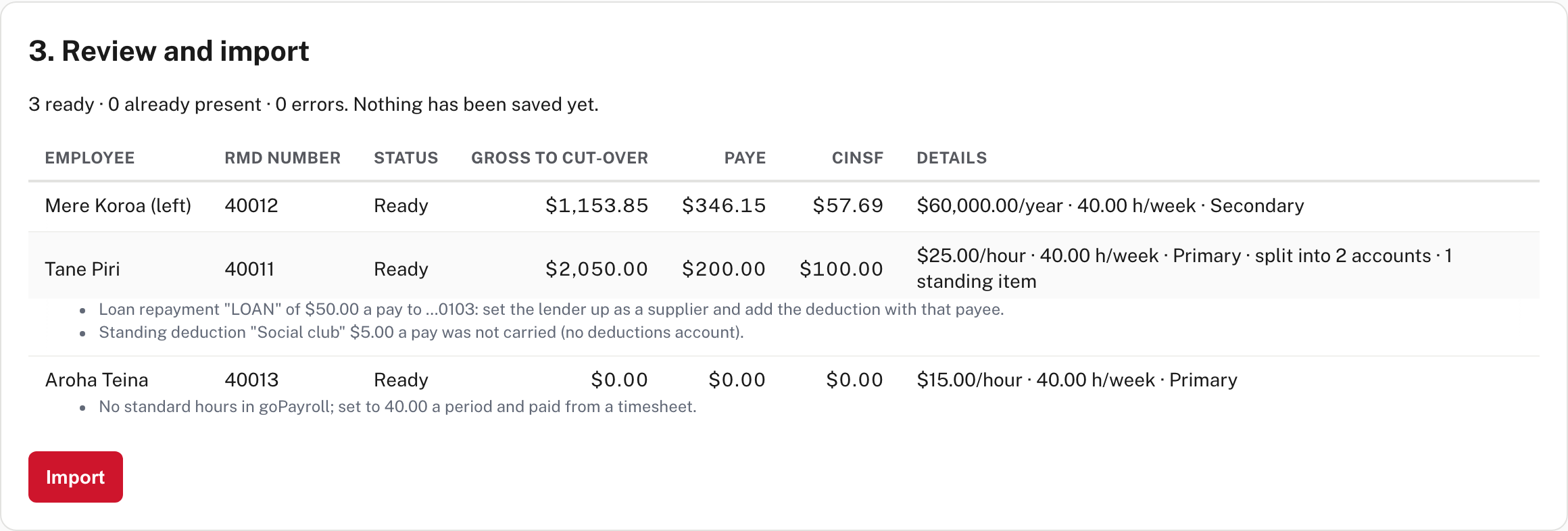
The second card lists each person with a Status and, under their row, a note for anything Easy could not carry:
| Status | Meaning |
|---|---|
| Ready | Will be created |
| Already present | Easy already has an employee with this RMD number. They are left exactly as they are |
| Error | Easy cannot make this person. The reason is on the row, and Import stays off while any row shows Error |
For example, "No RMD number in goPayroll; add it there or key this person by hand" is what a person with no RMD number gets, and "Several employees in Easy already carry this RMD number" is another (not shown in the sample, from Easy's source).
What comes across, from Easy's own Help (What comes across), with what the preview showed:
| From goPayroll | In Easy |
|---|---|
| The staff record | One employee each. A person rehired under the same RMD number is one employee, and the year's pay on the earlier records counts. The goPayroll badge becomes the clock / badge number |
| Pay and tax | Hourly rate or salary, standard hours, tax code (goPayroll's rule 1 is the scale; rule 2 is 30 % unless a flat rate is on the record, which becomes the secondary rate), extra PAYE and whether they pay CINSF. Mere Koroa showed as Secondary |
| Bank accounts | The account taking the rest becomes the main account, and each fixed-amount account a split-pay account. Tane Piri showed "split into 2 accounts" |
| Standing allowances and deductions | Pay items, coded to the wages account (allowances) or the deductions account. Tane's showed "1 standing item" |
| Leave balances | In hours, matched to Easy's leave types. A type Easy lacks is added |
| The year's figures | Opening-balance runs, one a month, for the RM101s and RM106 |
Not carried, and listed on the preview: a loan repayment to a lender's account (Easy pays those through a supplier: Tane's showed "set the lender up as a supplier and add the deduction with that payee") and an account with no amount per pay. Aroha Teina has no standard hours in the file, so Easy set her to 40 a period and paid from a timesheet.
Step 4. Import
Choose Import. Nothing is saved until you do, and the result screen has no undo, so read the preview first.
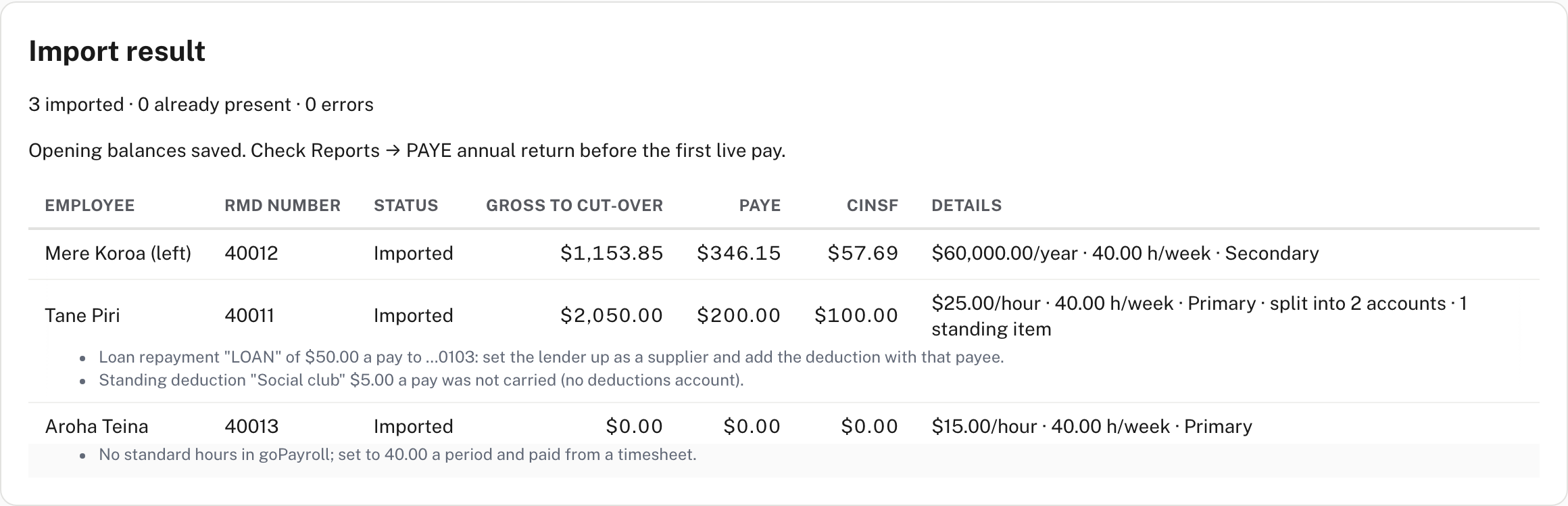
The result reads "3 imported · 0 already present · 0 errors" and, because the year's figures were included, "Opening balances saved. Check Reports → PAYE annual return before the first live pay." Each person is made through the same save as a hand-keyed employee, so the same checks and audit trail apply. Not shown, from Easy's source: running the import again skips everyone already created and reports them as Already present, and if the opening figures can't be saved the card says "Opening balances were not saved" and why.
Step 5. Check what came across
Do this before anyone is paid. Compare each screen with goPayroll's own reports.
Payroll → Employees. The list holds the new people.
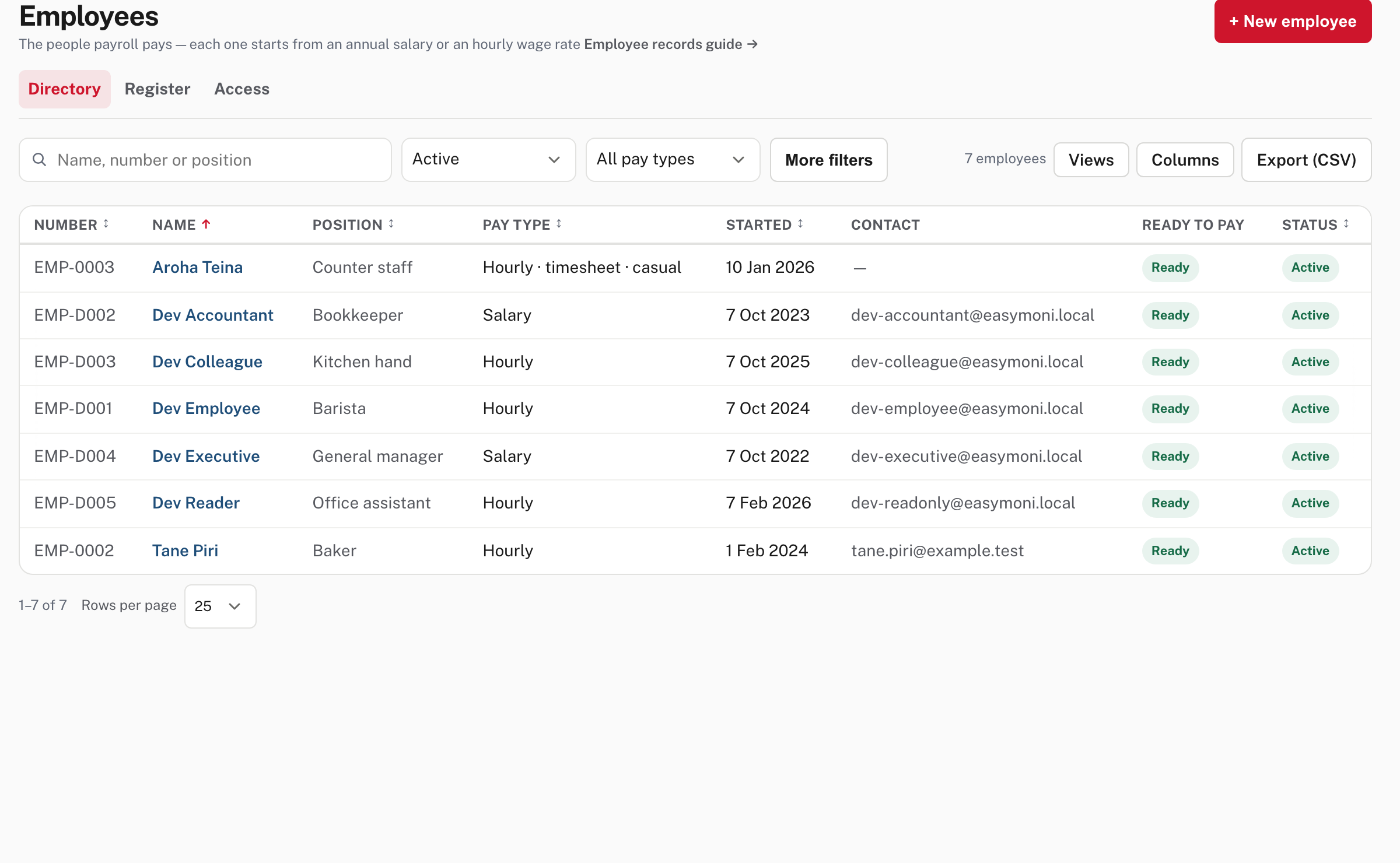
Tane Piri is hourly, Aroha Teina is Hourly · timesheet · casual. Mere Koroa, who left, is not in this list: the default filter is Active. Open a person to check each section.
Pay & work pattern. The standing allowance came across as a pay item.
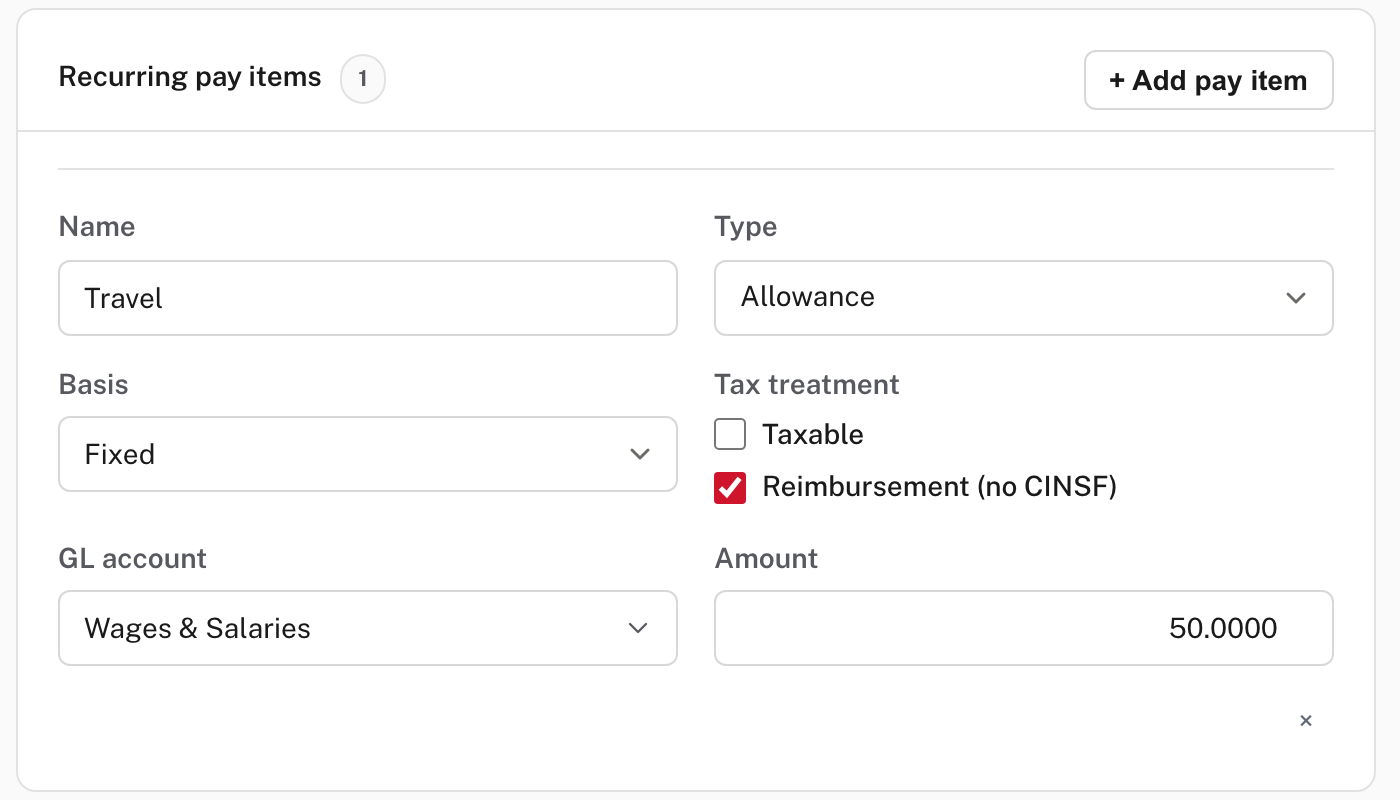
Travel is a fixed $50 allowance, not taxable, ticked Reimbursement (no CINSF). goPayroll leaves a non-taxable pay code out of CINSF, and Easy carries that as a reimbursement.
Bank details. The main account and the split.
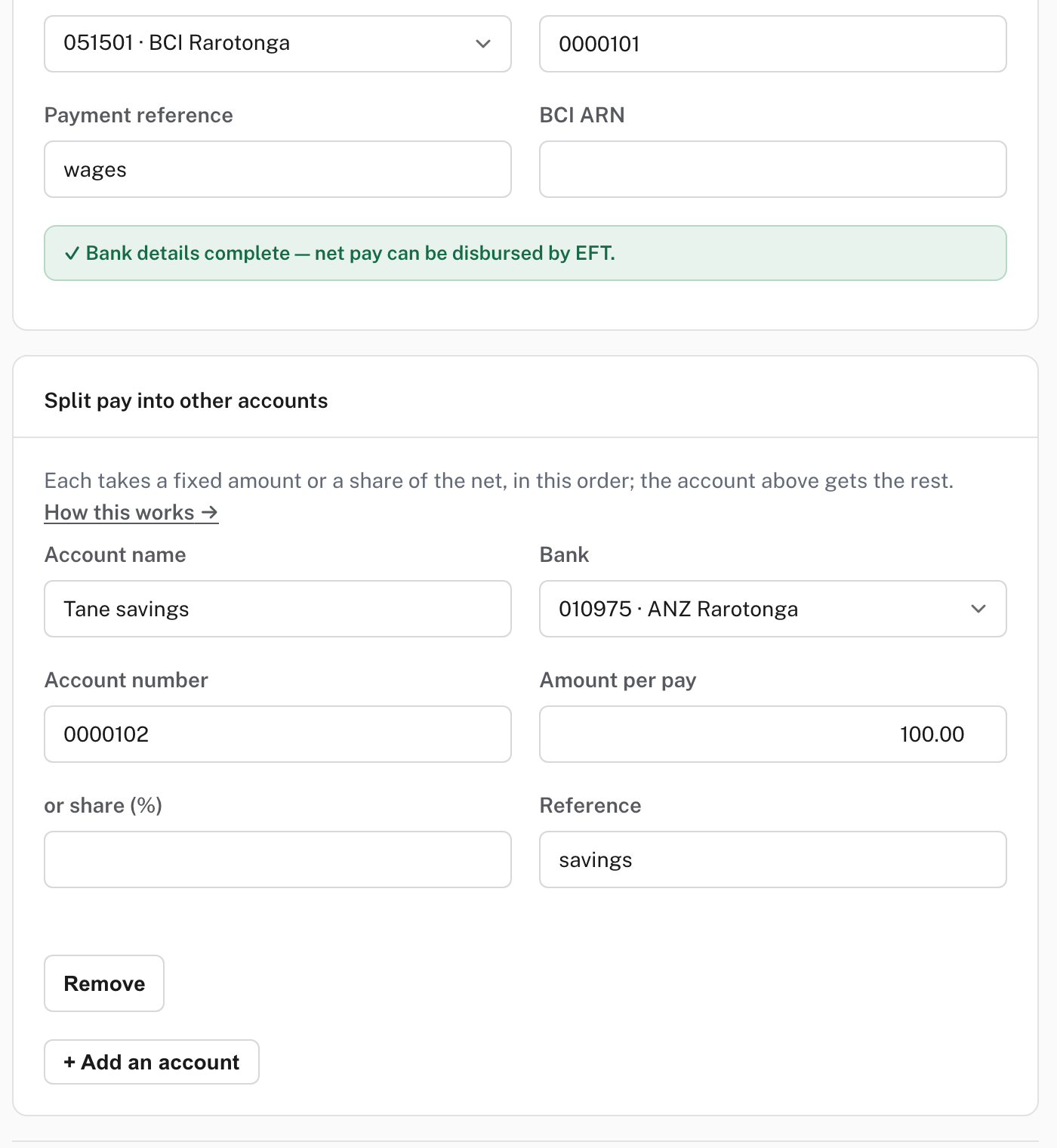
goPayroll stores the paying bank's routing code on the account (a BSP file reaches BCI as 089001 and ANZ as 099012), and Easy reads it as the bank it reaches. In the sample the main account came across as BCI Rarotonga and the split account as ANZ Rarotonga. The split account takes its fixed Amount per pay ($100.00), and the main account gets the rest. The BCI ARN box on a BCI account is empty after the import. The comparison's checklist asks that "required BCI ARNs" agree (step 6), so fill it in.
Leave & entitlements.
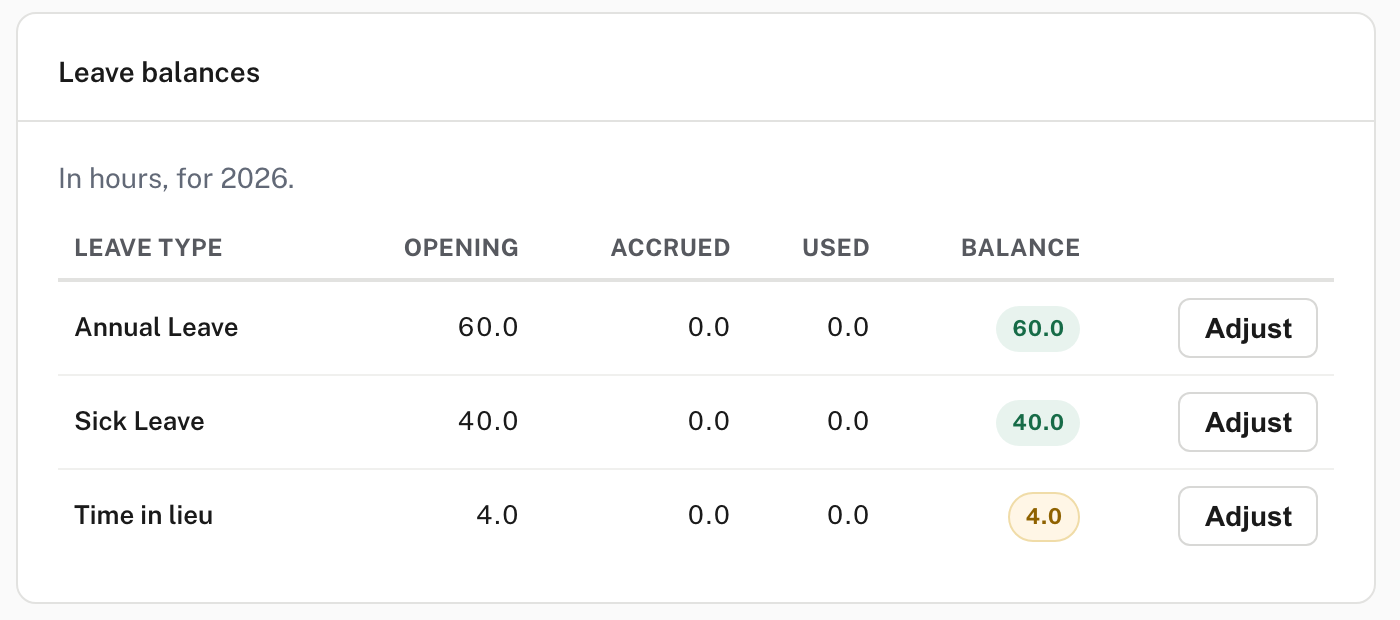
goPayroll counts a leave type in days or in hours. Easy turns days into hours using the person's hours a day and takes hours as they are. Tane's 7.5 days of annual leave (10 earned, 2.5 taken) became 60.0 hours, his 5 days of sick leave 40.0, and his time in lieu, which the file holds in hours, stayed 4.0. Check every balance against goPayroll's leave report.
Payroll → Reports → PAYE annual return. The year's pay is in the return.
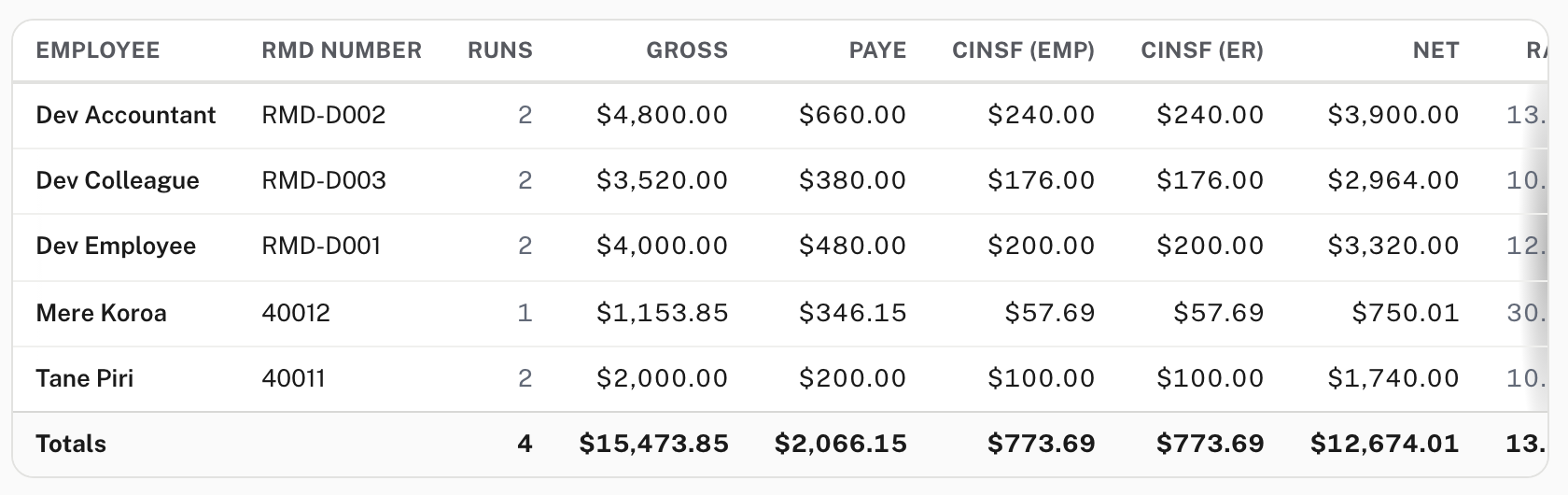
Mere Koroa and Tane Piri appear with the pay goPayroll paid them, beside the practice company's own people. The return counts taxable gross, so Tane's $2,000.00 here is $50 less than the $2,050.00 on the preview: the $50 is his non-taxable travel reimbursement, which the preview's gross includes and the return leaves out (from Easy's source). The RM106 grid under it (not in the picture) shows the opening figures in the months goPayroll paid them. See Payroll returns.
Then clear the rest of the list:
- Enter the employer RMD number and CINSF employer reference on Settings → Business details.
- Set the payment-file format for the paying account, and set up any lender as a supplier.
- Give each person an approver (the imported records say "No one specifically assigned") and invite them to self-service (For employees). An import brings no documents, so on each record the Documents check stays open until a supporting file is attached (from Easy's source).
- Set the entitlement for any leave type the import added (Leave).
Step 6. Compare Easy's pay with goPayroll's
Payroll → Payroll settings → Setup & switching → Payroll comparison. Do this before the first live pay, against a pay goPayroll has already made.
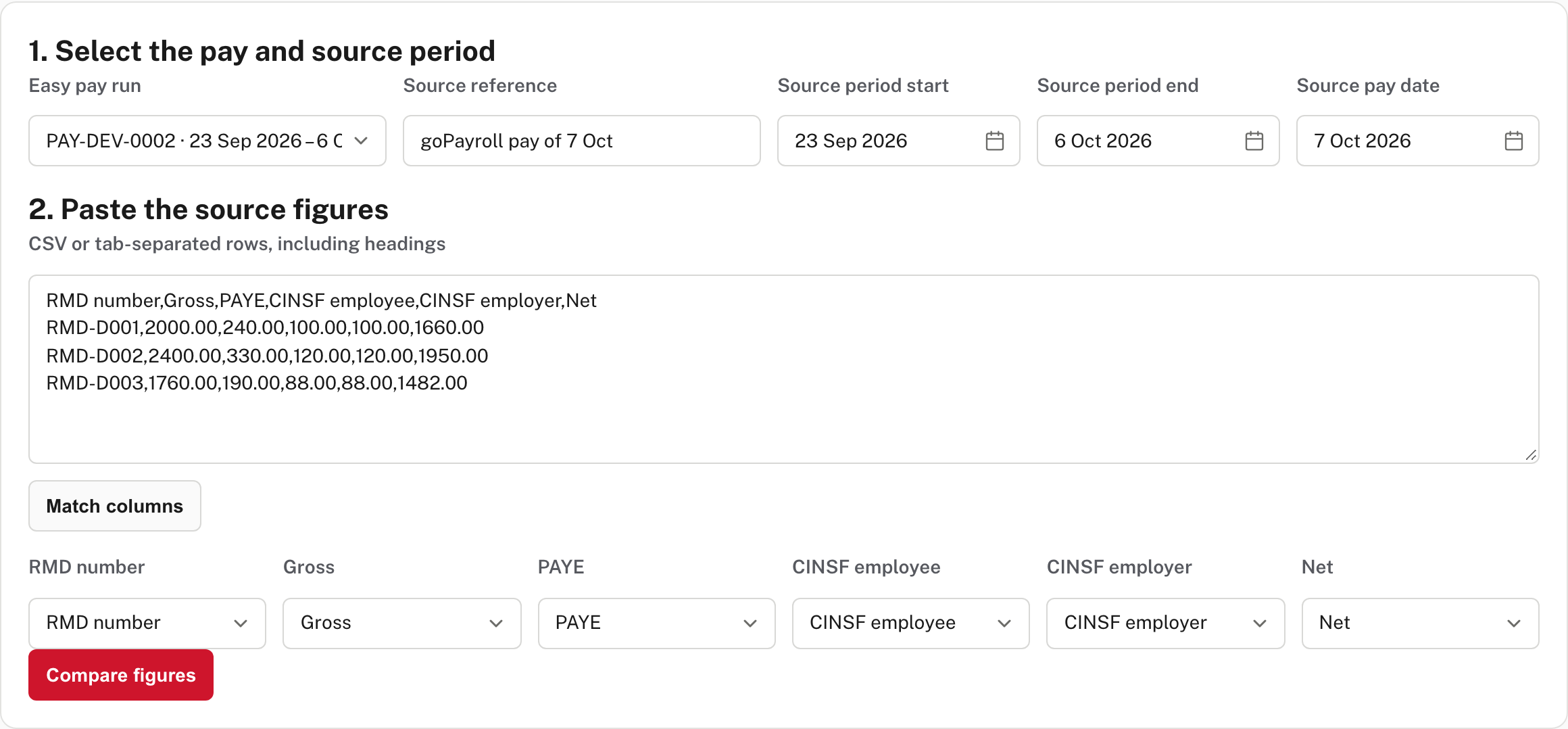
- Choose the Easy pay run to compare (the list also offers runs that are not finished). The source period and pay date fill in from the run. Change them to goPayroll's, and give the Source reference a name such as "goPayroll pay of 7 Oct".
- Paste goPayroll's figures as CSV or tab-separated rows, including headings: RMD number, Gross, PAYE, CINSF employee, CINSF employer and Net, one row for each person. Choose Match columns, check each box names the right column, then choose Compare figures.
Easy matches people by RMD number and shows every figure side by side. When they agree, the card says so.
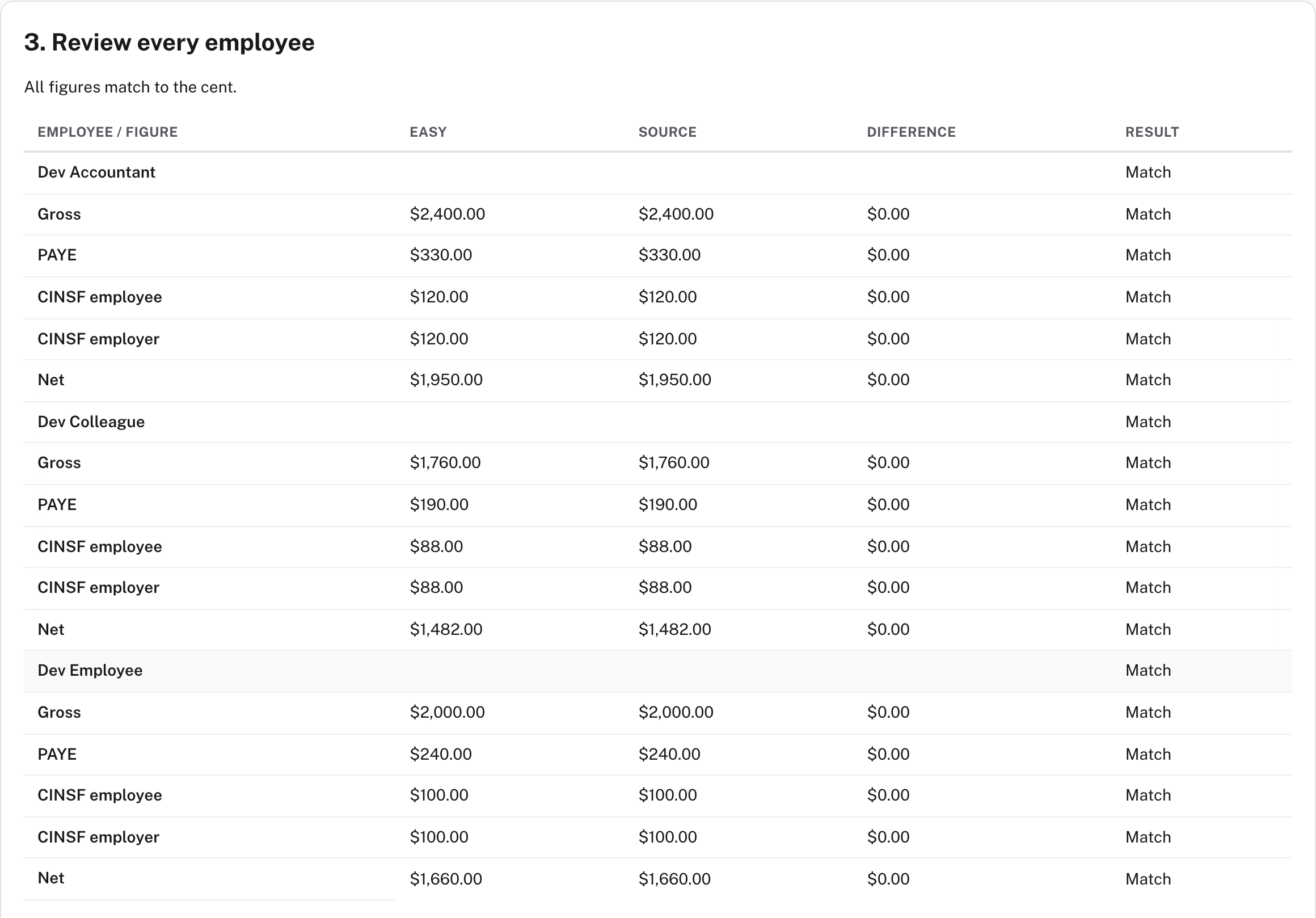
When one does not, it says Differences remain: sign-off is blocked, and marks the figures to check.
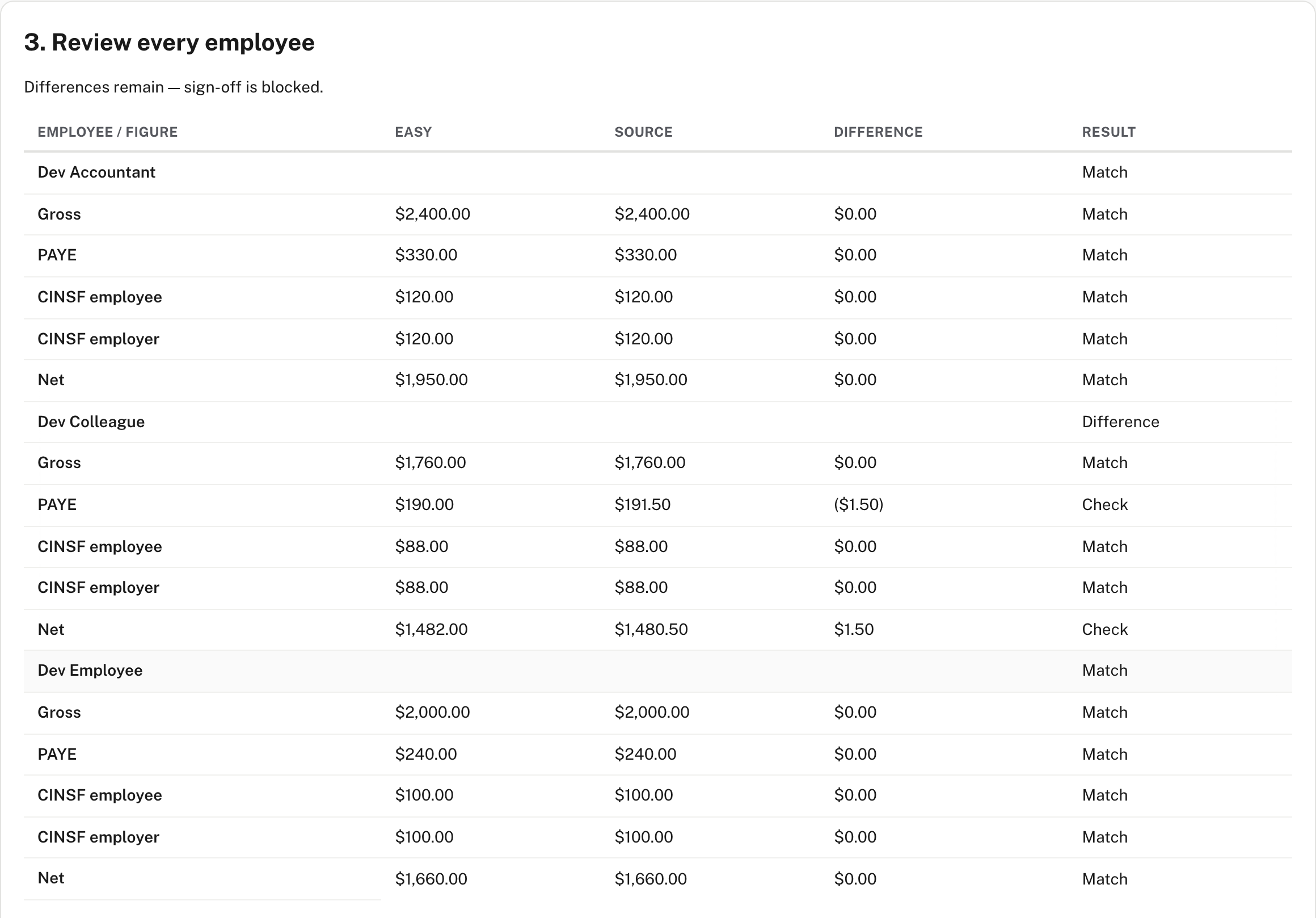
Below the table the page asks for 12 checks with the evidence you used for each: the same-period figures, 20 weekly cases from each RMD table, secondary, no-declaration and bonus cases, CINSF age limits and voluntary elections, overtime above 40 hours, public holidays, leave balances, payslip YTD, a bank test import, the journal and monthly liabilities, the RM205 preview, and the payslip wording. Not shown in the demo, from Easy's source and Help:
- The business Owner gives the first sign-off, and a different pay-run approver countersigns when the pay-run approval needs a second person. A payroll manager can compare but not sign (the pictures here are a payroll manager's).
- The run must be finished or locked ("Finish or lock this pay run before signing the final comparison"), and the figures must match.
- Checks 1, 2 and 8 to 12 must be Passed. Checks 3 to 7 can be Not applicable with a reason.
- Signing is recorded in the audit trail. If the run or approval policy changes afterwards, the sign-off shows as stale.
Comparing changes nothing until someone signs.
When something goes wrong
| What Easy says | What to do |
|---|---|
| "Choose the goPayroll data export: the .zip it downloads, or the .db inside it, up to 256 MB." | The file is the wrong type or too big. Use the .zip from Tools → Data export |
| "That file could not be read as a goPayroll export: …" | The file is damaged or not goPayroll's. Export again |
| "Choose the first day of a month as the cut-over." | Change the date |
| A row marked Error | The reason is on the row. Fix it in goPayroll, export again and preview again |
| "Upload the export in the business it is for first." | The company in the switcher changed after you uploaded. Switch back and upload again |
| "Opening balances for this calendar year were already imported." | There is one opening set a year, and it can be added to at the same cut-over but not repeated or moved to another date |
| "An employee already has payroll in or after this calendar year. Resolve it before importing opening balances." | Someone being imported already has a pay run in Easy this year. Sort that run out first |
Not shown in the demo: these come from Easy's source.
Check before you continue
Check before you continue
- The preview showed 0 errors, and every note on it has been dealt with or noted.
- Each employee's pay, tax code, bank accounts and standing items match goPayroll.
- Every leave balance matches goPayroll's leave report, in hours.
- The PAYE annual return shows each person's year to the cut-over, and agrees with goPayroll's year to date.
- The employer RMD number, CINSF reference and payment-file format are entered, and every BCI ARN that is needed is filled in.
- The Payroll comparison matched goPayroll's last pay to the cent, and the checklist is recorded and signed.
- Everyone has an approver, and goPayroll stops paying from the cut-over.