Company income tax return
Do this once a year, after the year-end accounts are final. The RM6 is the annual company tax return. Easy starts from your accounting profit (the profit and loss), walks it through the RM6 ladder to taxable income, terminal tax, and the provisional tax position. You add what only you know, check it, file it in Easy, and lodge it with RMD.
Easy does not send the return to RMD. Print the PDF (RM6) and lodge it as usual.
About the screenshots
Screenshots are from Easy's demo company, Little Polynesian Café. The only year the demo offers (the year to 31 March 2026) ended before its transactions begin, so its figures are nil, and Easy says so in the Before you file box. On a real company the boxes are filled in from the books.
Before you start
The return reads your books, so finish these first:
- The year is closed out: all invoices, bills, receipts, payments, journals, depreciation and payroll for the year are entered, and every bank account is reconciled (Month-end checklist; Year-end).
- The company's tax rate is right. The residency and rate are on Settings → Accounting & tax → Tax (VAT: registration and tax codes): resident 20%, non-resident 28%.
- Your balance date is right (the last day of the financial year, Settings → Accounting).
- Papers for the schedules: share details, dividends paid, directors' fees, payments to relatives, insurance premiums, and so on.
Step 1. Open the return and choose the year
Accounting → Compliance → Company income tax.
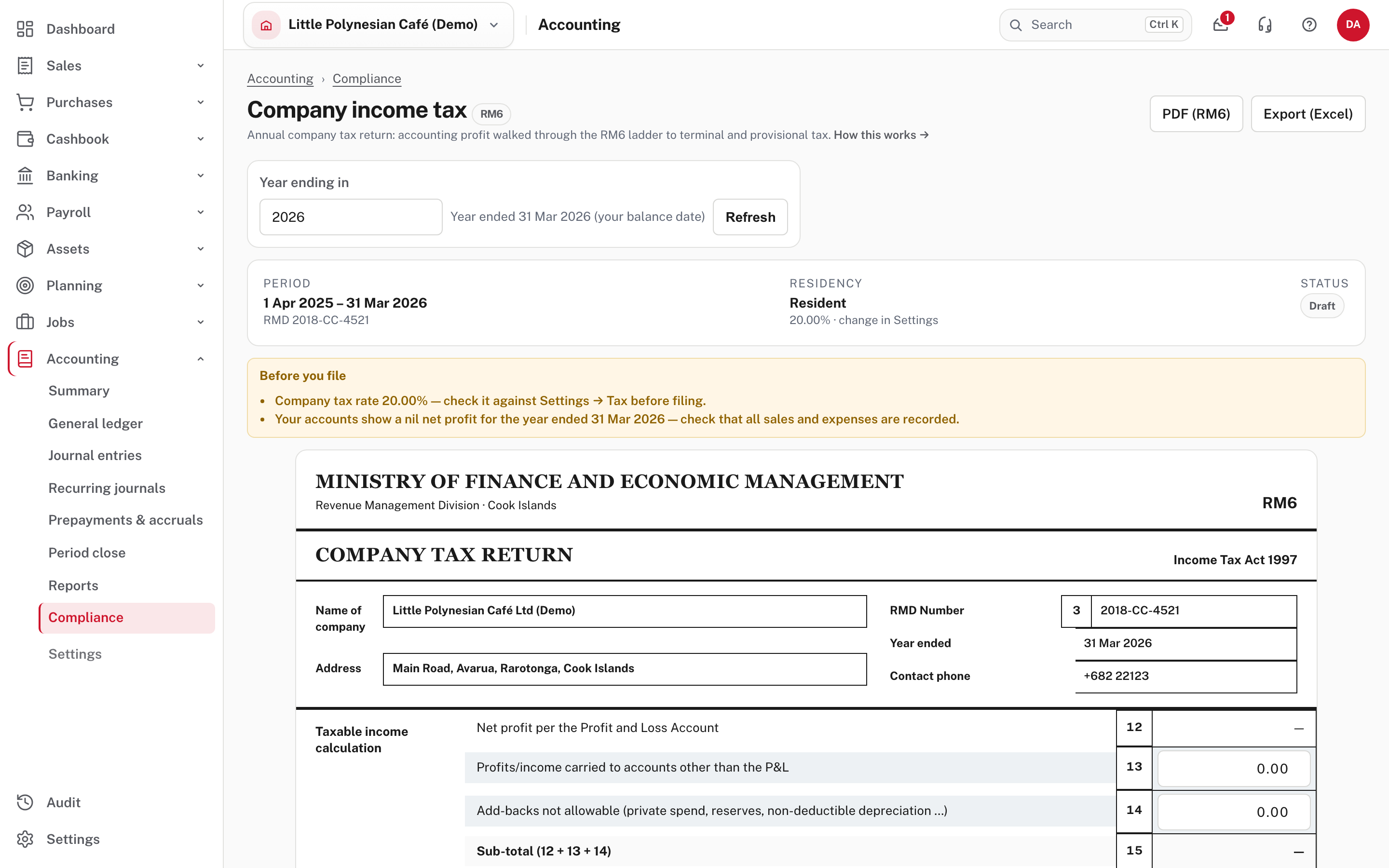
- Year ending in names the year by the calendar year it ends in. With a 31 March balance date, "2026" is 1 April 2025 to 31 March 2026, and box 12 is the profit and loss for exactly those dates. The newest year offered is the last one that has ended. Refresh reloads it.
- The return is due ten months after your balance date (1 November for a 31 December balance date). Check the date with RMD if your balance date is not 31 December.
- The bar shows the period, your RMD number, the company's residency and rate, and the status (Draft until you file).
- Before you file lists things worth checking. Here: the tax rate, and a nil net profit that suggests sales and expenses are not all recorded. Don't ignore it.
Step 2. Read the tax calculation
The RM6 is laid out as the form is. Taxable income calculation starts with box 12.
| Boxes | What they are |
|---|---|
| 12 | Net profit per the profit and loss (from your books: you can't type it) |
| 13 | Profits or income carried to accounts other than the P&L (you type it) |
| 14 | Add-backs not allowable: private spend, reserves, non-deductible depreciation (you type it) |
| 15 | Subtotal (12 + 13 + 14) |
| 16, 17 | Deductions not in the P&L, and dividends paid to shareholders |
| 18, 19, 20 | Total income for tax purposes, loss brought forward, and total taxable income |
Then Tax calculation: 21 is the tax on box 20 at the company rate; 21(b) is a withholding tax credit (attach the evidence), 21(c) the overseas tax credit (the lesser of the overseas tax paid and the Cook Islands tax on the net overseas income in 21(d)), 21(e) their total, 21(f) the terminal tax, 21(g) provisional tax paid, and 21(h) the refund or tax payable. Box 22 is next year's provisional tax (standard or your estimate). When the return shows a refund, you can say whether to use it for next year's provisional tax.
Box 12 opens the year's profit and loss, so you can follow the figure to the entries behind it.
More detail: Reading the reports: tax returns.
Step 3. Fill in the schedules
Pages 2 and 4 of the RM6 ask for extra tables. On the return, the Schedules section has a tab for each.
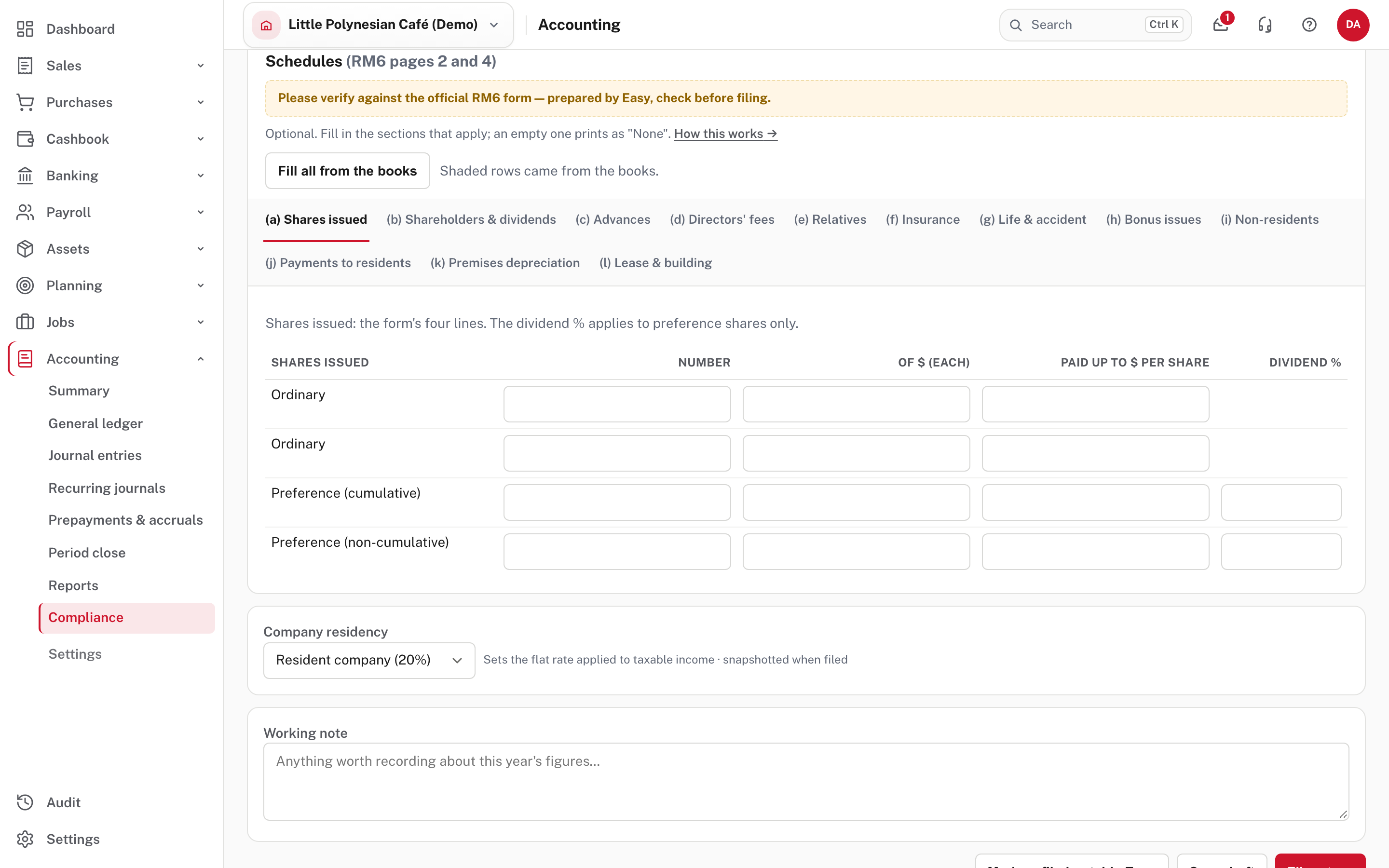
The tabs are (a) shares issued, (b) shareholders and dividends, (c) advances, (d) directors' fees, (e) relatives, (f) insurance, (g) life and accident, (h) bonus issues, (i) non-residents, (j) payments to residents, (k) premises depreciation and (l) lease and building.
- Fill in only the tabs that apply. An empty tab prints on the form as "None", because RMD expects every section.
- Fill all from the books starts every tab from what Easy already holds, and each tab has its own Fill from the books. Rows it fills are shaded, and a row marked * on the PDF came from the books. Filling again updates those rows and keeps anything you typed into them (an RMD number, an address); rows you typed yourself are never touched.
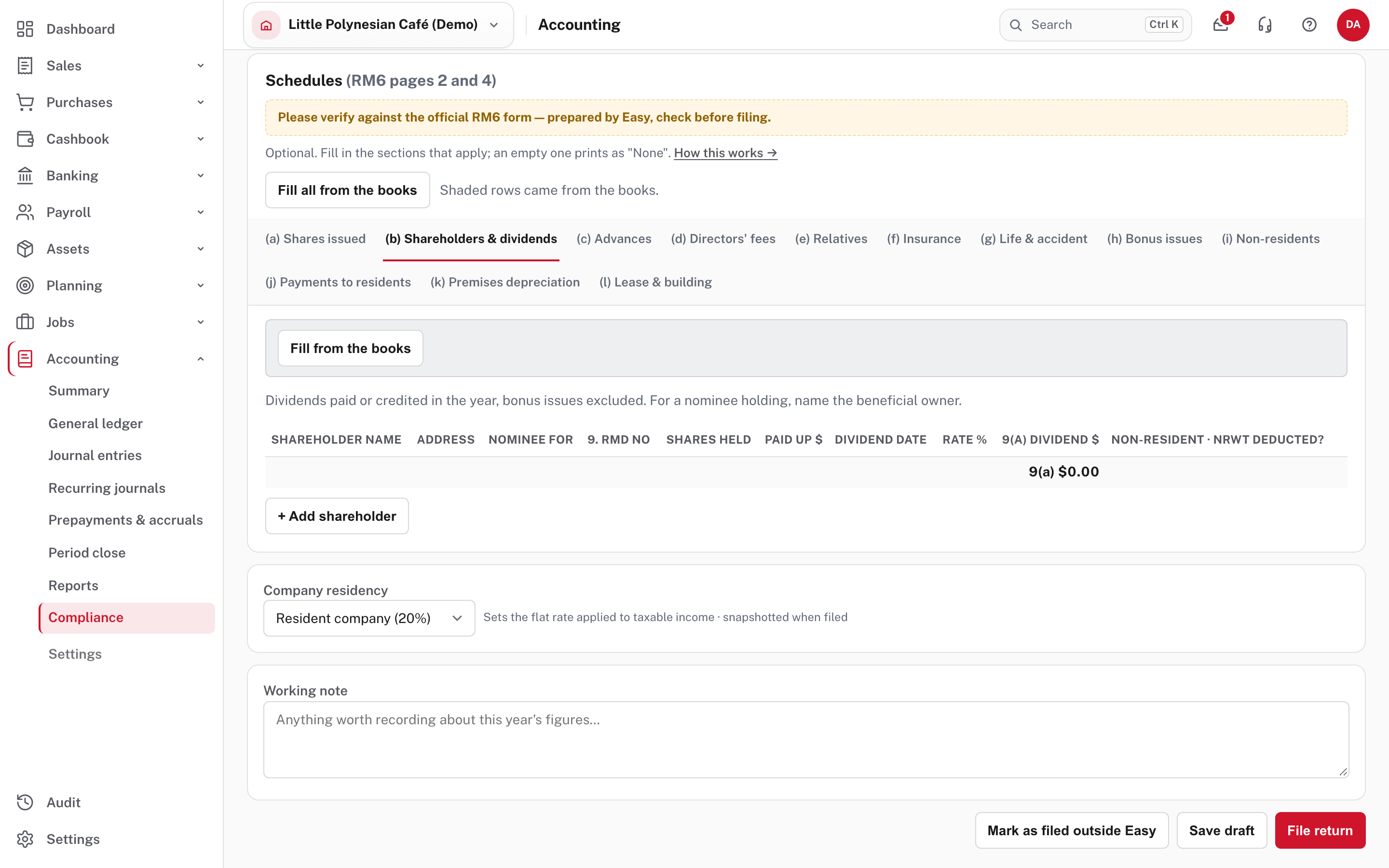
- The totals for boxes 9(a), 10(a), 11(a) and 23(b) add up as you go. Once the shareholder tab has rows, box 17 is its box 9(a) total. Depreciation of premises claimed above cost times the allowed rate is added back in box 14.
- Where each one comes from: shareholders and dividends from dividends paid through Owner money on the Dividends Paid account (one row per payee name); advances from an owner loan account that ends the year owing money to the company; directors' fees, insurance and payments to residents from the expense accounts you choose on the tab, grouped by supplier or payee; non-residents from interest and royalties paid in a foreign currency (Easy has no residency flag for suppliers); relatives from the pay of the employees you choose.
Check the schedules against the official form
The page and the PDF say "Please verify against the official RM6 form: prepared by Easy, check before filing." Easy prepares them; your accountant should check them against the official form before you lodge.
More detail: Reading the reports: company tax schedules.
Step 4. Set residency, add a note, then save or file
At the foot of the return:
- Company residency (Resident company (20%) or Non-resident company (28%)) sets the flat rate applied to taxable income. It is kept with the return when you file it.
- Working note: anything worth remembering about this year's figures.
- Save draft keeps your work (including the schedules) without filing.
- File return locks the return and its schedules with the figures. Re-open the year to change them.
- Mark as filed outside Easy is for a year you lodged in another system. Filing the period in Easy later replaces the mark.
Then PDF (RM6) (or Export (Excel)) at the top gives you the return to lodge with RMD.
Check before you continue
Check before you continue
- Every sale, expense, journal, depreciation run and pay run for the year is recorded, and the Before you file box is clear.
- Net profit (box 12) agrees with the profit and loss for the same dates.
- Add-backs, deductions and loss brought forward are ones your accountant has agreed.
- Only the schedules that apply are filled in, each checked against the official RM6 form.
- The return is filed in Easy, lodged with RMD by the due date, and the tax payable is paid and recorded.