Prepayments and accruals
A prepayment is money you have paid for something you will use up over time: a year of insurance, rent in advance, a subscription. It sits on the balance sheet as an asset and is charged to the expense a little each month. An accrual is the other way round: a cost you are running up now but will not be billed for until later, so you charge the expense each month and build up what you owe. Easy keeps both as schedules: you give it a total, a number of periods and the two accounts, and it posts the entry for each period for you. This is accountant's work. You set a schedule up once, then it runs; you look at the balance report each month end. It belongs with Manual journals and the Month-end checklist.
About the screenshots
Screenshots are from Easy's demo company, Little Polynesian Café. The insurance premium ($2,400 a year, released $200 a month) and the power and water accrual ($450 over three months) are made-up examples, and names that begin Manual: are too. The first release is dated 1 Oct 2026.
Before you start
- Who can do this. The Owner, Administrators and Accountants can set up and change schedules. A role that only reads the books can open the list but has no + New schedule button, and Data entry can't open the page at all.
- Two accounts for each schedule. One is the balance-sheet account (here Prepaid Insurance or Accrued Expenses), the other the expense (here Insurance or Power & Utilities). The pickers leave out bank, cash and control accounts, the same as a manual journal.
- The books are open for the release dates. A release posted into a locked period is held (see step 3).
Step 1. Put the prepaid amount on the prepaid account
Skip this for an accrual. A prepayment schedule releases money out of an account that already holds it, so the premium must be on Prepaid Insurance first.
A bill's or a cashbook payment's Expense type list offers expense and fixed-asset accounts, not Prepaid Insurance. So record the premium the way you always do (Enter and record a bill or Receipts, payments and transfers), coded to Insurance, and then move what is not yet used up with a manual journal.
Accounting → Journal entries → + New journal
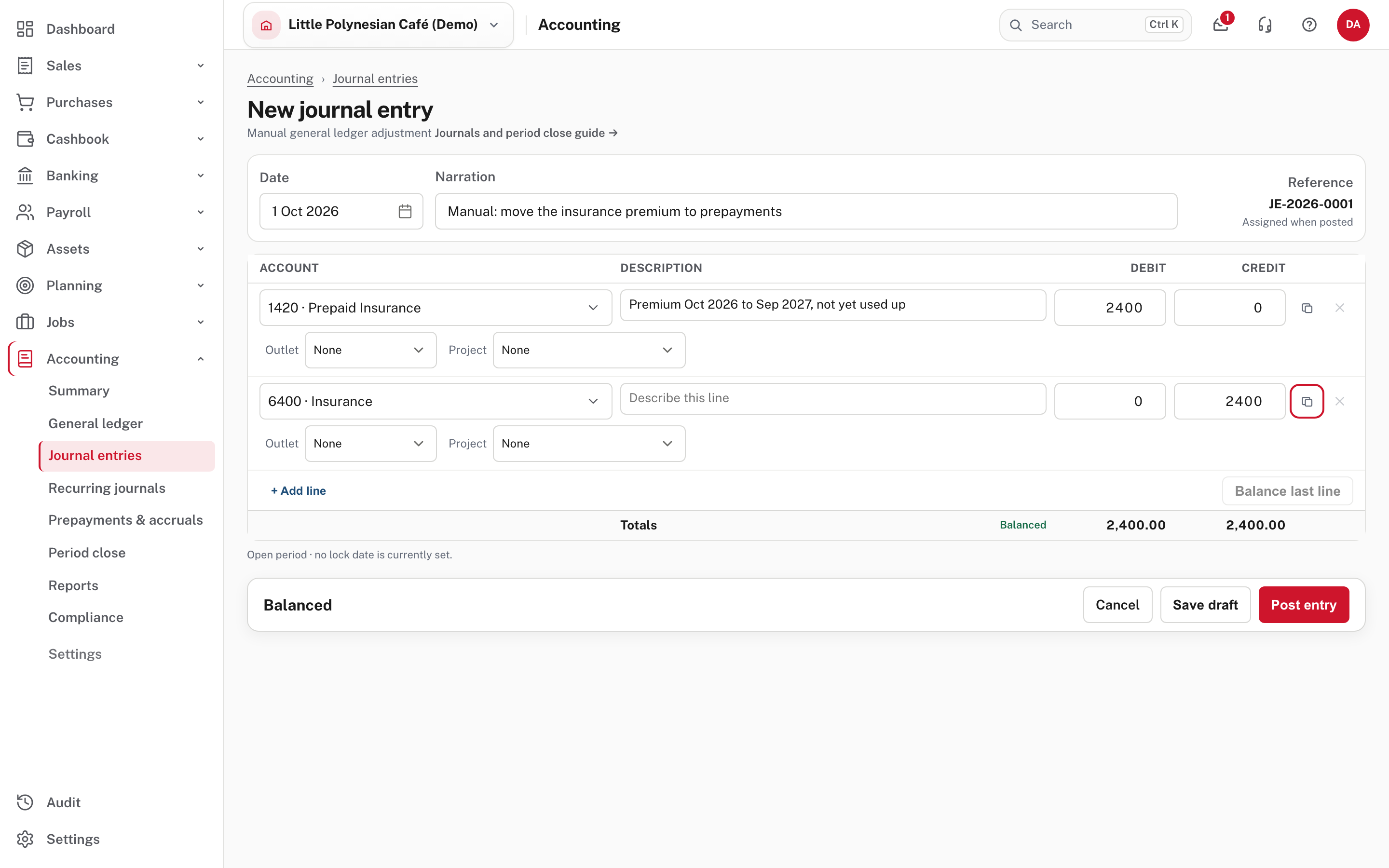
Here the premium was paid on 1 Oct 2026: $2,400 plus 15% VAT, $2,760 in all. The payment handles the VAT as usual; only the $2,400 is prepaid. The journal is dated the same day: debit 1420 · Prepaid Insurance $2,400, credit 6400 · Insurance $2,400, with a narration someone can follow in a year. It is a normal manual journal (Manual journals covers posting it). Date it on or before the first release: that is the day the schedule looks for the money.
Step 2. Set up the schedule
Accounting → Prepayments & accruals → + New schedule
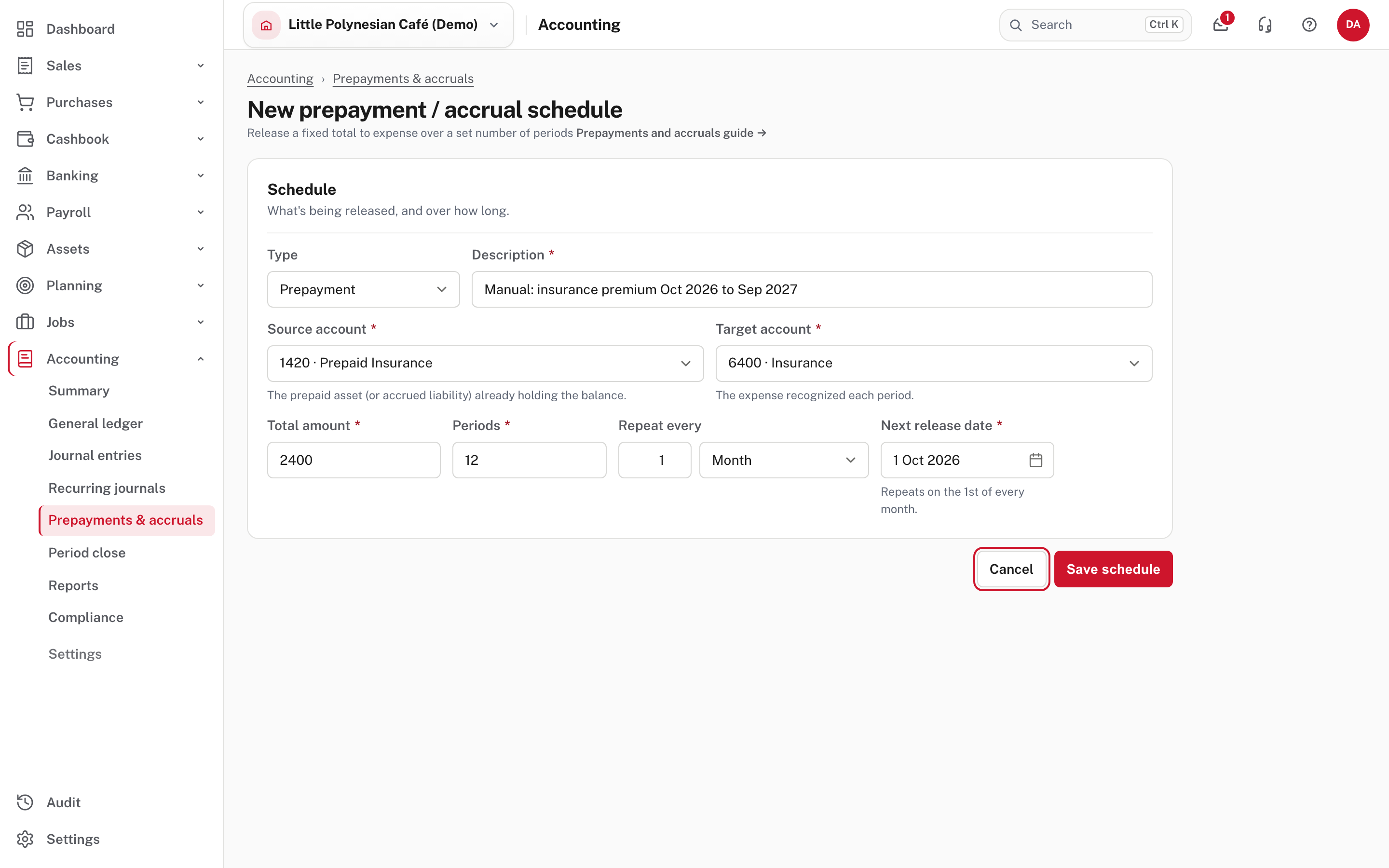
| Field | What to enter |
|---|---|
| Type | Prepayment or Accrual |
| Description | Words that will make sense in the journal narration and the list |
| Source account | The balance-sheet account: the prepaid asset (or the accrued liability) |
| Target account | The expense recognised each period |
| Total amount | The whole amount to release |
| Periods | How many releases it takes |
| Repeat every | A number of Weeks or Months (one month, here) |
| Next release date | The date of the first release; the line under it says what day it repeats on ("Repeats on the 1st of every month.") |
Here $2,400 over 12 periods releases $200 a month. Easy works out the period amount from the total, and the last period releases whatever is left, so rounding never strands a few cents.
Choose Save schedule.
If the account does not hold enough yet
Before it saves a prepayment, Easy checks that the source account holds, on the first release date, at least what the schedules on it still have to release. If not, it stops with a warning and two buttons.
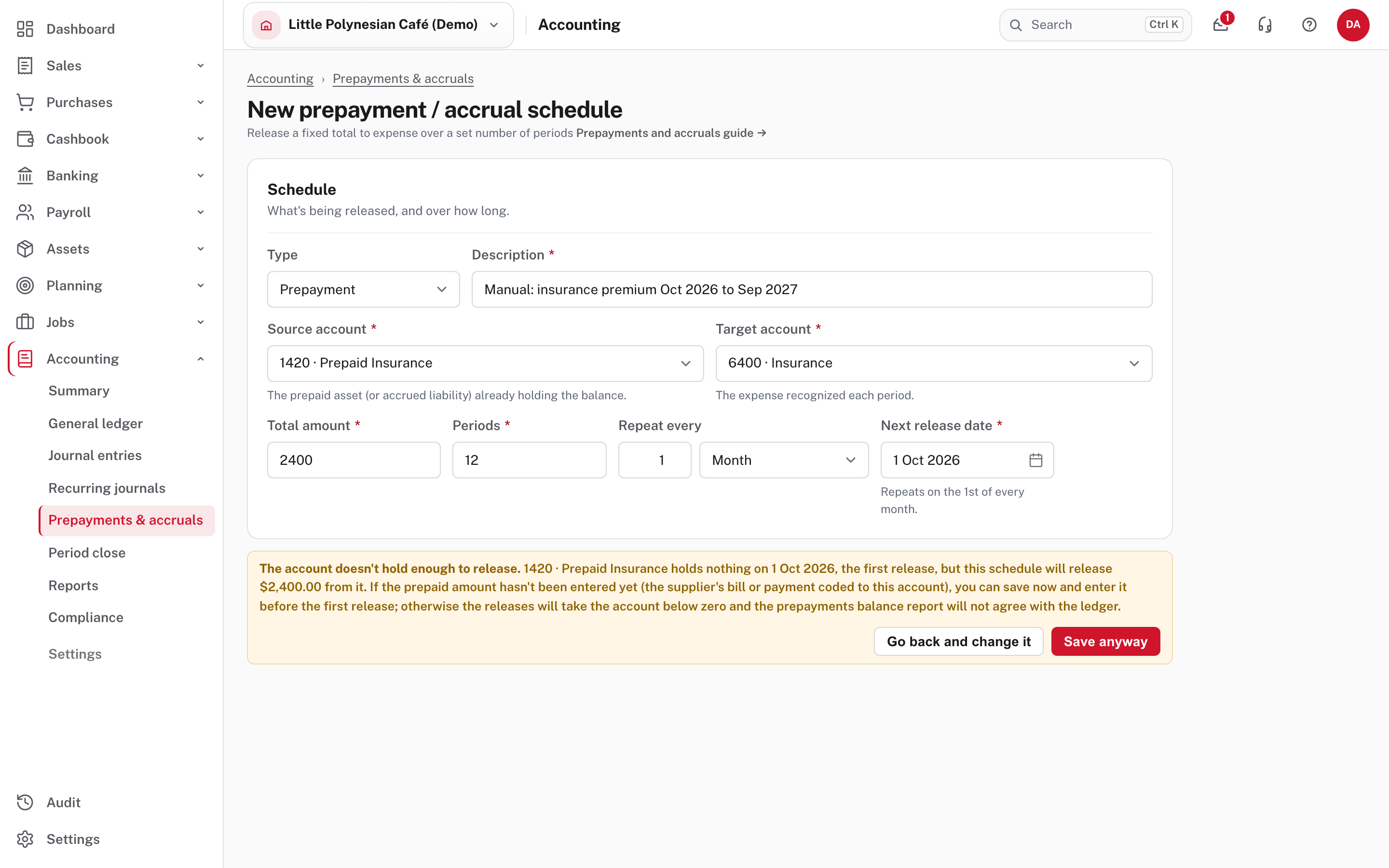
Go back and change it returns to the form (do step 1, or fix the date). Save anyway saves it as it is: use that only when you will enter the prepaid amount before the first release, for example when the supplier's bill is still to come. Otherwise the releases take the account below zero and the balance report will not agree with the ledger. An accrual is never warned about: its releases build the liability up, so it needs no balance to start from.
An accrual is set up the same way. Here the café accrues its power and water bill while the quarterly invoice is not yet in:
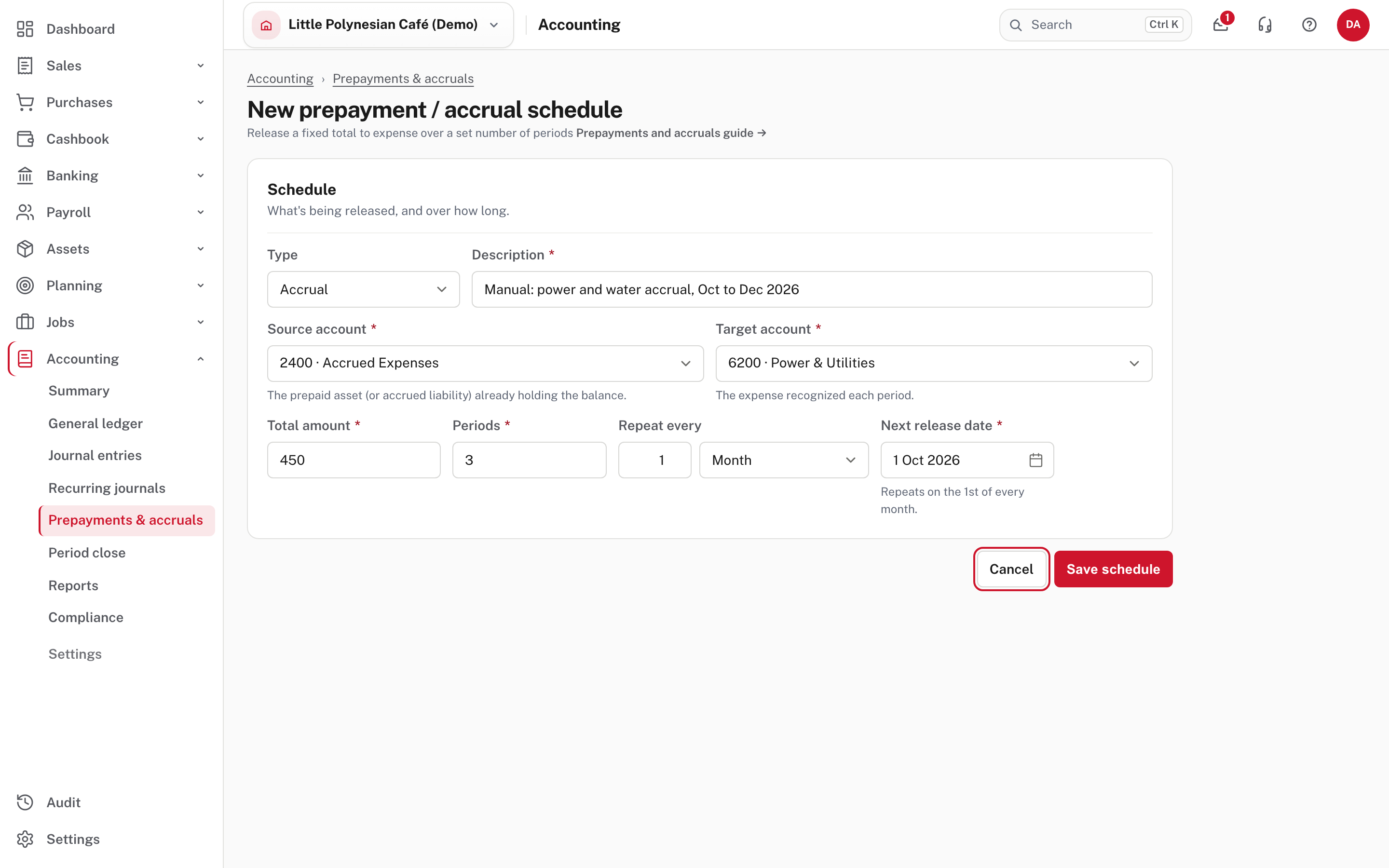
Each release debits Power & Utilities and credits Accrued Expenses $150, so the cost shows in the right month and the liability builds up.
After Save schedule a notice says Schedule saved. If Easy then asks Discard unsaved changes?, the schedule is already saved: choose Leave without saving, which only leaves the form.
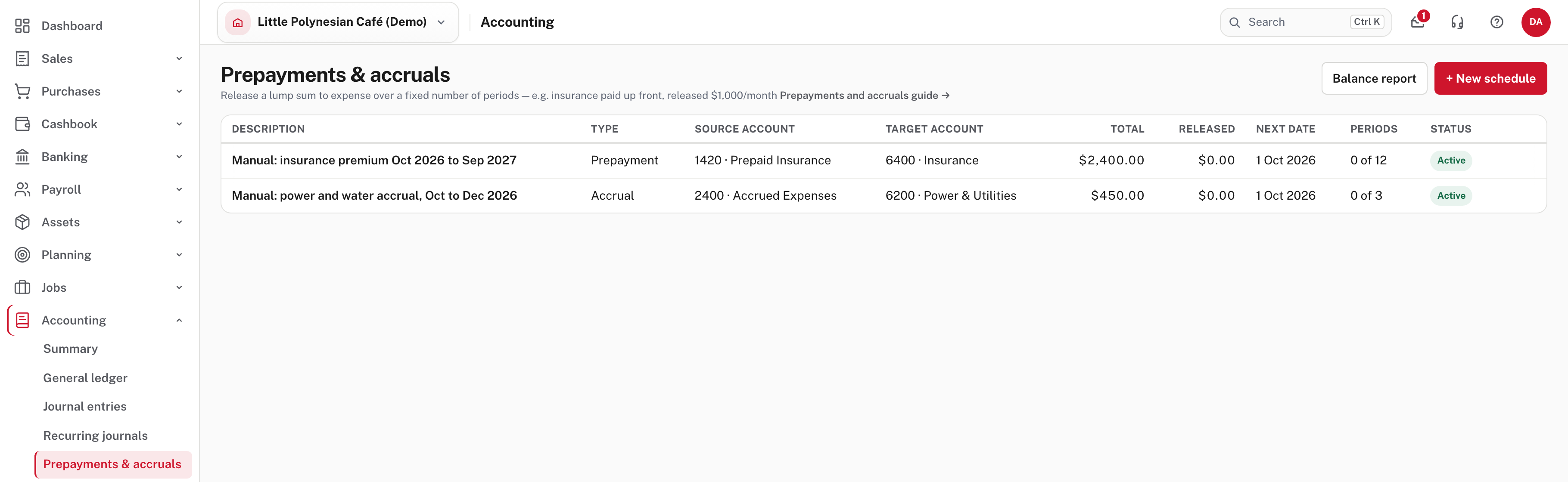
The list shows each schedule's accounts, Total, Released so far, the Next date, Periods (here 0 of 12) and a Status.
Step 3. Let the releases run
You do nothing. Easy looks for due schedules each night at 2:30 (Rarotonga time) and posts one release for every active schedule whose Next date has come. The date it posts on is the schedule's date, not the day it ran.
Not shown in the demo: the overnight run
The releases pictured below were started from Easy's background-jobs screen, a developer's tool that is not in the app's menus, because the demo had not yet had a night. The 2:30 am timing is not shown.
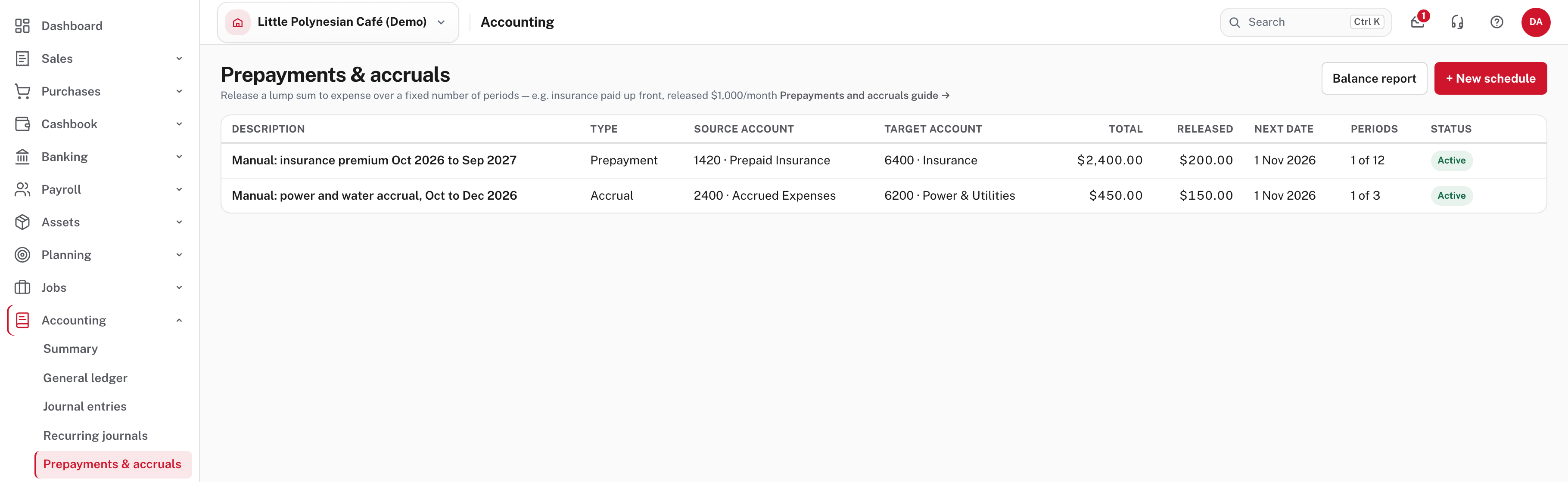
Released has gone up by one period ($200 and $150), Periods reads 1 of 12 and 1 of 3, and Next date has moved on a month. Each release is a posted journal. Open it from Journal entries, where its source is Prepayment / accrual release (a filter in the register finds them all):
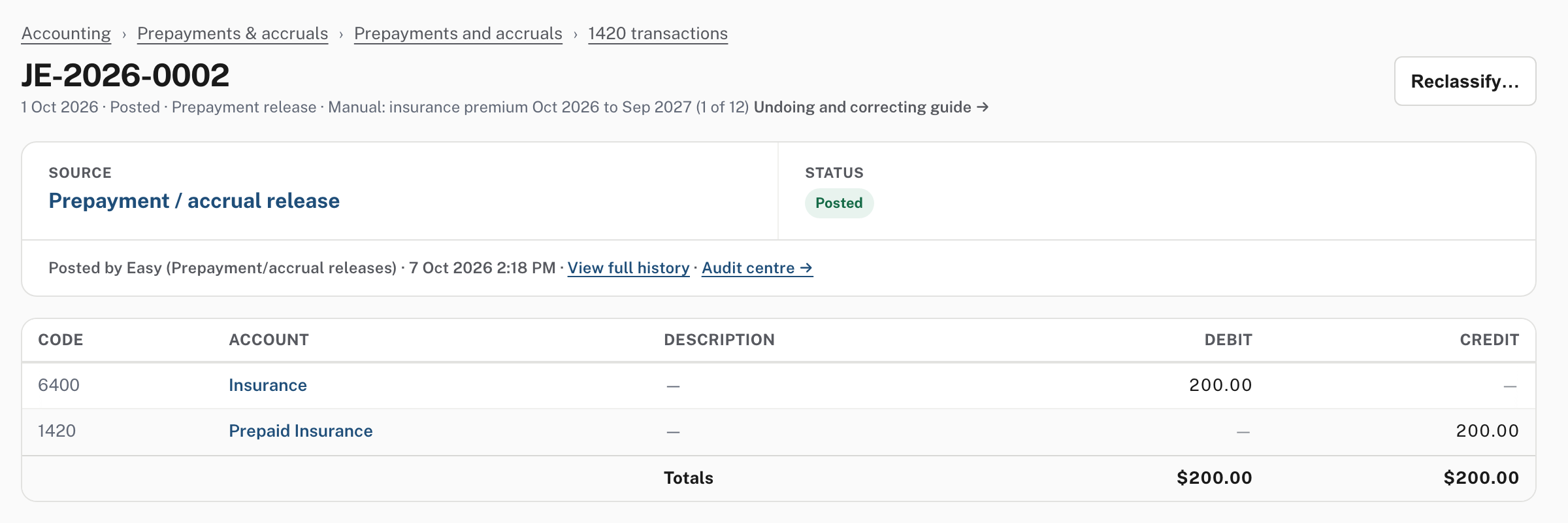
The narration names the schedule and the period (Prepayment release · Manual: insurance premium … (1 of 12)), and the journal says it was posted by Easy (Prepayment/accrual releases). A release posts straight away: there is no draft step.
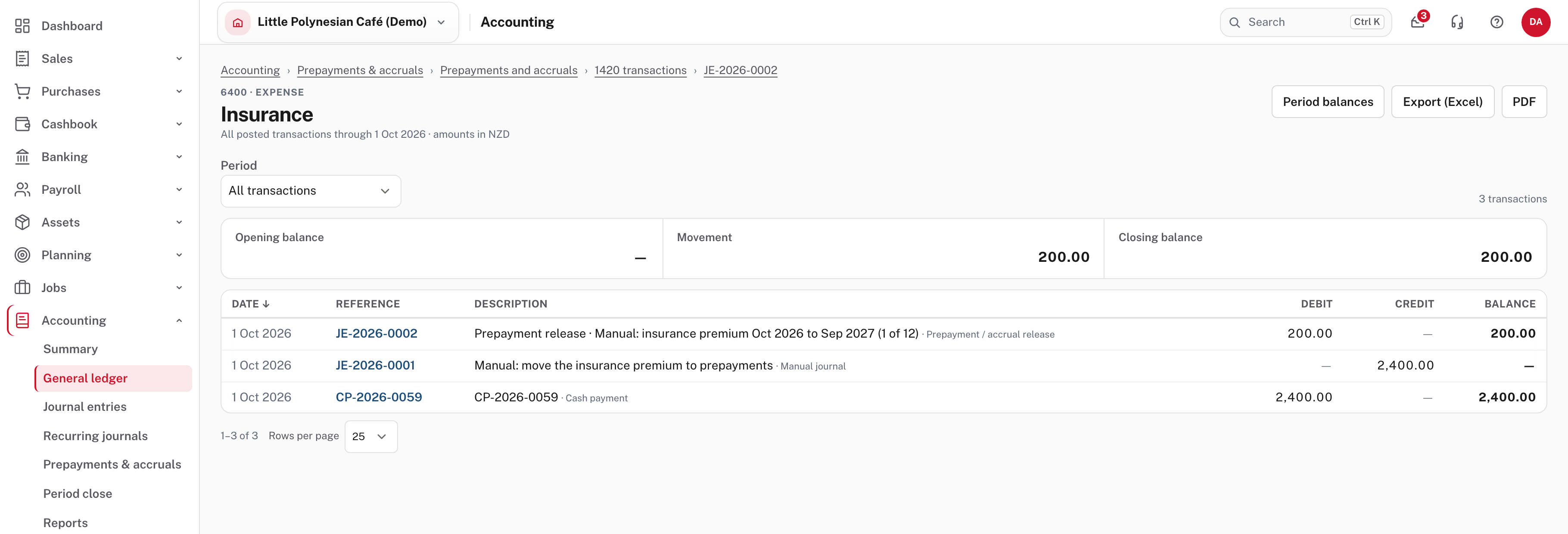
The accounts show the whole story. On Insurance, the premium went in as a debit, the journal took it out, and one month's release put $200 back, so October carries $200 of insurance, not $2,400:
Not shown in the demo: a release that cannot post
A release dated in a locked period is not posted; the schedule holds and tries again each night, so it posts once the period is reopened. If a release fails for any other reason, that period is skipped, the row shows a Skipped a period badge (hold the pointer over it for the reason), and the skipped period does not use up one of the schedule's periods. A schedule whose first date is well in the past catches up one period a night, not all at once.
Step 4. Change, pause or delete a schedule
Choose the description in the list, or Edit from the ⋯ menu on the row.
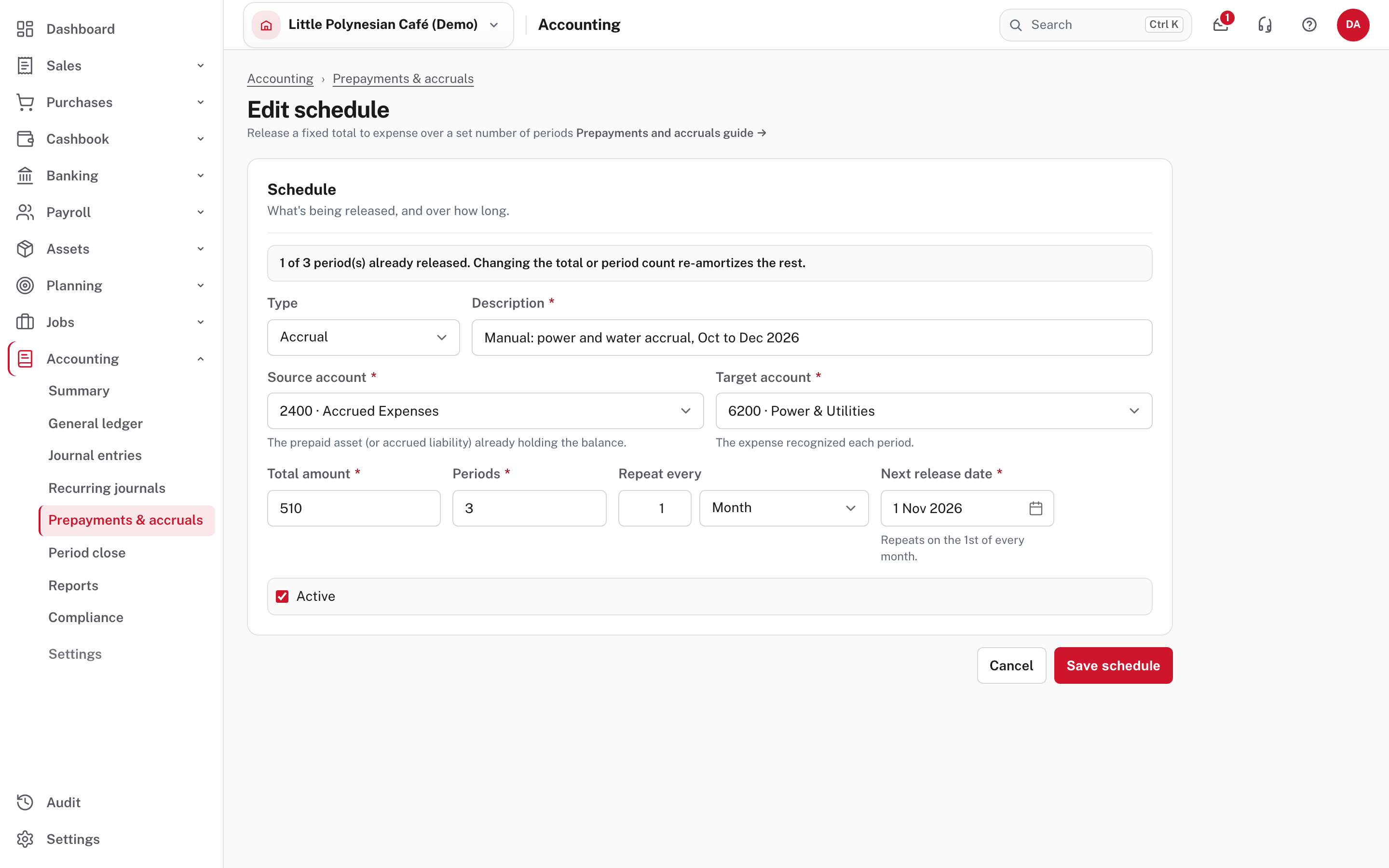
Once a schedule has released something, a notice says so: 1 of 3 period(s) already released. Changing the total or period count re-amortizes the rest. Easy keeps what has been released and spreads what is left over the periods still to come (Help). Here the power company's estimate was too low, so the total went from $450 to $510: $150 is released, and the remaining $360 is spread over the two periods to come ($180 each; the 1 Nov release, not yet posted in the demo, takes that amount). The journals already posted are not touched. The new total must be more than what is released, and the new period count must be more than the periods already released.
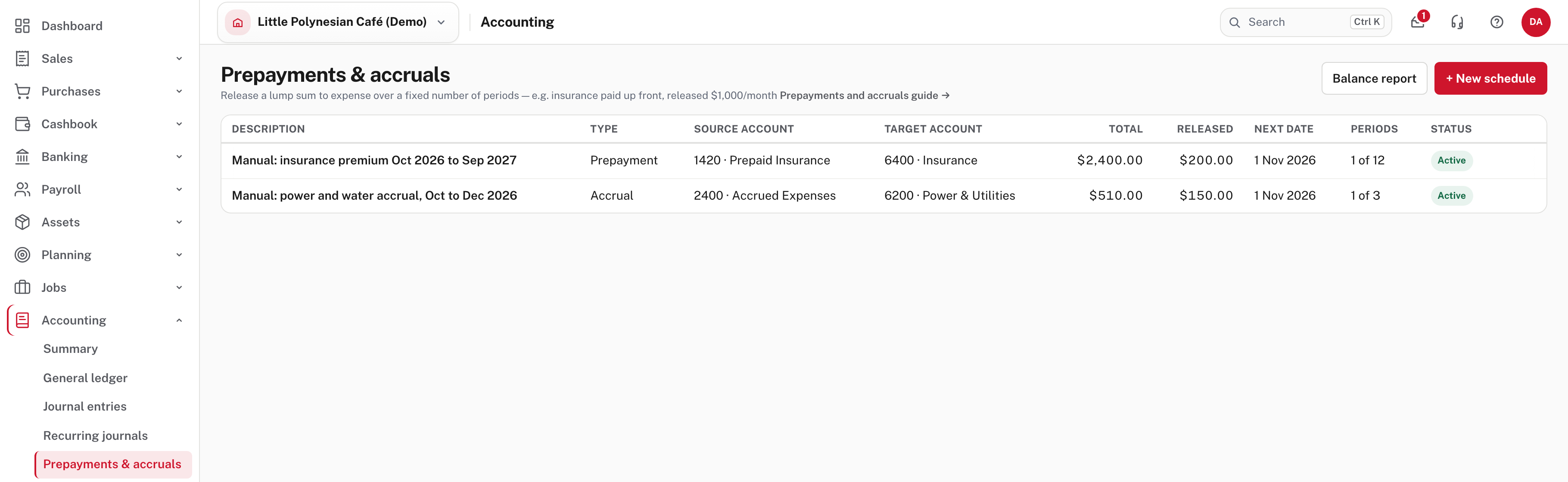
The ⋯ menu on a row also holds Pause and Delete.
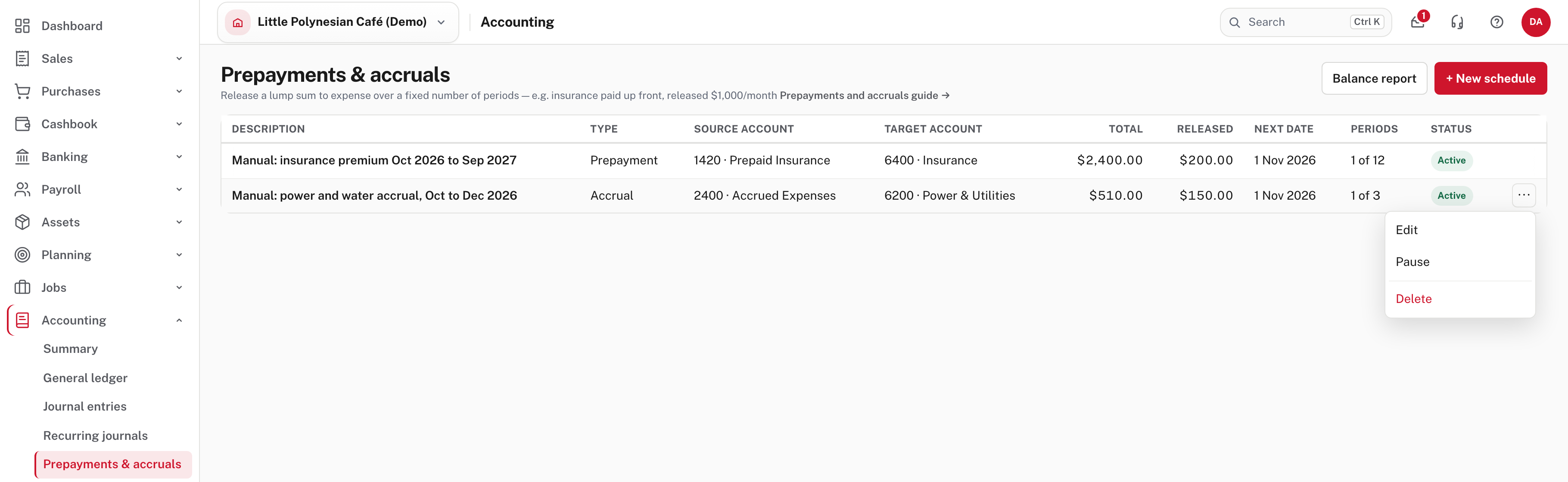
Pause stops the releases without losing the schedule (its status then reads Complete / paused) and Resume starts them again. Delete asks you to confirm and says that journals already posted are kept. Not shown in the demo: the result of Pause and Delete.
Step 5. Check the balance report each month end
Accounting → Prepayments & accruals → Balance report
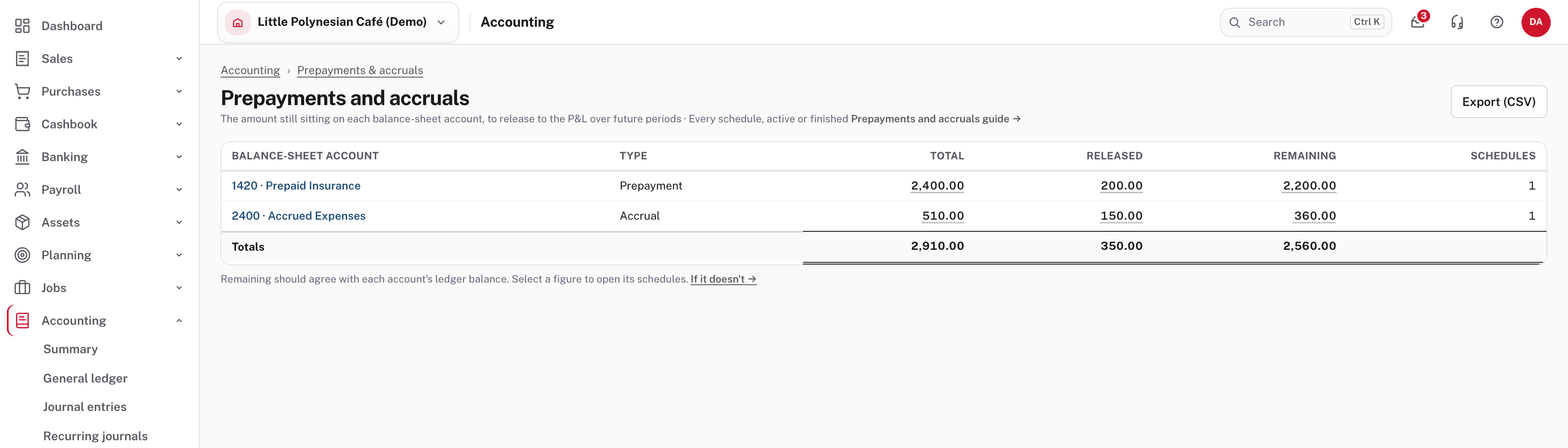
One row for each balance-sheet account and type: the Total of its schedules, how much is Released and how much is Remaining, and how many schedules are behind it. Choose an account name to open its ledger, and a figure to open the schedules it adds up. Export (CSV) saves the table.
Neither of these accounts is a control account, and the table on Period close does not cover them, so this report is your month-end check. Easy's note under it says Remaining should agree with each account's ledger balance.
-
For a prepayment, compare Remaining with the ledger. Prepaid Insurance shows Remaining $2,200.00, and its ledger closes at the same figure:
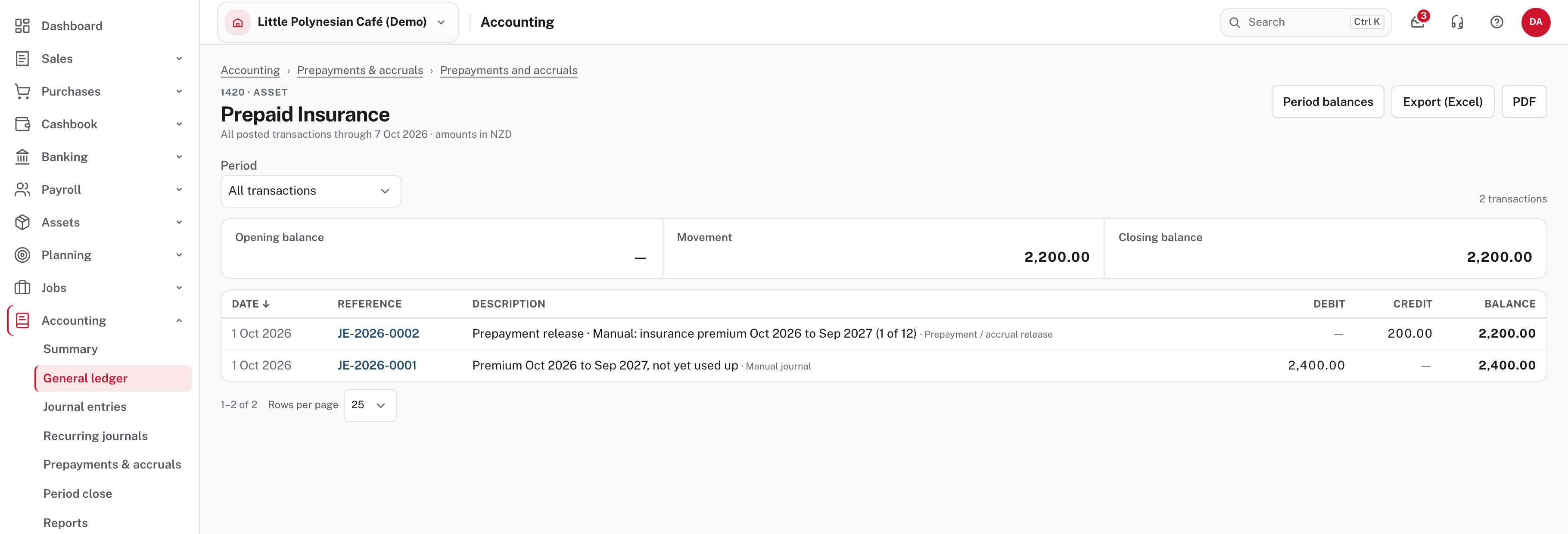
If a prepayment's figures disagree, look for a release posted by a manual journal instead of through the schedule, or a schedule set up on an account that never held the money (the warning in step 2). - For an accrual, compare Released with the ledger. Accrued Expenses shows Released $150.00 and Remaining $360.00, and its ledger holds $150.00:
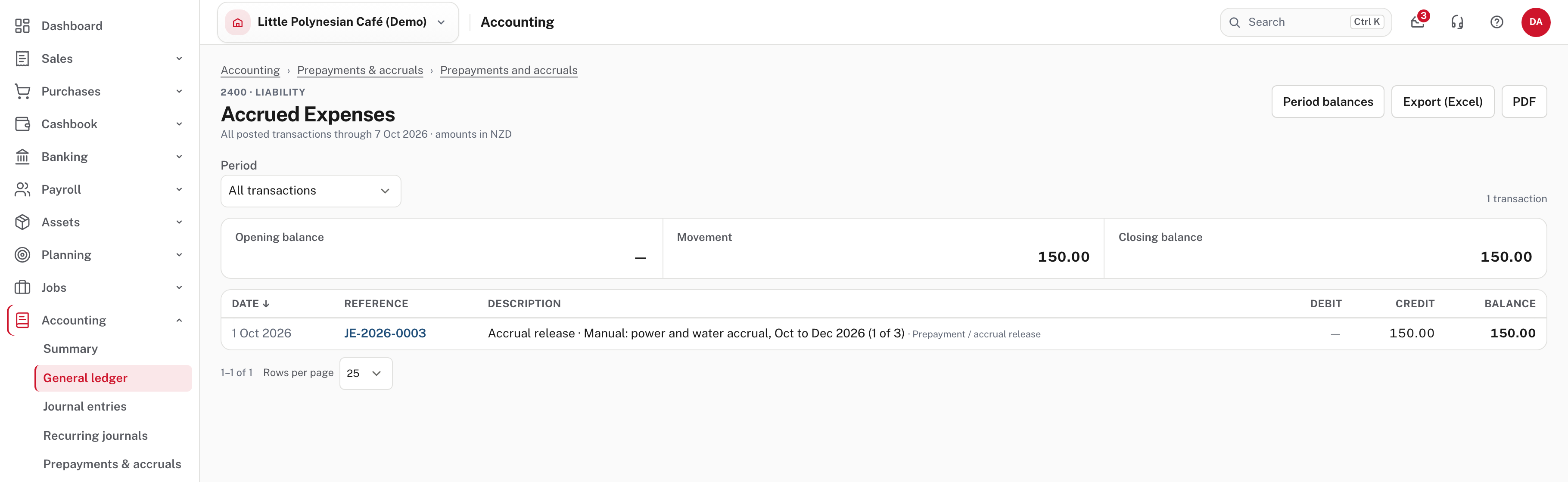
For an accrual, Remaining is what is still to be accrued, while the account holds what has been released. Other entries on the account (a manual accrual, say) will be in the ledger figure too.
When the real bill arrives
Easy doesn't match a bill to an accrual, and a bill's Expense type list does not offer Accrued Expenses. If you record the power bill against Power & Utilities, the cost is in that account twice, once from the releases and once from the bill. Take the accrued amount out with a manual journal (debit Accrued Expenses, credit the expense) when you record the bill. Agree the treatment with your accountant.
More detail: Prepayments and accruals and The balance report.
Common mistakes
- Saving a prepayment with no money on the prepaid account, and forgetting to put it there. The first release takes the account negative. Fix it with the journal in step 1 dated on or before the release.
- Posting a month's release by journal as well. The schedule has already, or will, post its own: the report will then disagree with the ledger.
- Expecting a change to rewrite past months. Changing the total or the periods only re-spreads what is left; the journals already posted stay as they are.
Check before you continue
Check before you continue
- Each prepayment's amount is on its prepaid account, dated on or before the first release.
- Each schedule has the right two accounts, total, number of periods and first release date, and the list shows it Active.
- This month's releases have posted: Released and Periods have moved, and the journals are in the register.
- On the balance report, each prepayment's Remaining agrees with its ledger, and each accrual's Released agrees with its.
- A real bill for an accrued cost has the accrued amount taken out, so the cost is not counted twice.