Starters, leavers and changes to pay
People join, leave and get raises. Each needs its own handling in payroll, and each is a place where mistakes cost money or break the law. This chapter covers adding a starter, paying a leaver their final pay, and the records you keep for both.
About the screenshots
Screenshots are from Easy's demo company, Little Polynesian Café. The starter, Moana Rakei, and the leaver, Papa Tuaiti, are examples. The final pay is a draft that was not finished.
Before you start
- Full Payroll is on and payroll is set up (Set up payroll), with a pay calendar and the PAYE and CINSF rules.
- For a starter, have their name, start date, position, pay rate or salary, RMD PAYE reference, CINSF number, bank account, and a signed employment agreement.
- For a leaver, know their last day, any notice to be paid in lieu, and why they are leaving.
- Check who approves. Your company can ask for a second person to approve new employees, pay-rate changes and terminations (Payroll settings → Approvals). The changes save straight away, but the person's pay waits for the decision, and the bank file and Finish pay run refuse a run while one is waiting. See Payroll approvals and controls.
Part 1. Add a starter
Payroll → Employees → + Add employee (the Directory tab).
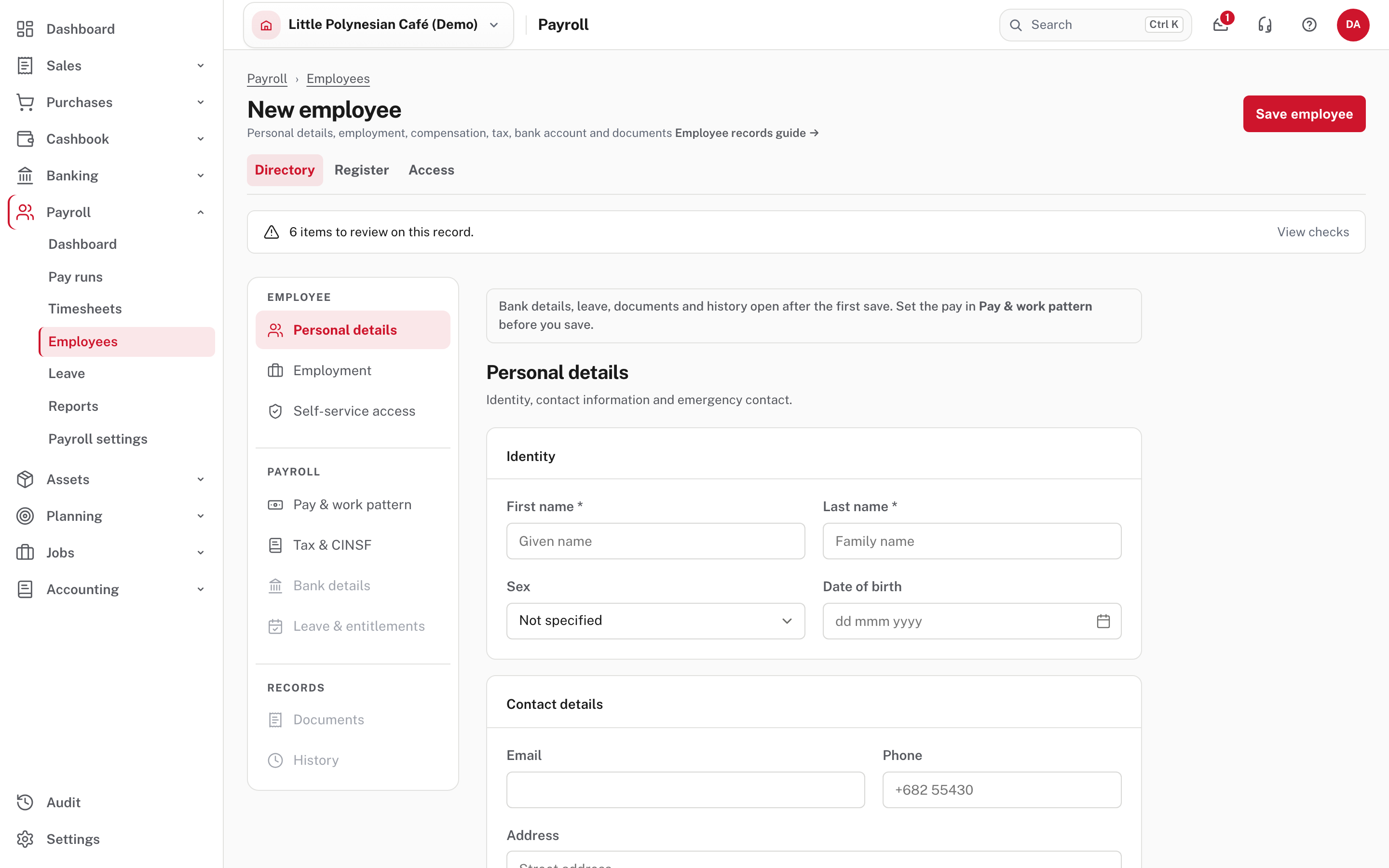
The form has sections down the left: Personal details, Employment, Self-service access, Pay & work pattern, Tax & CINSF, Bank details, Leave & entitlements, Documents and History. Bank details, leave, documents and history only open after the first save, and the page tells you to set the pay in Pay & work pattern before you save. Changes across the sections save together with Save employee.
- Personal details: first and last name (required), sex, date of birth, email, phone, address and an emergency contact. An email lets the person be invited to self-service and receive payslips.
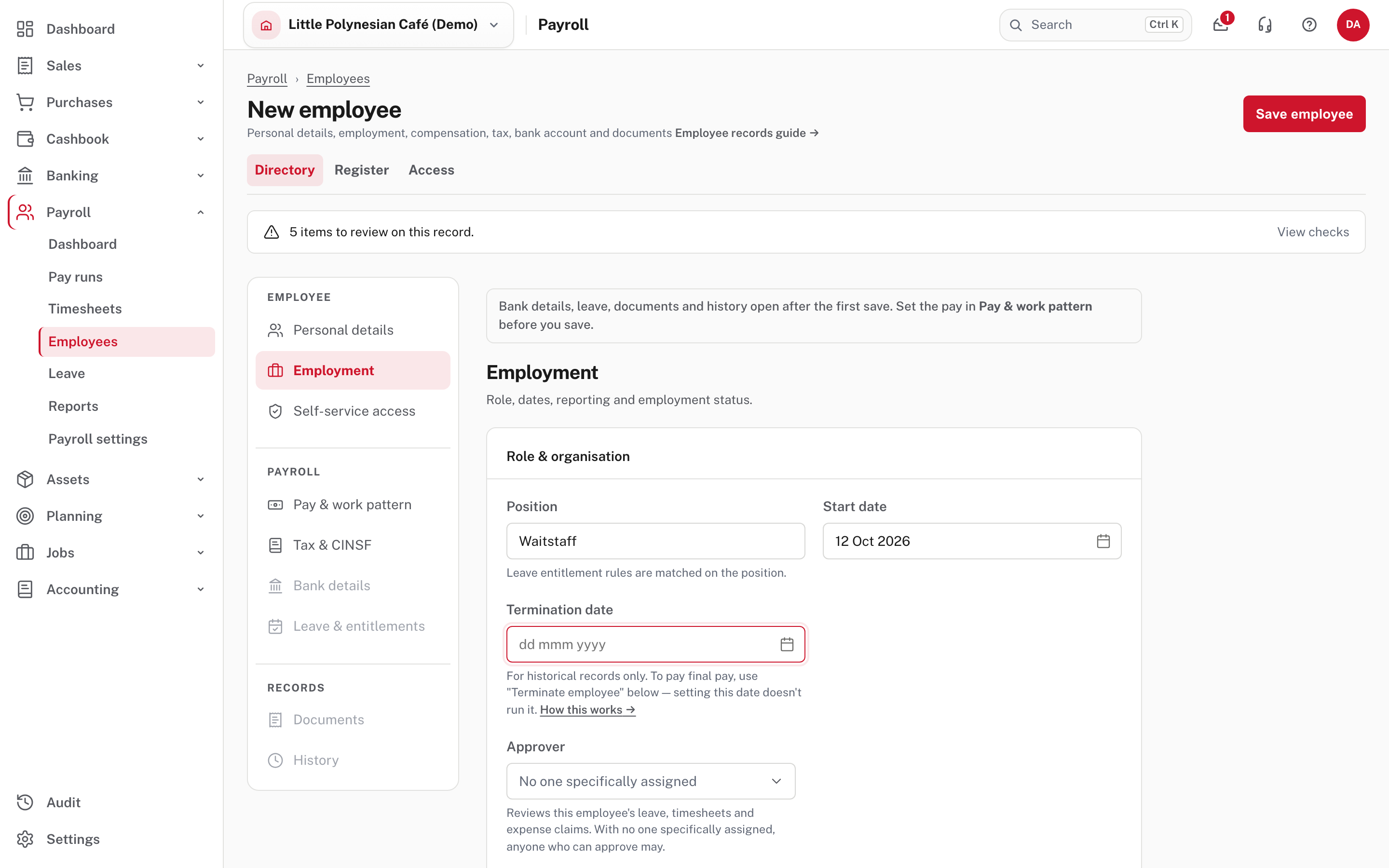
- Employment: the position (the leave rules are matched on it), the start date, an approver for their leave and timesheets, an outlet and project, a contract end date, a clock or badge number, and any work permit.
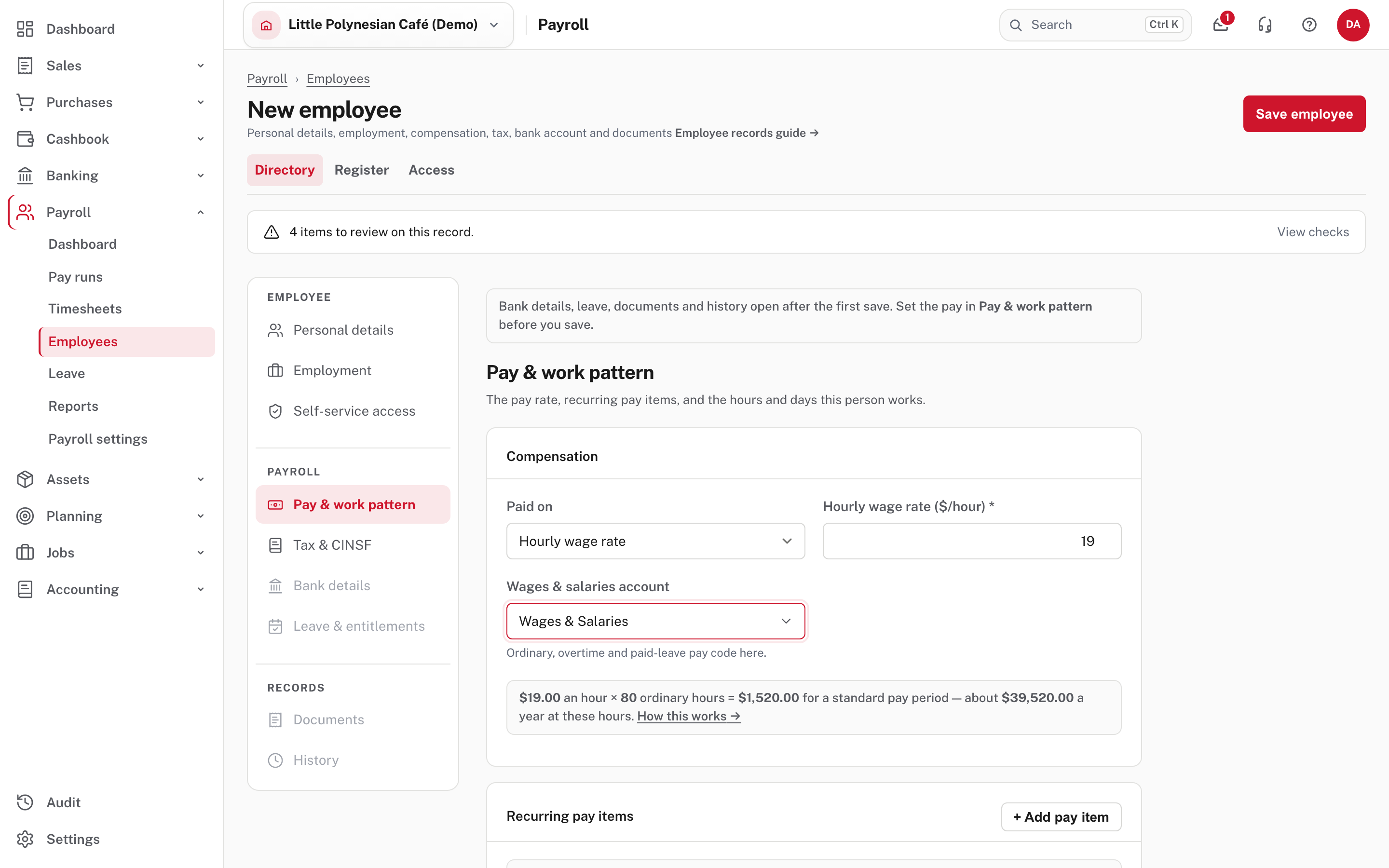
- Pay & work pattern: choose Annual salary or Hourly wage rate, enter the amount, the wages account, and a work pattern (or their own days and hours).
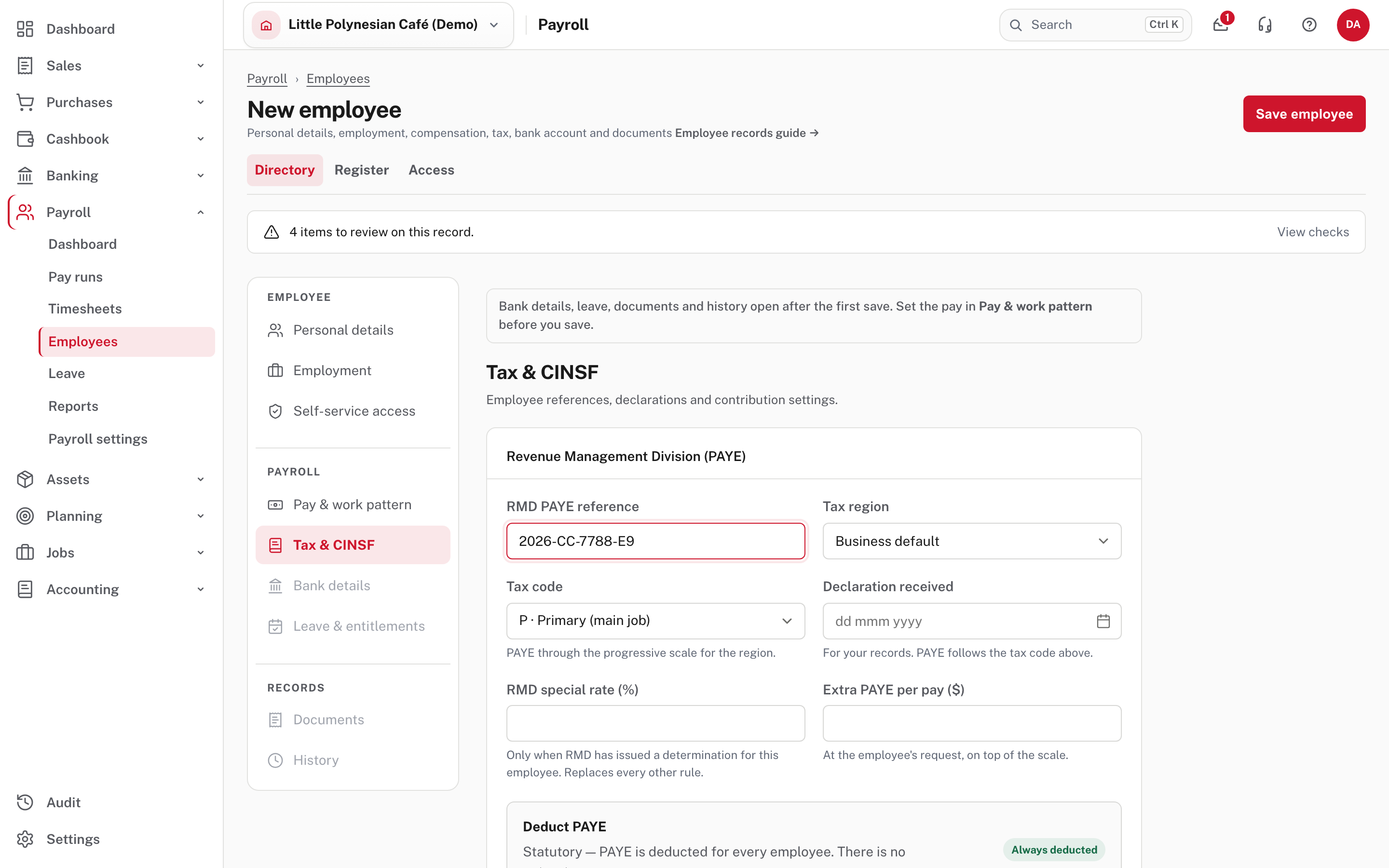
- Tax & CINSF: their RMD PAYE reference, tax region (the business default unless they differ), tax code (P, the primary job, unless told otherwise), the declaration date, and any special rate or extra PAYE RMD has told you about. CINSF is set here too.
Choose Save employee.
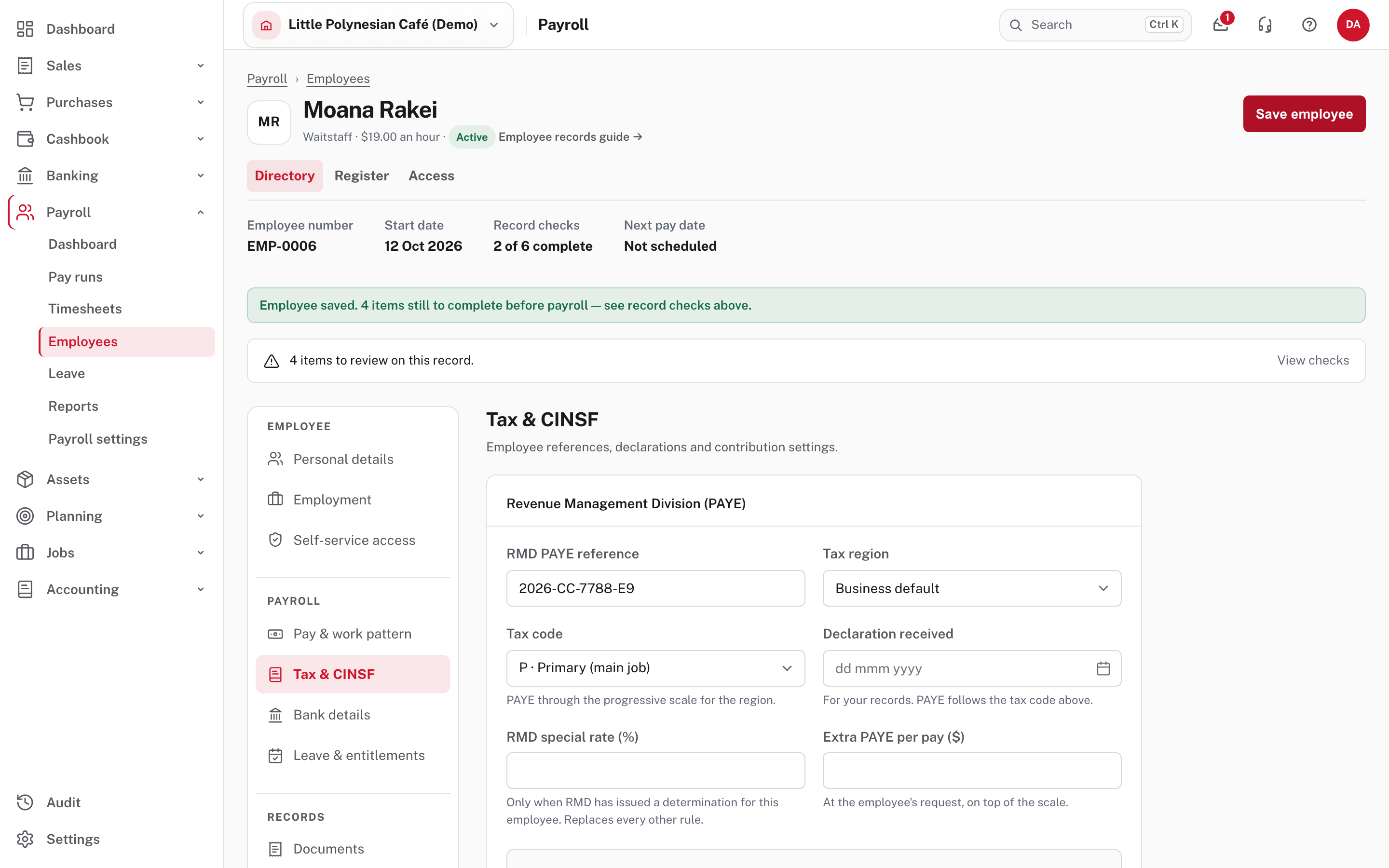
The person is Active with a staff number (EMP-…). The page says what is still to do: "Employee saved. 4 items still to complete before payroll." Record checks counts six things that must be in place before the person can be paid correctly; View checks lists what is missing. Work through them: the next is Bank details.
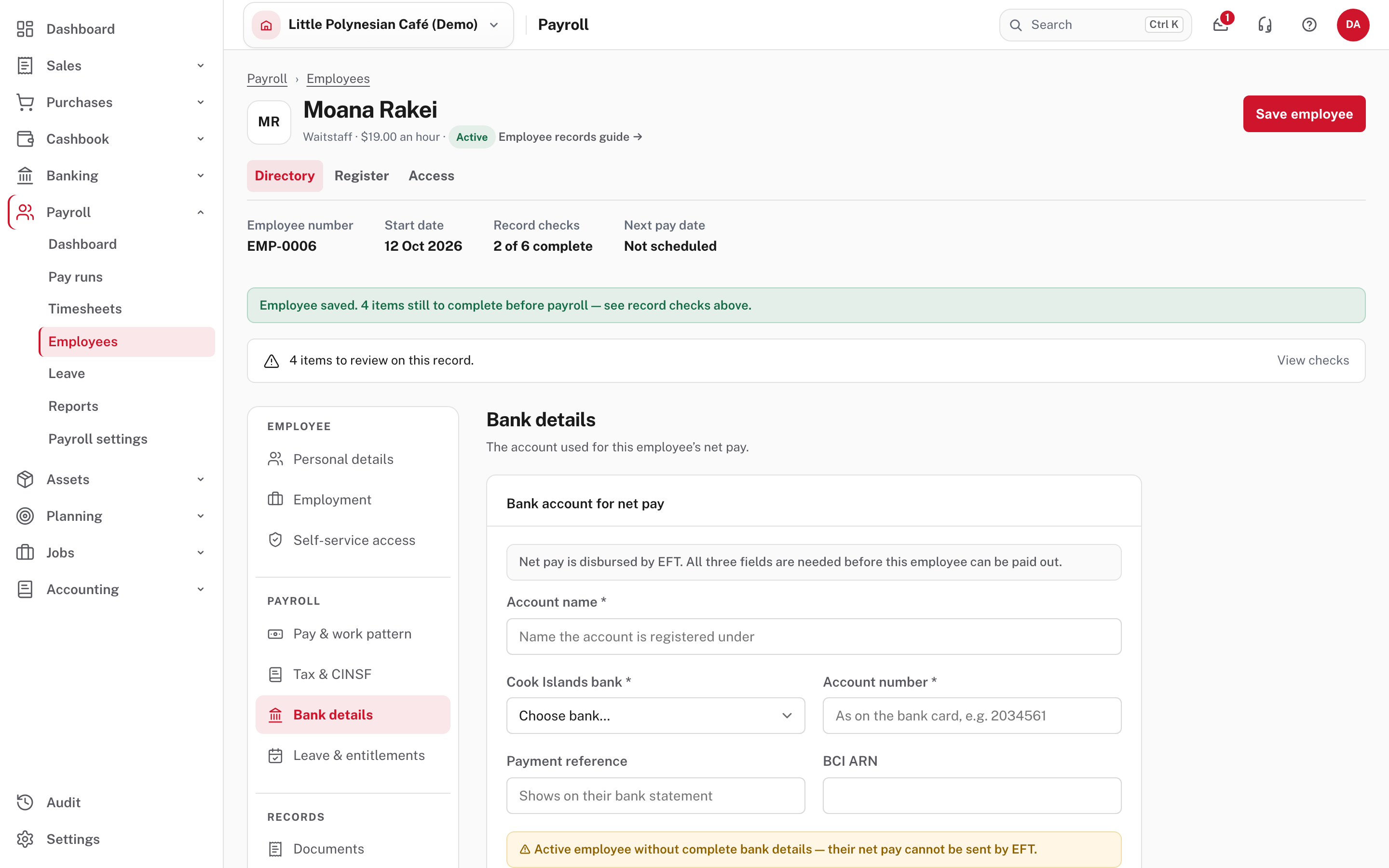
An active employee with a missing rate or bank account can't be paid correctly, and the Employees list shows how many. When bank-detail approval is on, a different person must confirm the account before the person can be paid by bank transfer. An hourly employee who is paid from timesheets appears on the Timesheets screen from their start date. For their first leave balance, see Leave.
More detail: Employee records.
Part 2. A leaver: paying final pay
Open the employee, then Employment.
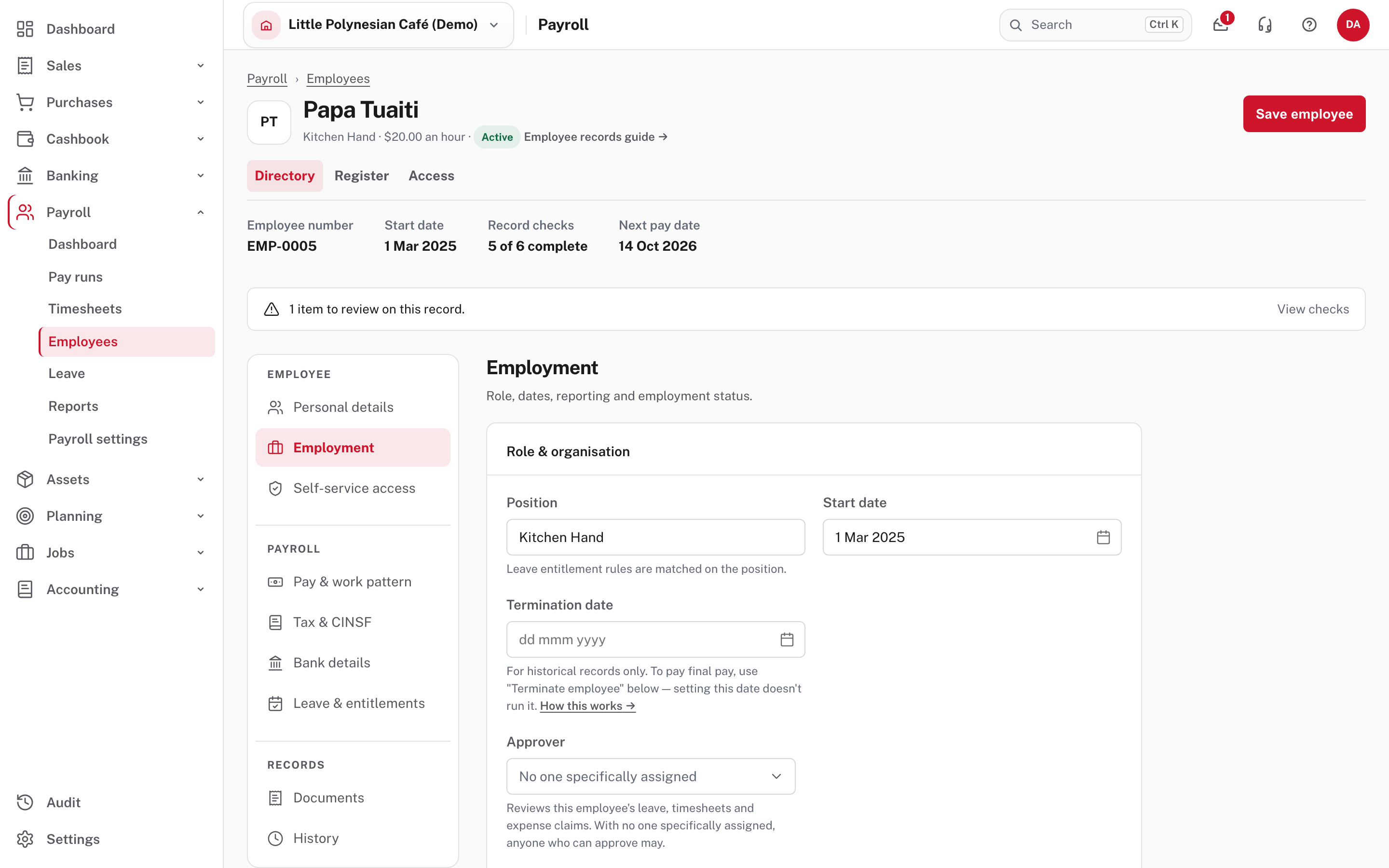
Use Terminate, not the termination date
The Termination date box is "for historical records only". Setting it does not run final pay, deactivate the person, or close their leave. To pay someone their final pay, use Terminate… under Employment status.
Choose Terminate….
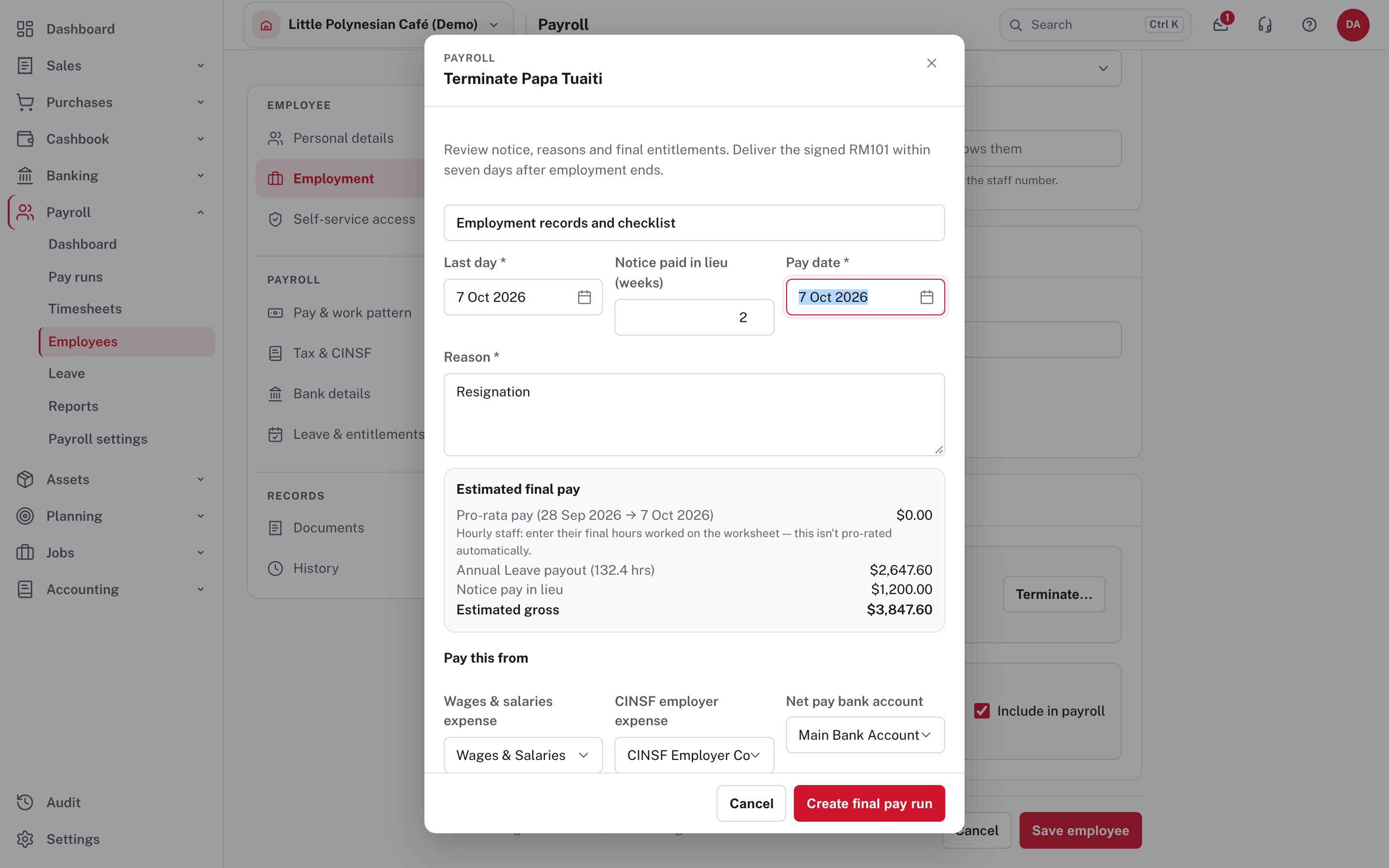
Fill in:
- Last day, Notice paid in lieu (weeks) and Pay date.
- Reason (required): resignation, redundancy, end of contract. It is kept on the run and in the audit trail.
- Pay this from: the wages expense, CINSF employer expense and net-pay bank account.
The estimated final pay is shown before you commit: pro-rata pay to the last day, the annual leave payout for the unused balance (at the person's rate), and notice pay in lieu. For an hourly employee Easy does not pro-rate: enter their final hours worked on the worksheet. Whether leave is paid out or forfeited depends on each leave type's Pay out on termination setting (Leave).
Nothing is recorded yet
Choosing Create final pay run only drafts the run. Nothing is recorded until you review and finish it, and finishing it deactivates the person and closes their termination-payable leave.
Choose Create final pay run.
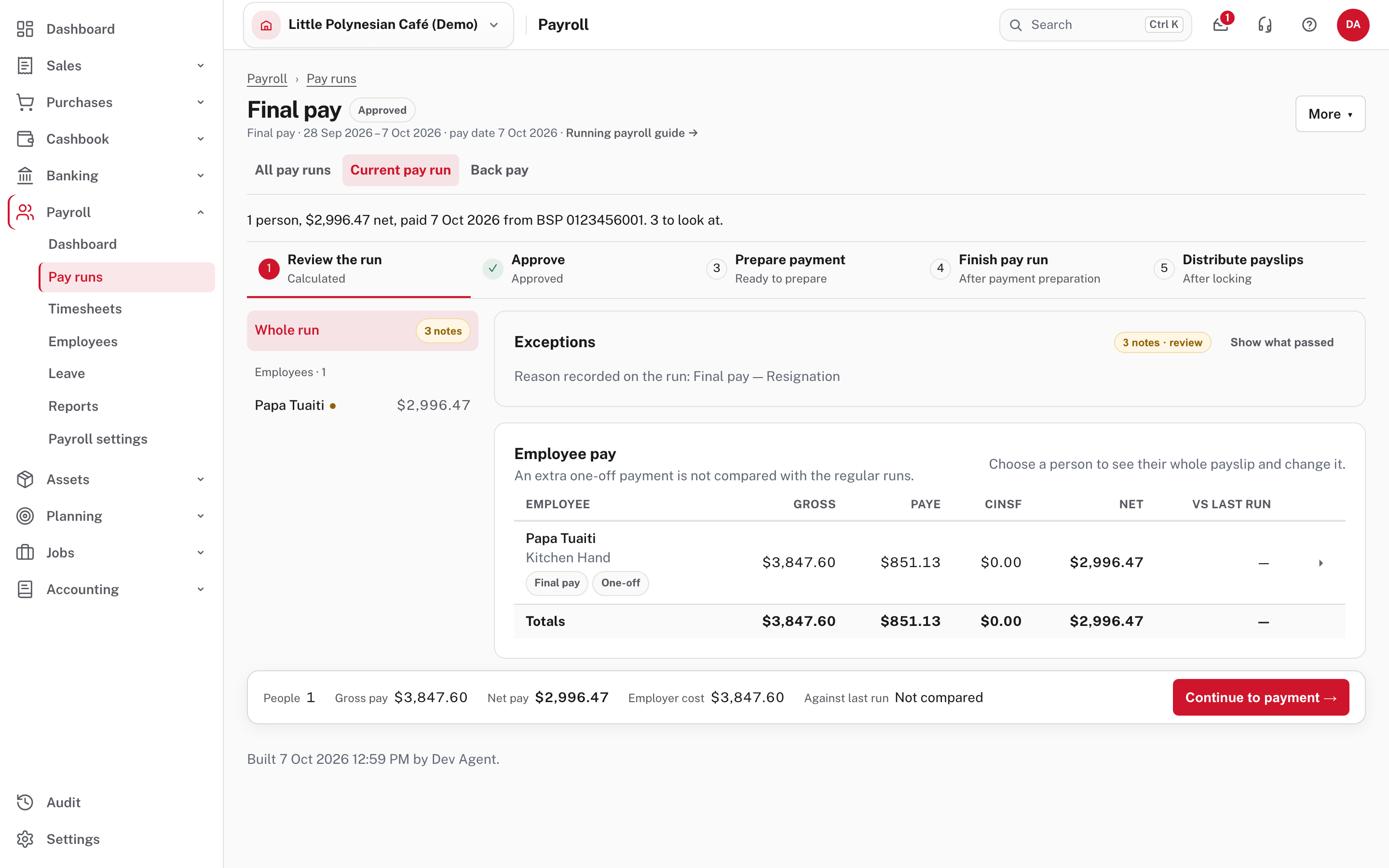
The run opens like any other, labelled Final pay and One-off, with the reason recorded. It is not compared with regular runs. Open the person to check their payslip, change any figure, or add a pay item (a lump sum, a deduction). A lump sum paid on leaving (a bonus, gratuity or retiring allowance) added to the final pay has no CINSF; holiday pay paid out on leaving still does. Then continue to payment and finish it as in Run a pay period, steps 4 to 7. The payslip then goes to the person with their final pay.
Part 3. Employment records and the leaving checklist
Payroll → Employees → Employment records keeps the paperwork the law asks you to hold. Choose the employee.
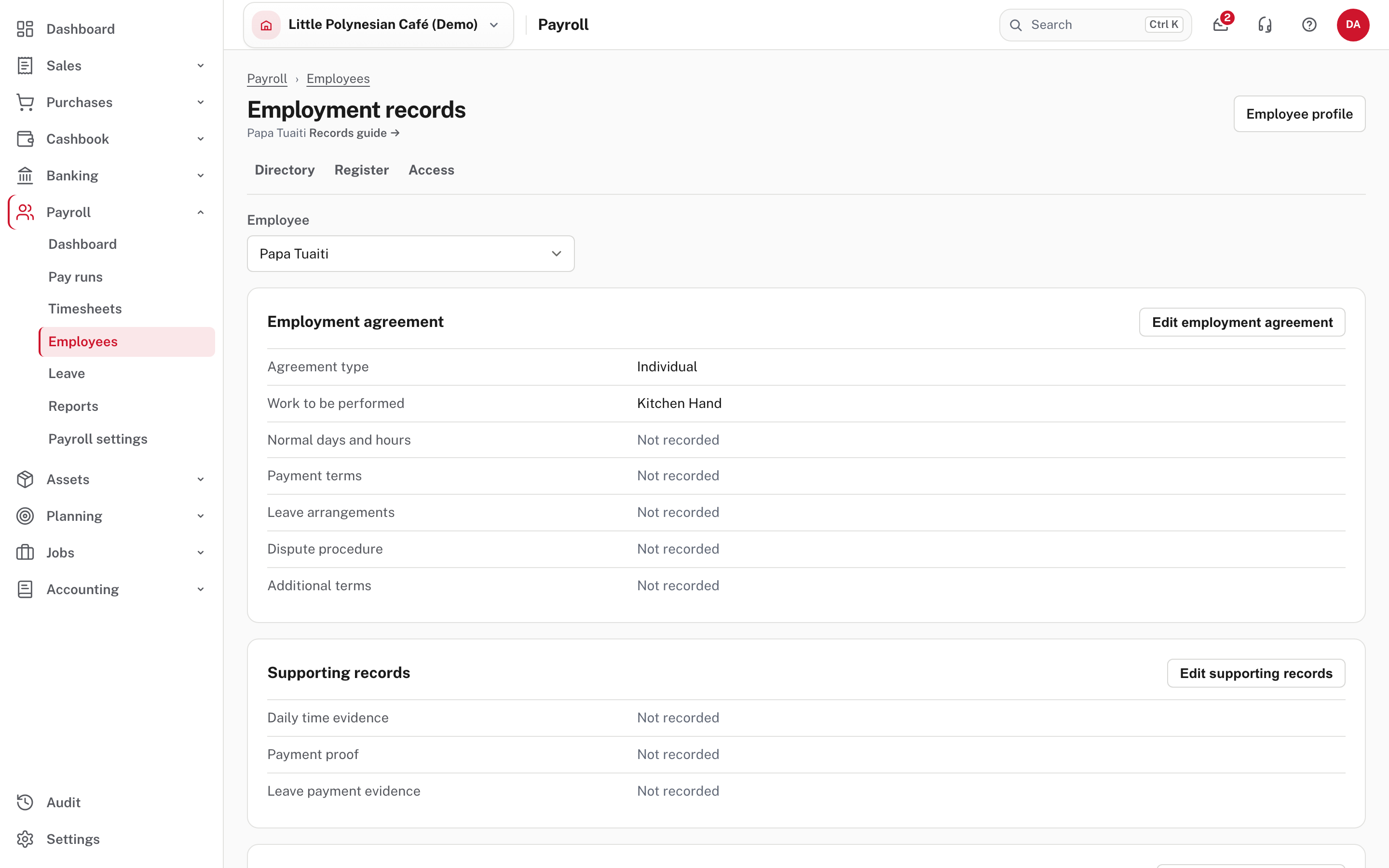
- Employment agreement: the agreement type (individual or collective), the work to be performed, normal days and hours, payment terms, leave arrangements, dispute procedure and additional terms. The individual agreement PDF is an unsigned draft: complete every missing field, review the terms against the requirements, agree and sign the final version, give the employee a copy, and attach the signed original in the employee's Documents. For a collective agreement, record its title, expiry and classification; the individual template is unavailable.
- Supporting records: daily time evidence, payment proof and leave payment evidence. The wages, time and leave record prints the chosen period's finished or locked pay, approved daily timesheet entries and stored leave balances; it flags missing start and end times, payment proof and the amount paid for each leave period. A finished pay run alone does not prove the employee was paid, so record a reference to the original evidence.
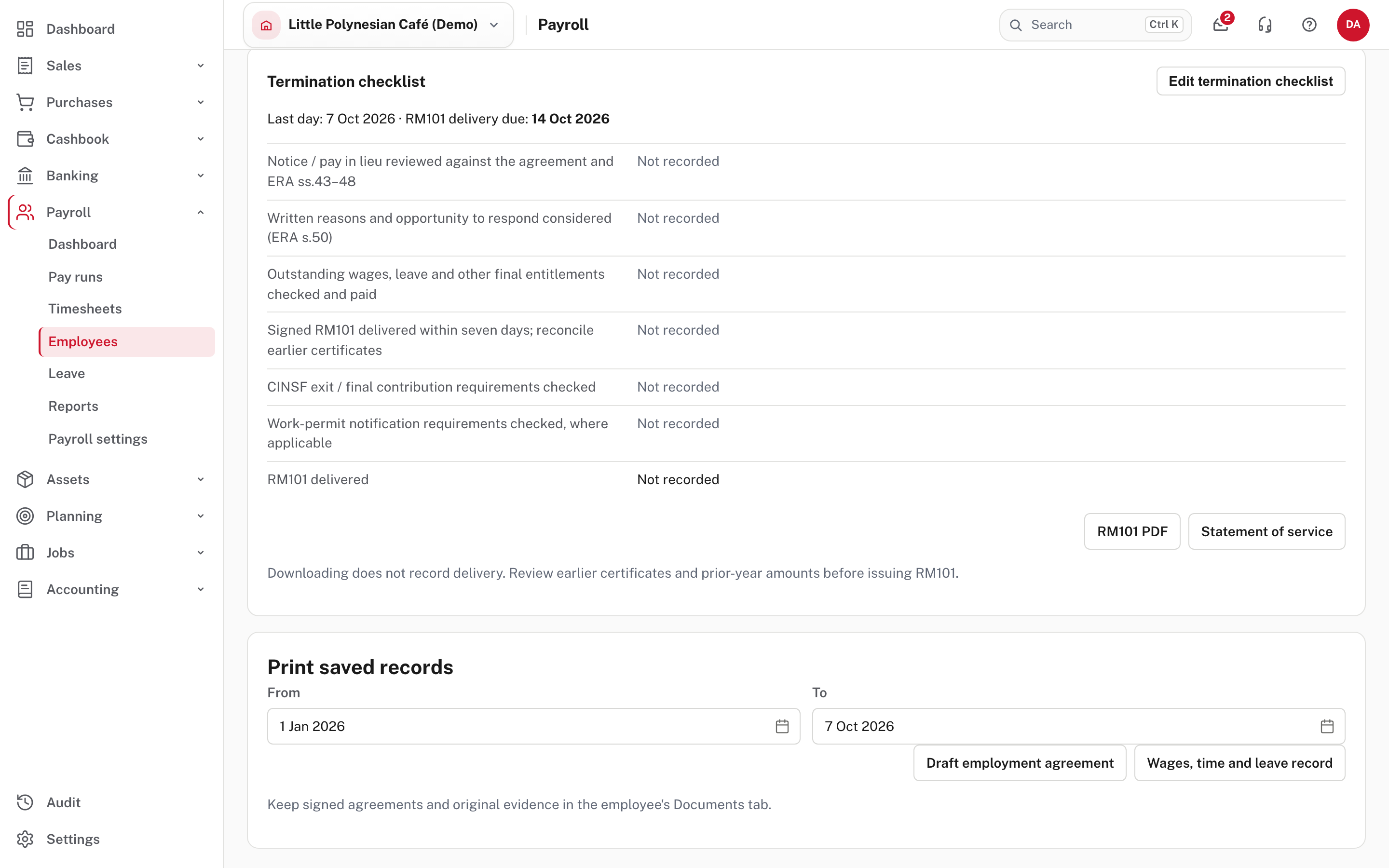
- Termination checklist (once the person has a last day): it shows the RM101 delivery deadline, seven days after the last day, and a list to record: notice or pay in lieu reviewed against the agreement and the Employment Relations Act, written reasons and an opportunity to respond considered, outstanding wages, leave and final entitlements checked and paid, the signed RM101 delivered within seven days, the CINSF exit checked, and work-permit notification checked where it applies.
- RM101 PDF and Statement of service: downloading does not record delivery. Record the actual delivery date and an evidence reference. The RM101 is a calendar-year report, so review earlier certificates and any prior-year amounts before you issue a leaver certificate. A changed last day clears the old checklist's delivery evidence so it cannot be reused.
The checklist helps you remember; it doesn't decide anything
It does not decide dismissal grounds or legal compliance. Review the agreement and the circumstances, and take advice where needed.
More detail: Employee records and Leave balances and accrual.
Part 4. Changes to pay
- A pay rise. Change the rate on Pay & work pattern and give the new rate its effective from date. The previous rate closes the day before. If the date is in the past, the difference is queued as back pay and added to the next scheduled run (Extra one-off payments and back pay).
- A bank-account change. A different person must confirm it before the employee can be paid by bank transfer; until then the old account is used. When an employee asks from self-service, nothing changes straight away.
- Split pay. Part of net pay can go to up to three other accounts (a savings account, a family member), each a fixed amount or a share; the main account gets the rest. Adding or changing one is a bank-account change like any other.
- Voluntary CINSF. On Tax & CINSF, Add voluntary contribution sets an extra amount from the employee's own pay: a fixed amount or a percentage, from a date. The employer does not match it.
- Who made a change. The History section of the record lists every field-level change, newest first, so it answers who changed this person's bank details, and when.
Check before you continue
Check before you continue
- A starter's record shows 6 of 6 checks, including bank details, and a signed employment agreement is on file.
- A leaver was ended with Terminate… (not just a termination date), and the final pay run was reviewed before it was finished.
- Hourly leavers' final hours were entered on the worksheet, and leave was paid out or forfeited as the leave rule says.
- The RM101 was delivered within seven days of the last day, and its delivery was recorded with an evidence reference.
- Pay changes have the right effective date, and any back pay shows on the next run.