Receipts, payments and transfers
Use the cashbook for every movement of money that is not already covered by a payment run or a bank statement line. Every receipt, payment and transfer is recorded once, against the right bank or cash account, and then matched to the bank statement when you reconcile (Bank reconciliation).
About the screenshots
Screenshots are from Easy's demo company, Little Polynesian Café. Names and amounts are examples.
Choose the right entry
| The money is… | Use |
|---|---|
| A customer paying an invoice | Cashbook → Receipts, or Record receipt on the invoice (Raise, send and get paid) |
| A supplier being paid | Record payment on the bill, or a payment run (Pay suppliers) |
| Money with no customer or supplier (takings, a bank fee, interest) | Other money in / Other money paid out |
| An owner putting money in or taking it out | Owner money in / Owner money out |
| Moved between two of your own accounts | Banking → Transfers |
| A loan or credit-card repayment | Banking → Make repayment on the loan's card (it splits principal, interest and fees) |
Before you start
- The bank or cash account exists (Banking, step 1).
- For a settlement, the invoice or bill is recorded and the customer or supplier exists.
- The date is in an open period. A locked period refuses new entries (Month-end).
The lists
Cashbook → Receipts and Cashbook → Payments list every entry.
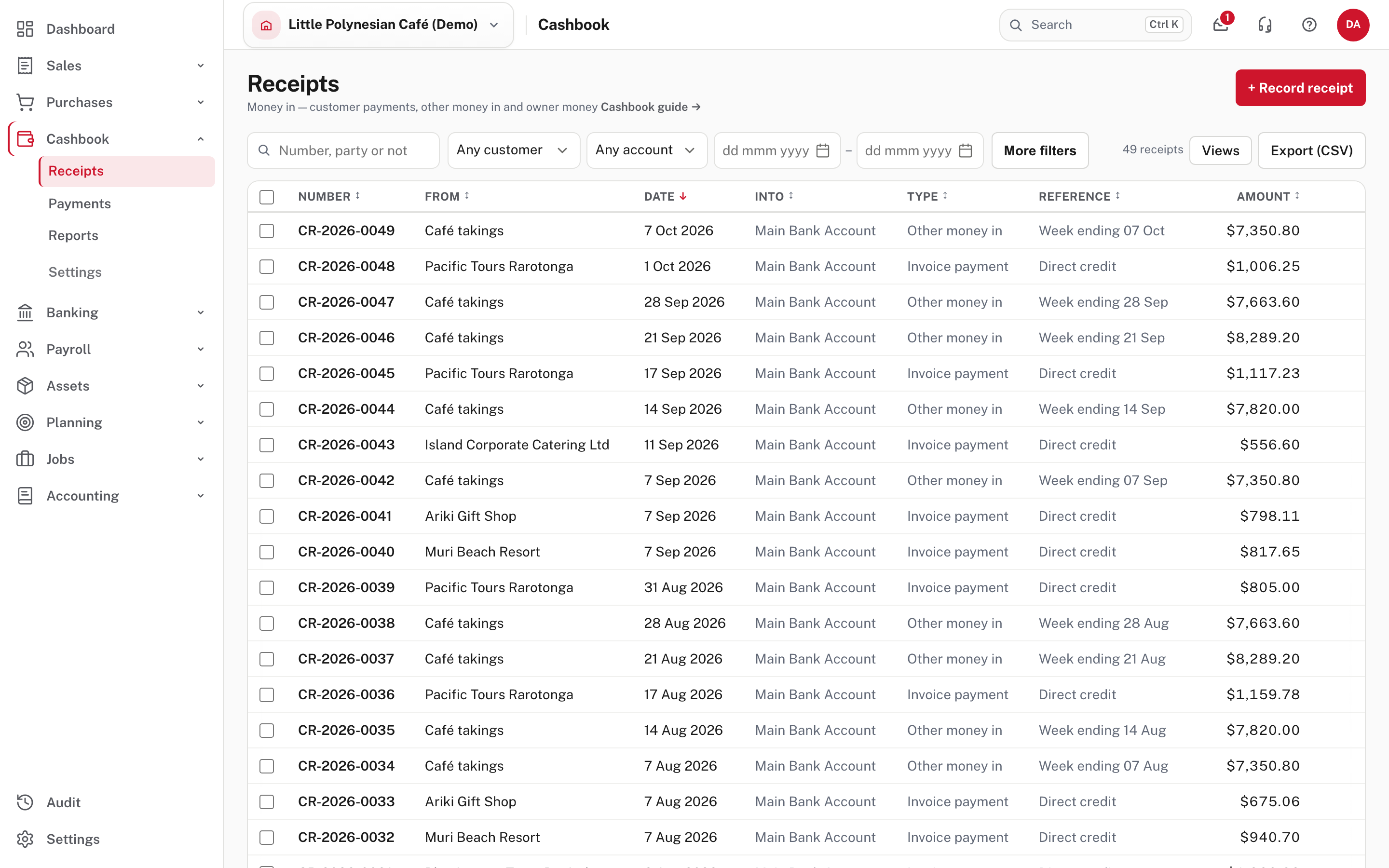
Filter by customer, by account and by date; Type says Invoice payment, Other money in or owner money. Choose + Record receipt (or + Record payment) to add one. A receipt opens to its printable copy and the accounting entry behind it.
Other money in
For money with no customer: the café's weekly takings, room hire, interest. Choose + Record receipt, then What is this for? → Other money in.
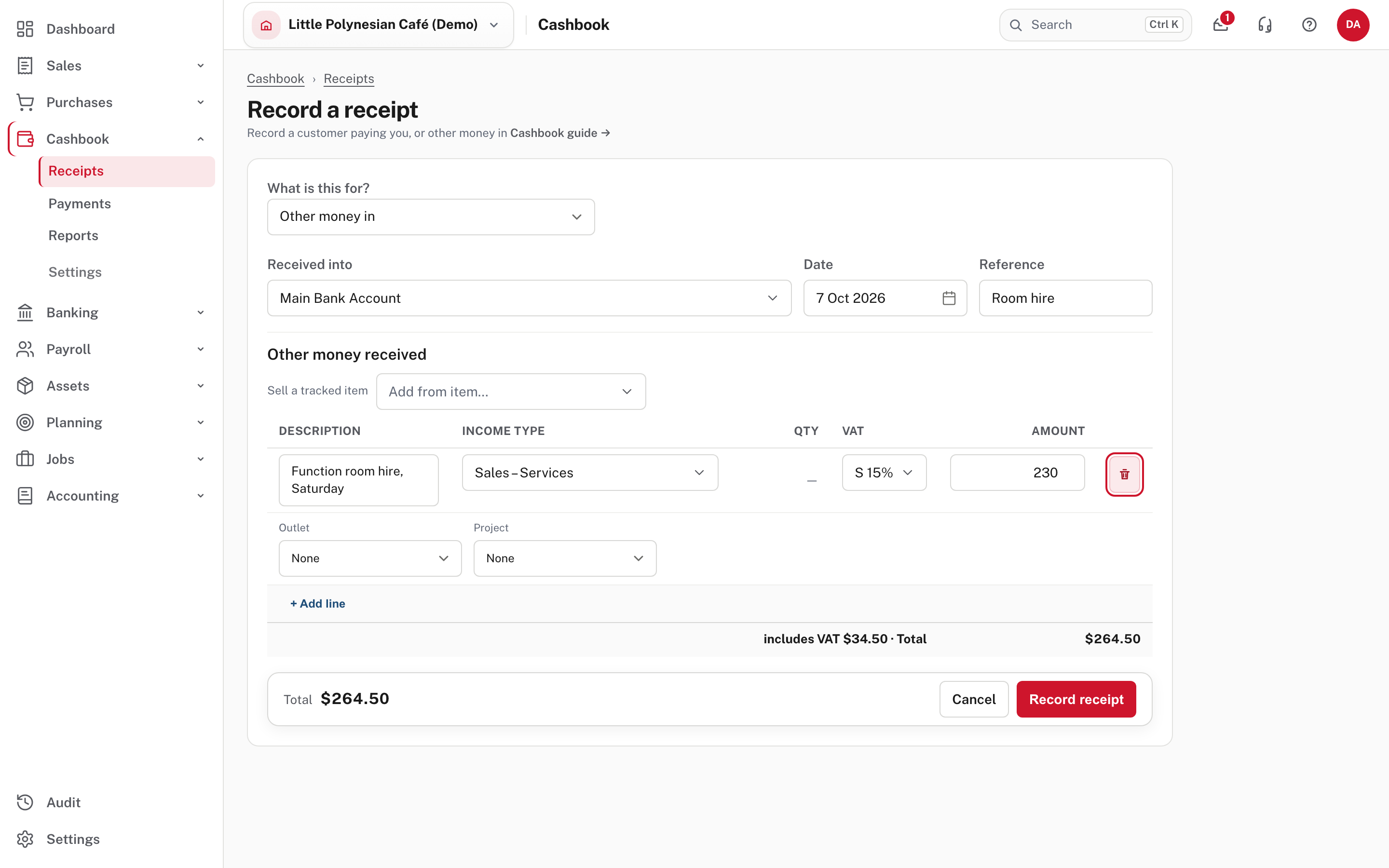
- Received into: the bank or cash account (it starts on your only account when there is just one).
- Date and Reference.
- One or more lines: a description, the income type (the account the income goes to), VAT and the amount. Enter the amount as it was received, VAT included. A new line starts on your standard VAT rate if the company is VAT registered; choosing an income type takes that type's own VAT code. + Add line adds another. Add from item sells a tracked stock item.
- Check the total, then Record receipt.
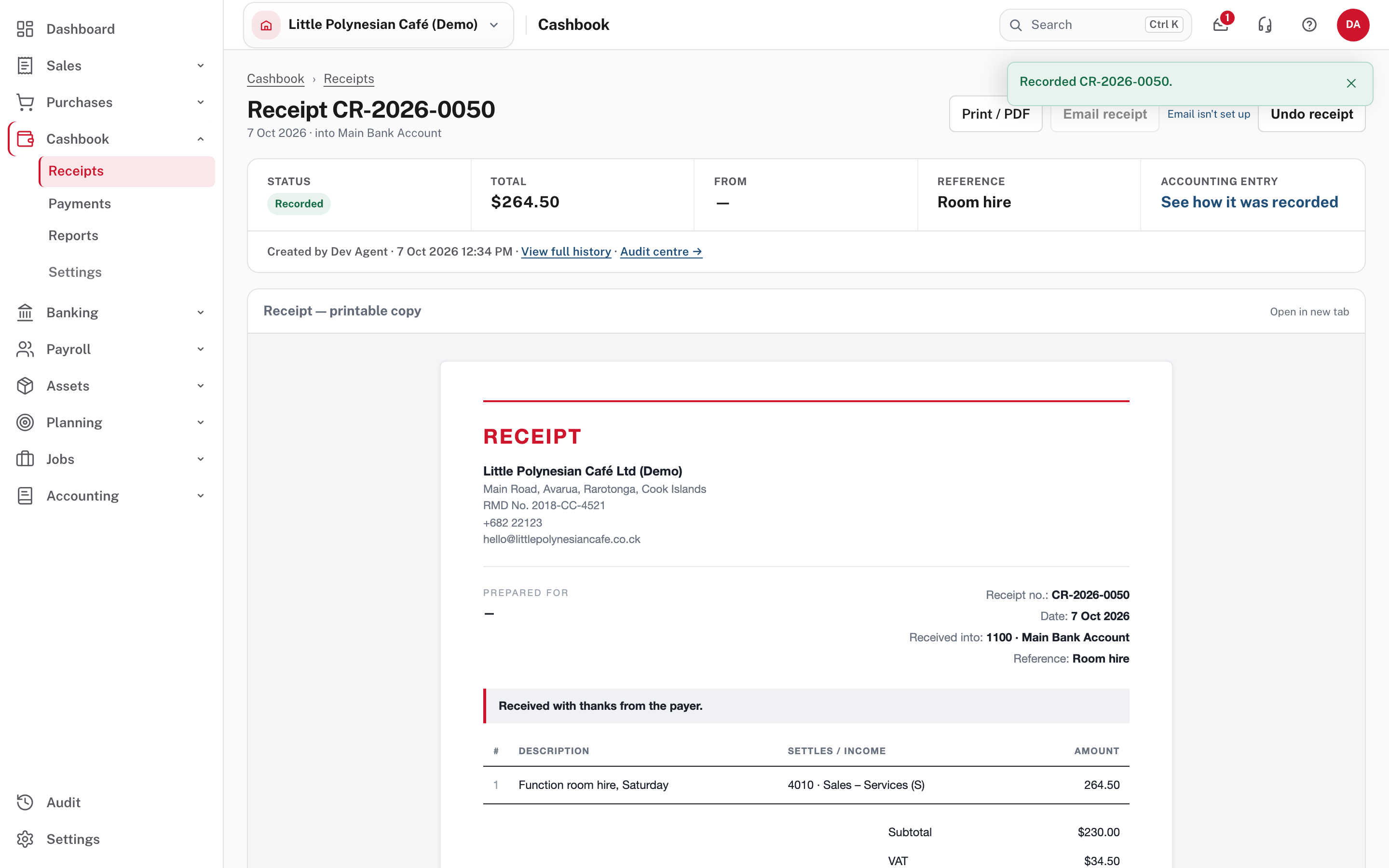
The receipt shows its status, total, reference, and See how it was recorded. Print / PDF gives a receipt you can hand over, in your branding. Undo receipt takes it back out of the books (see the end of this chapter).
A customer pays too much, or pays twice
Choose Receipts → + Record receipt, What is this for? → Customer payment, pick the account and the customer, and type the amount received.
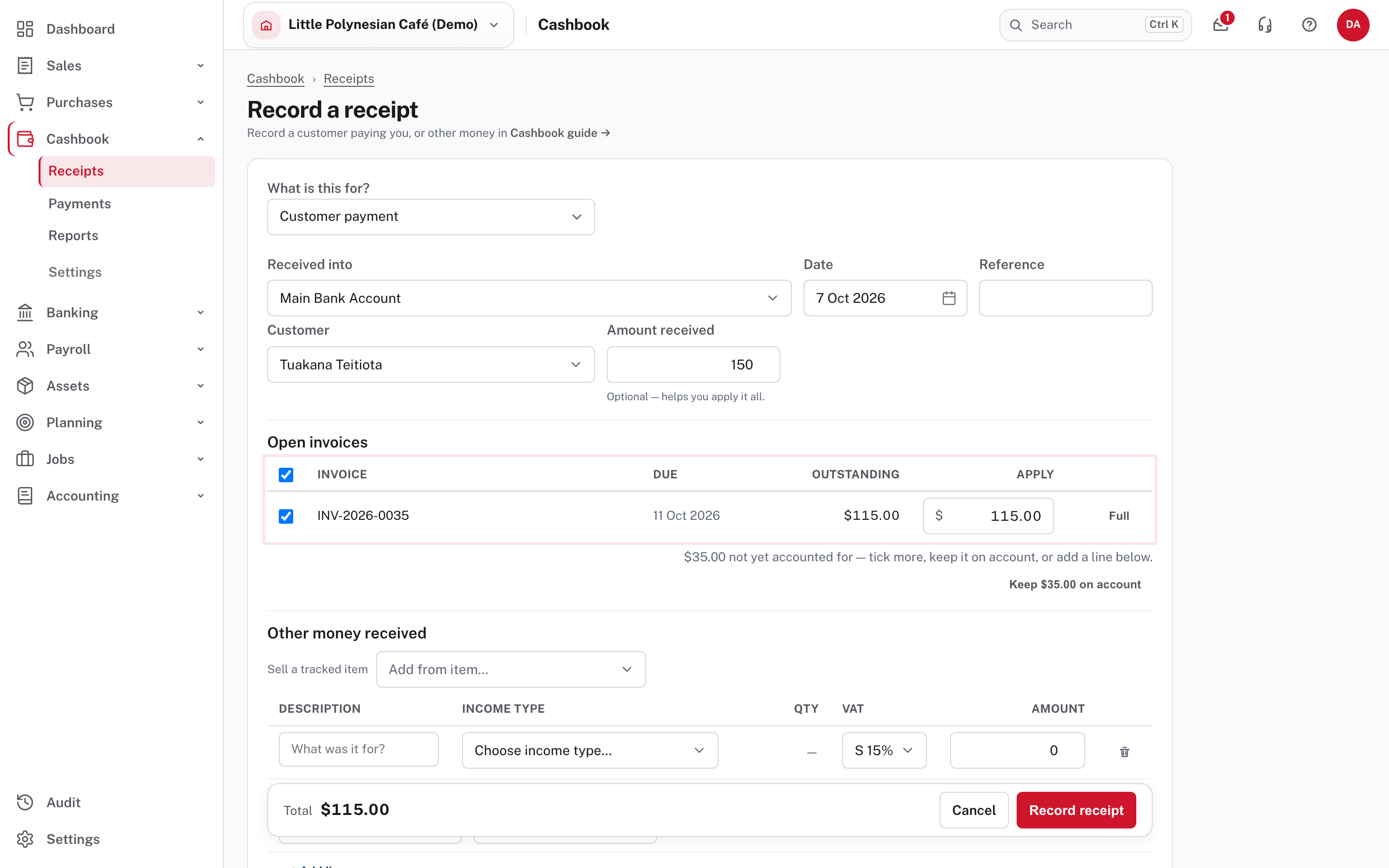
The open invoices are listed with an Apply amount each, already ticked, and Easy tells you what is left over: "$35.00 not yet accounted for: tick more, keep it on account, or add a line below." Choose Keep $35.00 on account.
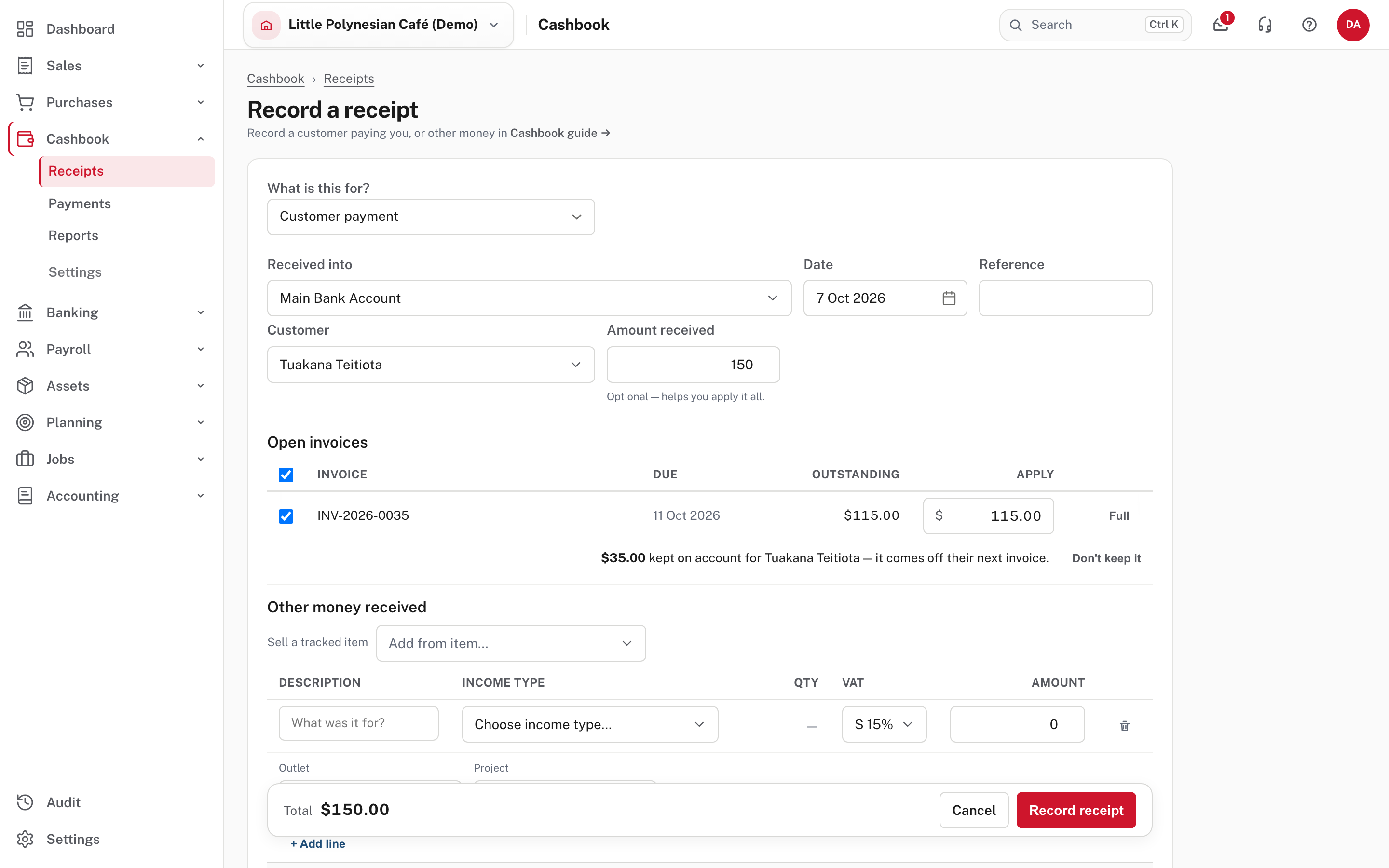
Easy keeps the rest as a credit for that customer, and it comes off their next invoice. Money you paid a supplier ahead of the bill works the same way. To give the money back instead, open the credit and refund it (see Credit notes, undoing and correcting).
A receipt dated before the invoice
It is allowed, but the form warns you: until the invoice's date, what customers owe won't agree with your books.
Other money paid out
For a bank fee, a small cash purchase with no bill. Choose Payments → + Record payment, What is this for? → Other money paid out.
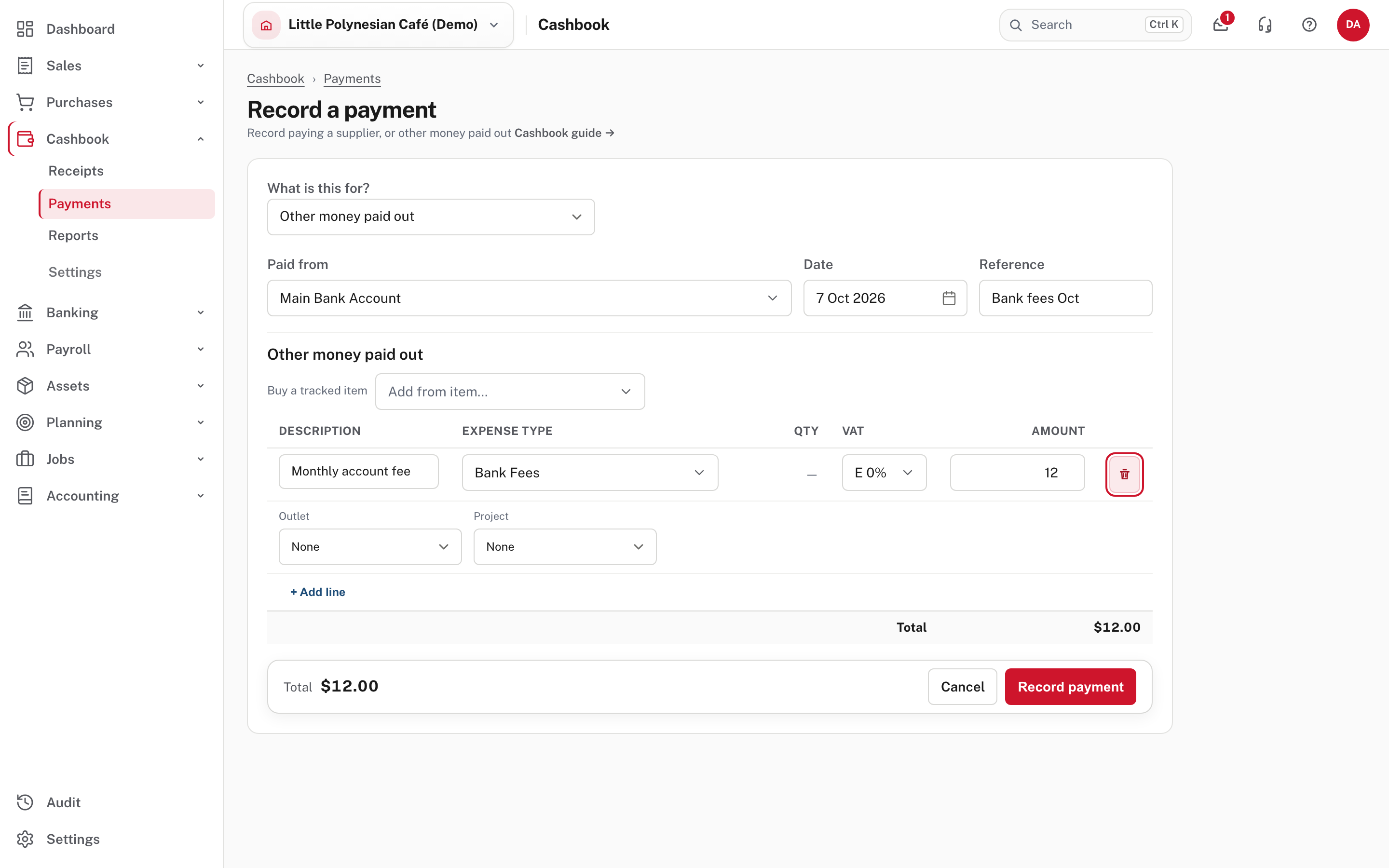
Choose Paid from, the reference, and the line: description, expense type, VAT and amount. Here the expense type is Bank Fees, and Easy has set the VAT to E 0% because that is how that type is coded. Always check the VAT after you choose the type. Then Record payment.
For money you pay a supplier, choose Supplier payment instead and tick the bills it pays, or use the bill's own Record payment.
Owner money
Money an owner moves between their own pocket and the business is not income or an expense: it changes what the owner has in the business, not the profit, and it never carries VAT. Choose What is this for? → Owner money in (or out).
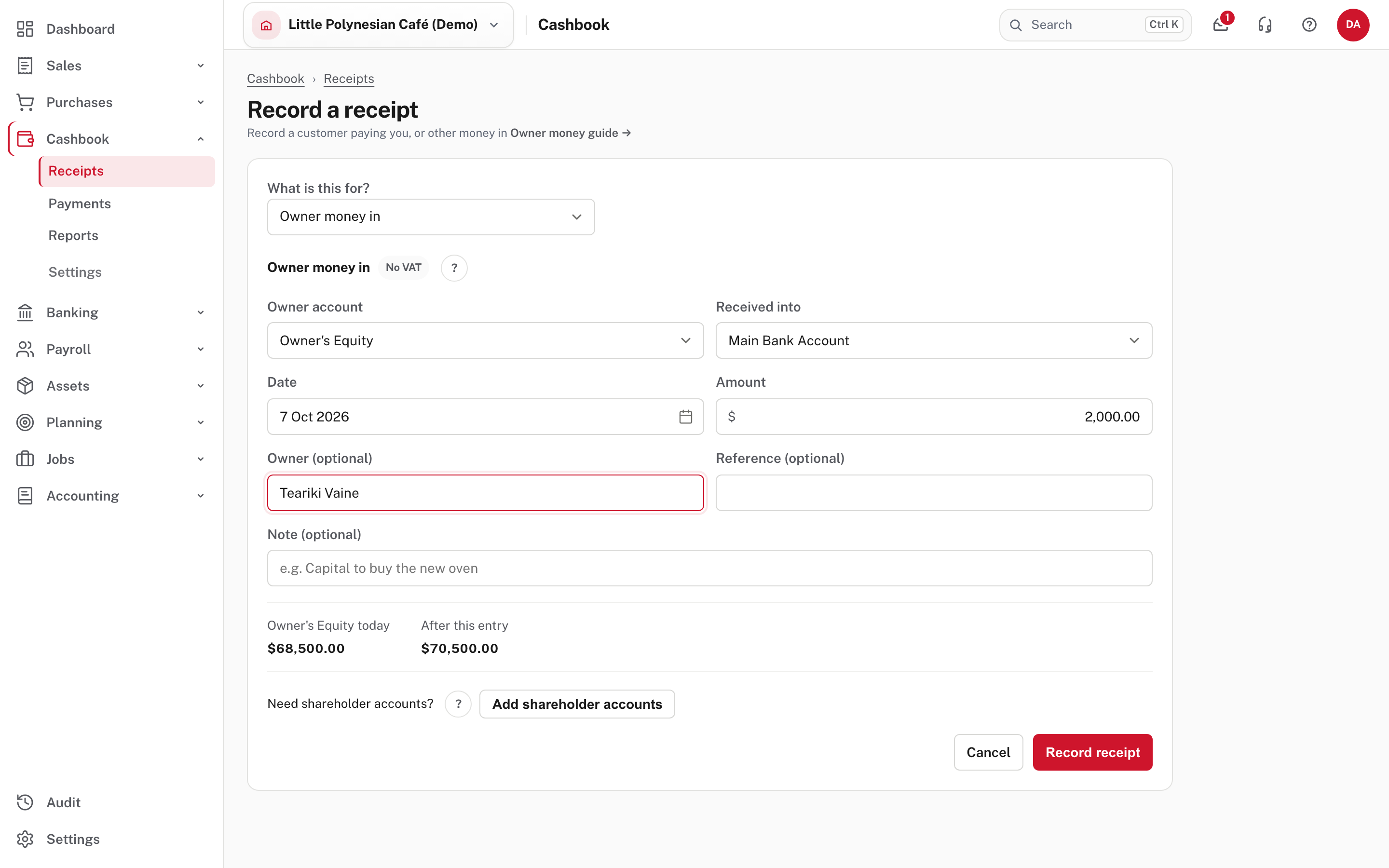
Choose the owner account (for a sole trader or partnership, Owner's Equity for money in and Owner's Drawings for money out), the bank or cash account, the date and the amount. The form previews the owner's balance today and after this entry. Add shareholder accounts adds the accounts a limited company needs (a Shareholder Current Account, and Dividends Paid).
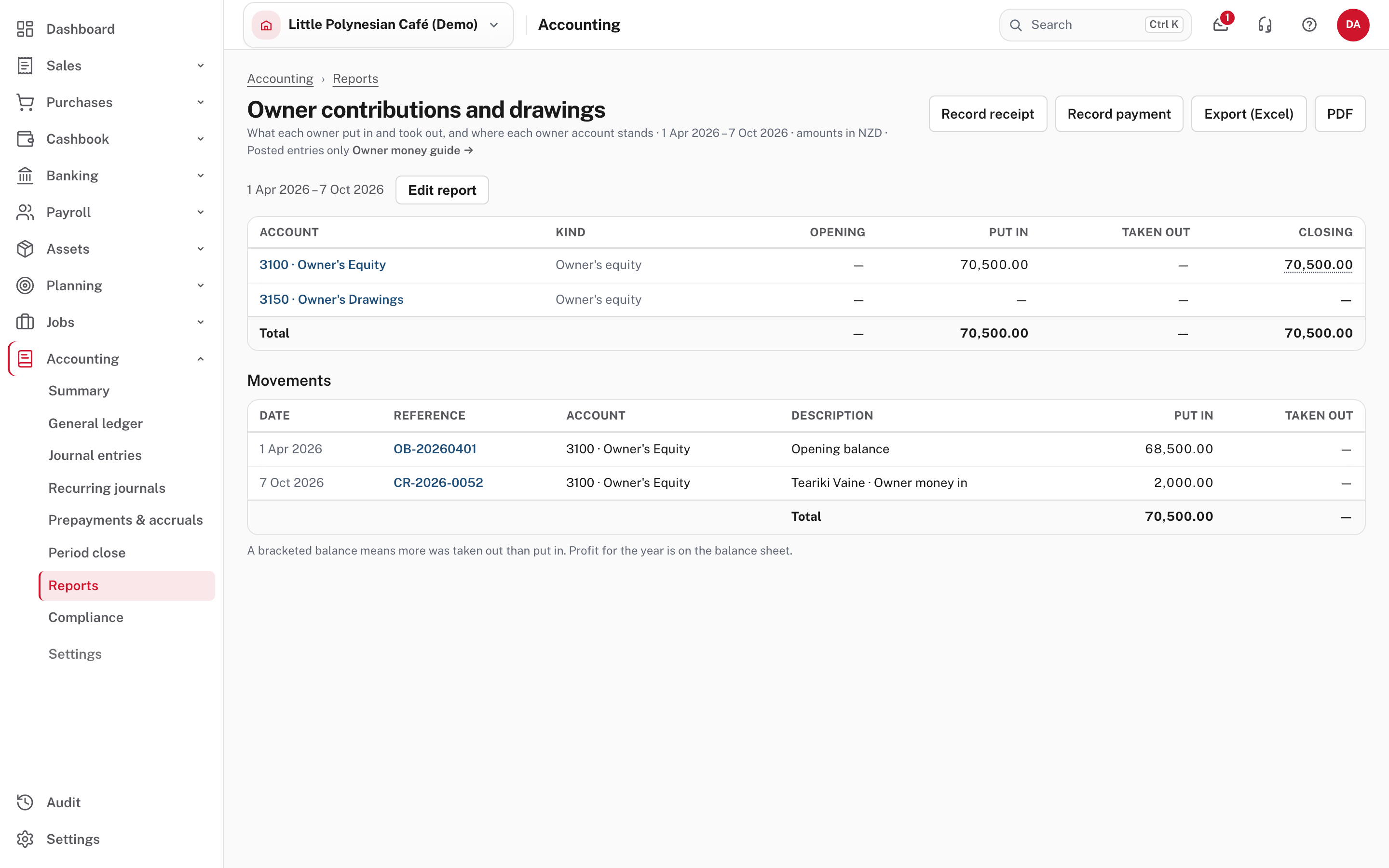
Accounting → Reports → Owner contributions and drawings lists every owner account for the dates you choose: the opening balance, what was put in, what was taken out, the closing balance, and each movement with its receipt or journal. A bracketed balance means more was taken out than put in. A limited company's money in is usually a loan the company owes back, not capital; ask your accountant if you are unsure.
More detail: Owner money in and out.
Transfers between your own accounts
Banking → Transfers → + New transfer. Use it for bank to bank, bank to cash and cash to bank. It is not income and not an expense.
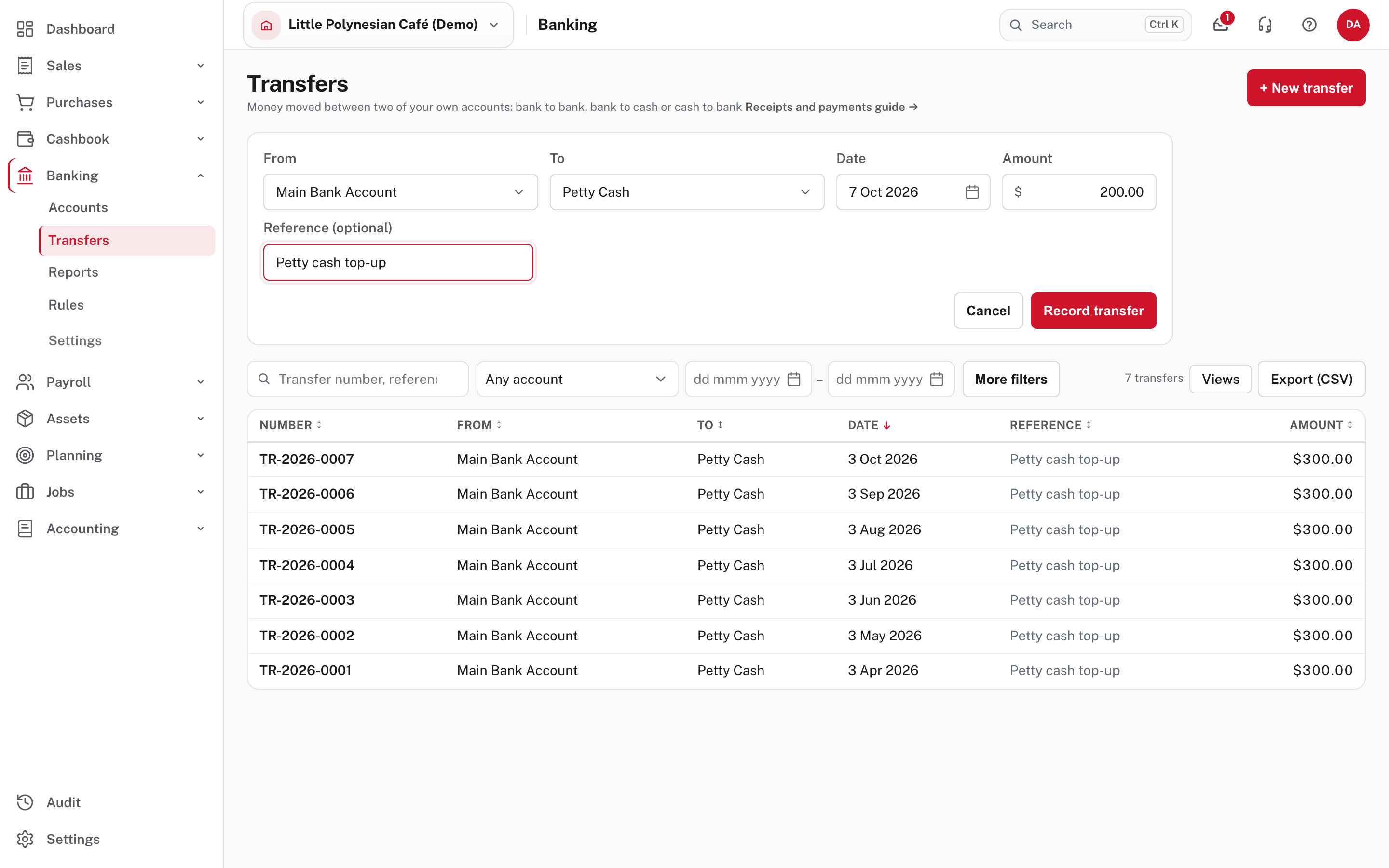
Choose From, To, the date, the amount and an optional reference, then Record transfer.
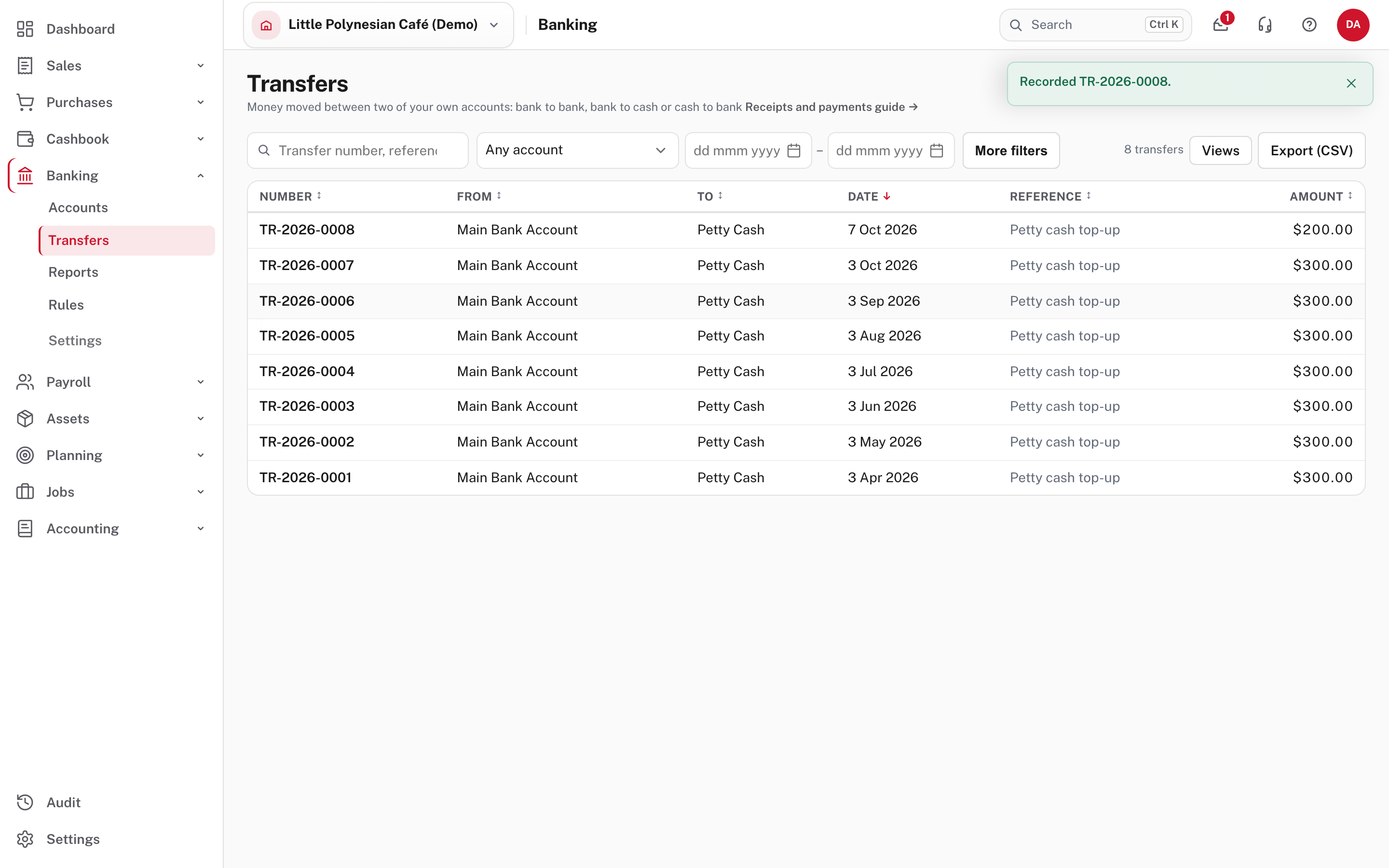
Each transfer is numbered TR-… and appears on both accounts' statements when you reconcile. A transfer to or from an account in another currency needs both amounts, and books no exchange gain or loss (Foreign currency).
A loan or credit-card repayment
On the Banking page, choose Make repayment on the loan's card. Choose the bank or cash account that paid it, then split the total into principal, interest and fees: principal reduces the loan, and interest and fees go to expense accounts. A loan must first be marked as bank-like in the Chart of accounts (the page says so if it isn't). If the repayment is already on an imported statement, choose Record repayment beside its unmatched debit and the form starts from the statement's amount.
More detail: Import and reconcile a bank statement.
Fix an entry
Open the receipt or payment and choose Undo receipt or Undo payment. It records the opposite entry and reopens the invoices or bills it paid. A receipt or payment that is matched to a statement line can't be undone until the match is undone in the reconciliation. Check the date of the undo and the new open balance.
More detail: Cashbook receipts and payments and Undoing, correcting and allocating.
Check before you continue
Check before you continue
- Each entry went into the account the money really moved through, on the right date.
- Customer and supplier settlements are applied to the right invoices and bills, and no overpayment is left unexplained.
- The VAT on each "other money" line is what you intended.
- Owner money is entered as owner money, not as income or an expense, and carries no VAT.
- Transfers are recorded once, not as a payment and a receipt.